



 Resources
 Feature overview
 Alani
Alani 2026-10-20 15:28
When browsing the internet, you may sometimes want to find your current IP address, check which country or city an IP address is associated with, or identify the internet service provider (ISP) behind your connection. These questions can be answered with an IP address lookup tool.
An IP address is the network address used by a device to communicate over the internet. It can also reveal useful information about your network connection. However, many people are unsure what IP geolocation, ISP details, and network type actually mean. In this guide, we'll walk you through the basics and show you how to use ToDetect to look up IP information.
一. What Is an IP Address Lookup? What Information Can You Find?
An IP address lookup uses IP databases and related network data to retrieve information about an IP address, including its network attributes and estimated geographic location.
Common lookup results include the following:
1. IP Address and Geographic Location
An IP lookup tool can display your current public IP address or information about an IP address you enter. Depending on the available database, the results may include the associated country, region, and city.
Keep in mind that an IP address's registered or estimated location is not necessarily the device's actual physical location.
2. Internet Service Provider (ISP)
ISP stands for Internet Service Provider, the company or organization that provides internet access or related network services.
An IP lookup can identify the ISP or network organization associated with an address according to the available data. This information can help you understand where a connection may originate, but it does not, on its own, prove that an IP address belongs to a residential broadband user.
3. ASN and Network Organization
ASN stands for Autonomous System Number. It identifies an autonomous system, a network or group of networks operated under a common routing policy on the internet.
Fields such as ASN and ASN organization can help you identify the network organization associated with an IP address.
4. IP Type and Network Source
Some IP lookup tools also provide information about IP type and network source. These details can help you assess whether an IP address is associated with a residential network, mobile network, data center, or another type of connection.
5. IP Risk and Historical Data
Some tools also provide IP risk scores, blacklist or abuse records, ASN history, and historical IP geolocation data to help users assess potential risks and changes over time.
二. How to Look Up an IP Address Online with ToDetect
If you don't want to search through IP databases manually, you can use ToDetect's online IP lookup tool to get started.
Tool:https://www.todetect.net/ip/
Follow these steps:
Step 1: Open the IP Lookup Tool
Visit ToDetect's online IP lookup page. The tool provides IP information and related network checks to help you examine the properties of your current internet connection.
Step 2: Check Your Current Public IP Address
If you want to find out which public IP address you're currently using, start by checking the IP displayed on the page.
If you're connected through a proxy server or corporate network, the public IP detected by the website will generally be the connection's exit IP, rather than the local address assigned to your device.
Step 3: Enter an IP Address to Look Up
To check a specific IP address, enter it in the lookup field on the page and start the search.
The tool will return the available information associated with that IP address.
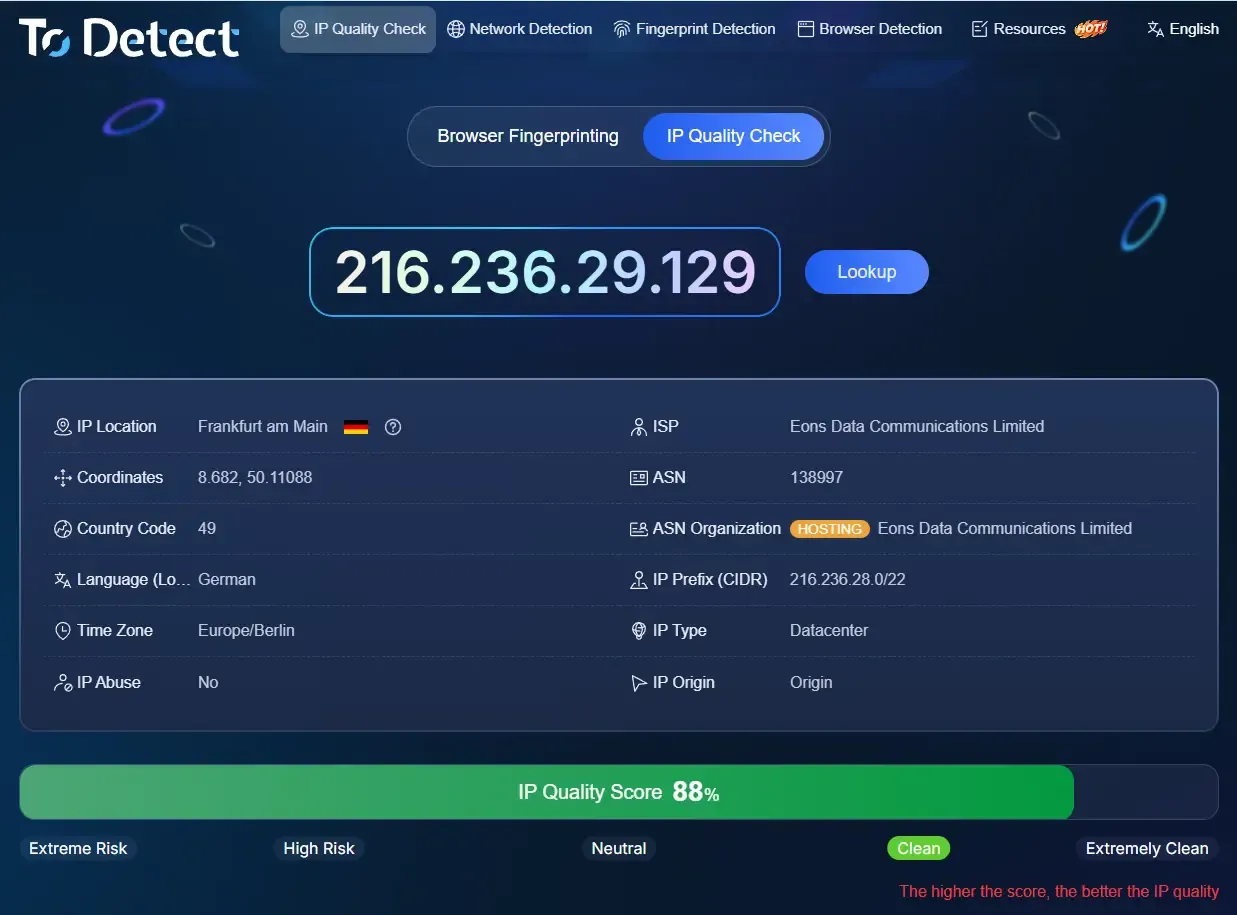
Step 4: Review the Results
Once the lookup is complete, don't focus only on the country or city. Depending on your needs, you should also check the following details:
• Geographic location: Check the country, city, and region identified by the database.
• IP type: Use this information to assess the likely category of the IP address.
• ISP and ASN: Identify the network provider or organization associated with the IP address.
In addition to basic IP address lookups, ToDetect provides information that can help users assess IP quality.
三. How to Interpret IP Location and ISP Information
Once you have the results, how can you tell what they actually mean? The answer depends on what you're trying to verify.
| Lookup Field | What It Tells You | What to Keep in Mind |
|---|---|---|
| Country/Region | The country or region identified by the IP database | May not reflect the device's actual location |
| City | An estimated city-level location | The result may not identify the correct city |
| ISP | The internet service provider or network operator | May show an upstream network or hosting provider |
| ASN | The associated autonomous system and network organization | ASN alone cannot confirm the IP type |
| IP Type | Whether the IP may be residential, mobile, or data center-based | Classification depends on the data source and detection method |
| Risk Information | Known abuse reports, blacklist entries, or other risk signals | Different databases may produce different results |
For example, suppose an IP lookup identifies a city in the United States, but the ASN organization belongs to a cloud service provider. Even if the location looks plausible, you shouldn't automatically assume the IP comes from a local US residential broadband connection.
Similarly, if an IP lookup identifies a residential ISP, that doesn't necessarily mean the address is a dedicated residential IP. Nor can a single field tell you whether the IP is stable or what its usage history looks like.
For everyday internet use, country, region, and ISP information may be enough to answer most basic questions. For proxy IP checks, cross-border business operations, and network troubleshooting, you should also consider IP type, ASN, risk signals, and actual connection performance.
四. Why Does IP Geolocation Sometimes Differ from Your Actual Location?
IP address lookups don't always match a user's actual location. This is common and can usually be explained by one of the following factors:
Differences Between IP Geolocation Databases
Different lookup tools may rely on different IP geolocation databases or update their data at different intervals. If the same IP address appears to be in different cities across multiple tools, it doesn't necessarily mean one of them is malfunctioning.
If city-level accuracy matters for your use case, compare the results from multiple tools.
The Network Exit Point Is Different from Your Actual Location
When you use a proxy server, corporate network, or third-party network routing service, websites generally see the exit IP address of that connection.
For example, you might be physically located in Beijing while your internet traffic is routed through a proxy server in Hong Kong. An IP lookup may therefore show Hong Kong, reflecting the network exit point rather than your physical location.
Centralized Network Exits or Dynamic IP Allocation
Some ISPs use centralized network exit points or dynamically assign IP addresses. As a result, the geographic information associated with an IP may not accurately reflect where the connection is being used, leading to city-level discrepancies or broader location estimates.
Changes in IP Address Allocation or Usage
IP addresses may be reassigned, transferred between users, or affected by changes in network information. If a geolocation database isn't updated promptly, its results may continue to show outdated information.
五. Frequently Asked Questions
How Can I Find My Own IP Address?
Open ToDetect's online IP lookup page: https://www.todetect.net/ip/. Check the public IP displayed on the page to find out more about its country, region, ISP, and other available network details.
Can an IP Address Lookup Identify an Exact City?
Some IP lookup databases provide city-level location information, but accuracy depends on IP allocation, database coverage, and how frequently the data is updated. Treat city-level results as estimates rather than exact locations.
Why Do Different Websites Show Different Results for the Same IP?
Different websites may use different geolocation databases, ISP data sources, and IP classification methods. As a result, their findings may not match. Compare multiple fields and sources instead of relying solely on the city name.
六. Conclusion
An IP address lookup can help you identify your public IP address, its estimated location, ISP, ASN, and other network attributes. However, these results don't provide precise geolocation, and a single field cannot definitively establish an IP's true type or risk level.
If you want to check your current public IP address or assess the quality of a proxy IP, try the ToDetect online IP lookup tool.