



 Resources
 Feature overview

 Ganesh
 2026-04-21 11:45
When browsing the internet in daily life, you may often see prompts like “Your IP address is xxx.xxx.xxx.xxx”. However, not many people truly understand what an IP address is or how much information it can reveal.
Especially for those engaged in overseas social media or cross-border e-commerce, “online IP address lookup tools” have become essential utilities on both computers and mobile phones.
Today, let’s take a closer look at what online IP lookup, IP address checking, and IP detection tools can actually do for you, and why more and more people are paying attention to browser fingerprint detection.

1. What is an IP address? Why check it?
Simply put, an IP address is like your “house number” on the internet. Through IP lookup tools, you can quickly obtain basic information such as:
• Current public IP address
• Approximate city or region
• Network provider (telecom, ISP, etc.)
Many people feel surprised the first time they use an online IP checker—without entering any information, the platform already “knows” where they are.
2. Why perform IP Detection ? It’s more than curiosity
Many people think IP detection is just about “checking your IP”, but its actual uses go far beyond that:
□ Website operators need to verify if traffic sources are normal
□ Cross-border e-commerce users need to ensure network environments aren’t misidentified
□ Gamers need to check latency and node routing
□ Suspicious login attempts can be analyzed via IP risk detection
In some platform risk control systems, frequent IP changes may trigger security verification. So, an IP is not just a number—it’s an important indicator of network behavior.
3. Overview of common IP and network detection dimensions
| Detection Item | Information Obtained | Common Uses | Notes |
|---|---|---|---|
| Public IP Address | Current external network IP | IP lookup, network positioning | Dynamic IP may change frequently |
| IP Location | Country, province, city | Identify traffic source region | Only approximate location |
| Network Provider | ISP (Telecom, ISP, etc.) | Network quality and routing analysis | Enterprise networks may be labeled as IDC |
| Proxy Detection | Whether it's a proxy node | Security and risk control | Not 100% accurate |
| Latency / Response Time | Ping value | Gaming, streaming, remote work optimization | Highly affected by local network |
| DNS Information | Current DNS resolver | Troubleshooting DNS hijacking | Can be manually optimized |
| Browser Fingerprint | System, fonts, resolution, etc. | Account security, anti-fraud detection | Highly identifiable when combined |
| WebRTC Leak Detection | Whether real IP is exposed | Privacy protection | Important for proxy users |
4. What can online IP lookup tools detect?
Modern IP lookup tools are no longer limited to displaying a single IP—they are becoming increasingly feature-rich.
Typically, a complete tool includes:
• Current public IP
• IP location (country, region, city)
• ISP information
• Proxy/IP tool detection
• Network latency testing
Some tools even combine browser environment analysis, such as device system and screen resolution.
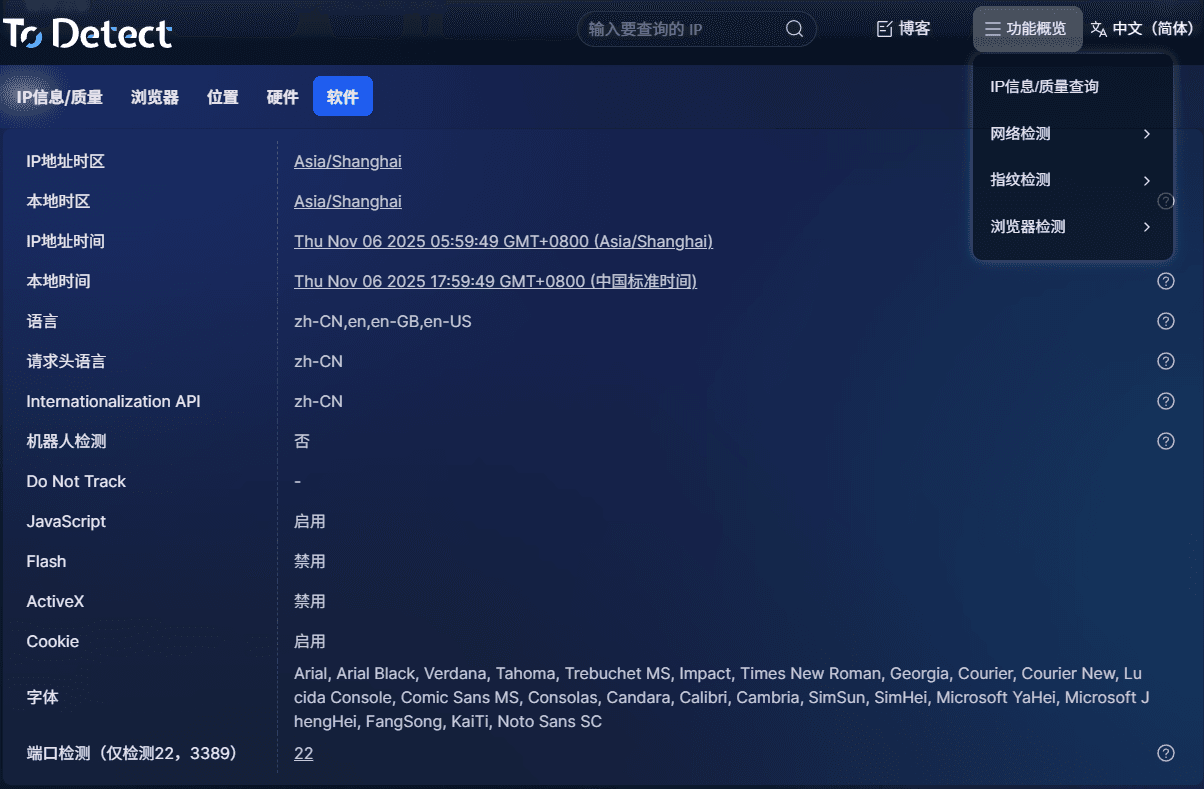
5. Advanced feature: Browser fingerprint detection
This brings us to browser fingerprinting. Many people think changing IP is enough for anonymity, but browsers themselves can “expose identity”.
• Browser version, font list, system language, screen resolution, timezone, etc.
• Combined together, these form a “digital identity card”. Even if you change your IP, platforms may still identify you.
Therefore, users with higher security awareness often use both IP detection and browser fingerprint detection for a more complete understanding of their exposure.
6. Why are tools like ToDetect popular?
Among many tools, platforms like ToDetect are gaining popularity because:
• Simple, one-click usage
• Combines IP and browser detection
• Clear and user-friendly interface
• Helps identify network issues and privacy risks
Especially for users who frequently use proxies, IP tools, or manage multiple accounts, these tools are practically essential.
7. When should you use an IP lookup tool?
You can consider using it in these scenarios:
□ Sudden network slowdown
□ Login alerts for unusual location
□ Checking if proxy/IP switch worked
□ SEO or ad targeting verification
□ Understanding your network exposure
In these cases, a quick IP check can provide valuable clues.
8. Online IP Detection FAQ
1. Why is IP location sometimes inaccurate?
IP geolocation is based on ISP databases and can only provide approximate location, not precise addresses. Proxy usage may also shift results.
2. Does IP detection leak privacy?
No. Legitimate tools only read your public IP and do not access internal device data. However, avoid entering sensitive information on untrusted sites.
3. What’s the difference between IP lookup and browser fingerprinting?
IP lookup focuses on network address, while fingerprinting analyzes device and browser characteristics. Together, they provide a more complete identity profile.
Conclusion
Whether it’s IP lookup or detection, the goal is to better understand your network environment.
As privacy and security become more important, adding tools like ToDetect to your routine can help you quickly access key information.
If you browse frequently or care about online security, it’s worth occasionally checking your IP and performing basic network diagnostics.
