



 Resources
 Feature overview

 Ganesh
 2026-07-01 11:35
After two or three months of nurturing an account—logging in, posting content, and interacting normally—it suddenly gets banned. Many people’s first reaction is that platform risk control is getting stricter, or they suspect unstable proxy IPs.
In fact, a seemingly normal IP can trigger risk control if it exhibits proxy characteristics, abnormal IP reputation, DNS leaks, or inconsistent browser environments.
Today, let us explain what hidden risks an online IP query can reveal and how to determine whether your current IP environment is secure enough.

1. Why do accounts get banned even after long-term nurturing?
Many platforms now no longer simply check account behavior; they comprehensively analyze the entire device and network environment.
For example, an account with stable daily login times and no content violations may still be flagged if it uses a proxy IP previously shared by many accounts, or if its IP location, ISP, DNS, or other information appears abnormal.
Many users think that as long as a proxy IP connects properly, it’s fine—but that is a misconception. What truly affects account security is not just whether the IP works, but whether the IP is “clean.”
“Clean” does not mean speed; it means the IP has no blacklist records, hasn’t been shared by many users, doesn’t expose proxy characteristics, and the overall network environment is normal.
2. What exactly can online IP query check?
Many people think online IP query just shows your IP address and location. A professional tool can detect:
• Whether the current public IP address is genuine;
• Country, city, ASN, and ISP information;
• Whether it is a datacenter IP or a residential IP;
• Whether proxy server characteristics exist;
• Whether DNS is leaking;
• Whether WebRTC exposes your real IP;
• Whether browser timezone, language, and geolocation are consistent;
• Whether IP reputation has abnormal records.
All this information affects how platforms judge your account environment. Especially in cross‑border businesses, platforms increasingly value environmental consistency—not just IP location.
3. Common IP environment risks and recommended actions – at a glance
| Check Item | Potential Issue | Impact on Account Operation | Recommended Action |
|---|---|---|---|
| IP Reputation | IP previously used by many accounts or has abnormal records | Increases risk-control probability, affects account stability | Switch to a better‑reputation IP and verify again with an online IP query |
| ASN Type | Datacenter IP disguised as residential IP | Easily identified by platforms as proxy network | Prefer genuine residential IPs and perform proxy IP detection |
| DNS Resolution | DNS region does not match IP region | Platform may judge network environment as abnormal | Use DNS servers consistent with the proxy IP region |
| IPv6 Status | IPv6 exposes real network information | Leads to real IP leakage, compromising account security | Disable IPv6 if not in use, or configure a consistent IPv6 environment |
| WebRTC Info | Browser leaks local real IP | Even after changing proxy, real address may be exposed | Check browser settings and complete IP environment check before login |
| Timezone & Language | Timezone/language mismatch with IP location | Reduces environmental authenticity, increases risk-control risk | Adjust system timezone and browser language to match target region |
| Browser Fingerprint | Multiple accounts use identical browser environment | Easily linked by platforms as related accounts | Use isolated browser environments to avoid account association |
| Pre‑login Check | Network environment not checked in advance | Makes it hard to detect potential risks in time | Use ToDetect for IP online query and environment check before each login |
4. Why is proxy IP detection becoming increasingly important?
Many people, after buying a proxy IP, only test the speed or whether they can open a webpage, then directly log in to their accounts—that’s far from enough. The main purpose of professional proxy IP detection is to identify problems with the proxy itself in advance.
For example, some proxy IPs show as US residential but their ASN actually belongs to a datacenter; some IPs have been used by many marketing accounts; others suffer from DNS leaks, IPv6 leaks, etc.
These issues are almost impossible to spot with the naked eye. If you skip detection and start operating accounts directly, you can easily trigger platform risk control.
Nowadays, many people running TikTok, Facebook, or Google accounts treat proxy IP detection as a standard step: test first, then log in—rather than troubleshooting only after problems arise.
5. Is IP environment detection really necessary?
The answer is: absolutely necessary.
Here’s a common example: the same computer logged into a US account yesterday, then switched to a German proxy for another account today—but the browser language is still Chinese and the system timezone still shows Beijing time.
Even though the IP has changed, the overall browser environment hasn’t been adjusted accordingly. The platform sees a login environment with obvious inconsistencies.
In such cases, even if the IP itself is fine, the account risk may increase. Therefore, a complete IP environment check doesn’t just test the IP—it checks whether the entire network environment is coherent.
Only when IP, DNS, browser fingerprint, language, timezone, and other information are consistent does the account environment resemble that of a real user.
6. Why is ToDetect gaining more and more recommendations?
There are many detection tools on the market, but most can only query IP location; few can perform comprehensive environmental checks.
ToDetect, in addition to online IP query, can detect proxy IP quality, DNS status, WebRTC leaks, browser environment, timezone, language, and many other dimensions.
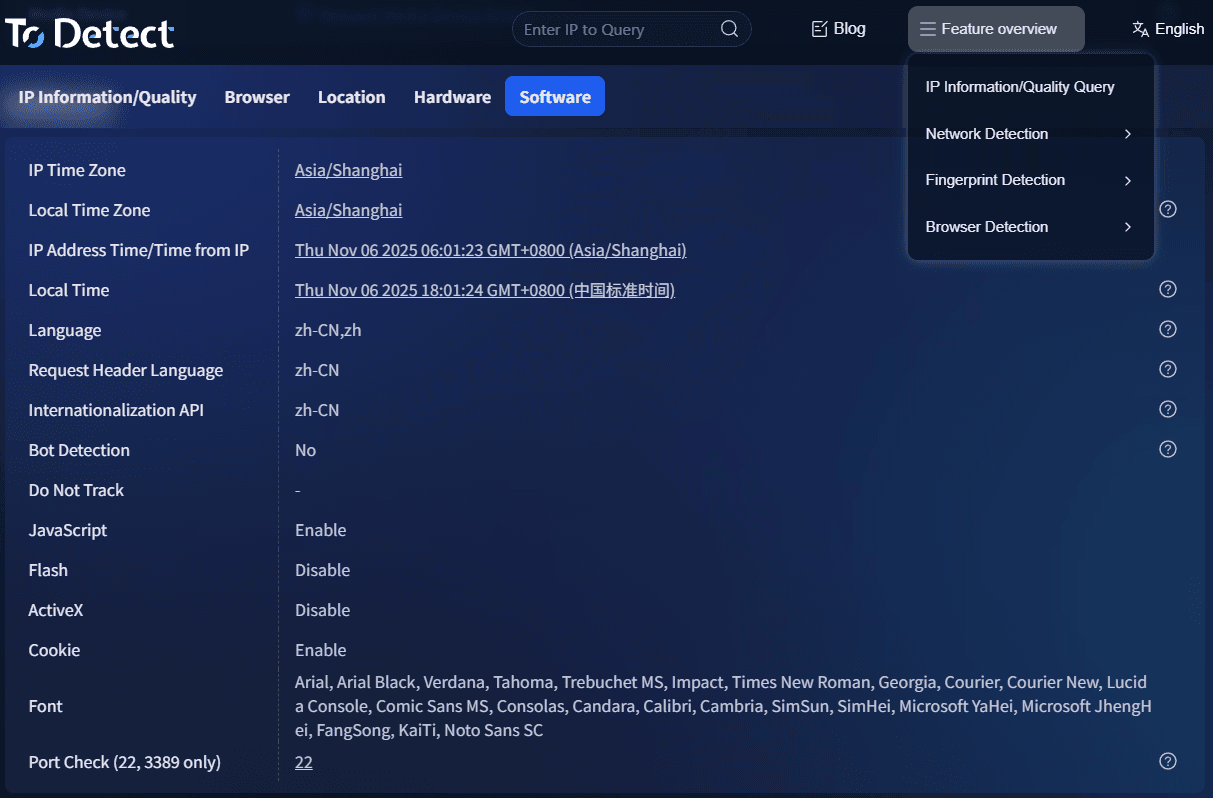
For those managing multiple accounts, the greatest value of such tools isn’t telling you where the IP is—but spotting potential risks before they become issues.
Many accounts show abnormal signals in detection results before any actual trouble occurs. Identifying problems early costs far less than replacing proxies after an account gets banned.
7. How to reduce the chance of account bans in daily operations
Besides performing online IP queries, we recommend adopting the following habits:
First, avoid frequent country/region switching. Logging in from the US today, the UK tomorrow, and Japan the day after is highly unnatural.
Second, after each proxy IP change, run a proxy IP detection first. Confirm there are no DNS leaks, WebRTC leaks, or proxy exposure before logging in.
Third, keep browser environment consistent—including language, timezone, fonts, resolution, etc. Avoid obvious conflicts.
Fourth, try to avoid sharing the same proxy IP among multiple people. Shared IPs are cheaper but usually riskier. For long‑term account operation, prefer stable, dedicated IP resources.
Fifth, perform regular IP environment checks. Even if a proxy has been in use, it doesn’t guarantee it remains safe. IP reputation, network environment, and proxy quality can change over time; periodic checks help you catch potential risks early.
Final words
Whether an account can operate stably in the long run often depends not on skills but on details. Many bans happen not because of poor account management, but because of problems in the most basic network environment.
Platform risk controls are becoming smarter every day; relying solely on a proxy IP is no longer enough. A truly stable account environment requires doing online IP queries, proxy IP detection, and full IP environment checks to ensure every login is more authentic and stable.
Develop the habit of performing an online IP query before each login. Use professional tools like ToDetect for environment checks—this can help you avoid many risks in advance, making account operation more stable and conducive to long‑term growth.
