



 Resources
 Feature overview
 Ganesh
 2026-07-20 12:21
In the digital age, every device communicates over the internet using an IP address. It serves as a unique network identifier, ensuring that data packets are correctly routed between senders and receivers.
Whether you are a casual internet user, a cross-border e-commerce seller, or an IT professional, knowing how to look up an IP address, understanding geographic positioning, and protecting your IP privacy are essential for maintaining network security and smooth business operations.
This article covers the fundamentals of IP lookup and shows you how to use a professional IP Lookup & Detection Tool to evaluate your network environment.
How to Quickly Perform an IP Lookup
There are several ways to find your local public IP address, depending on your needs:
Using Online Lookup Tools (Recommended):
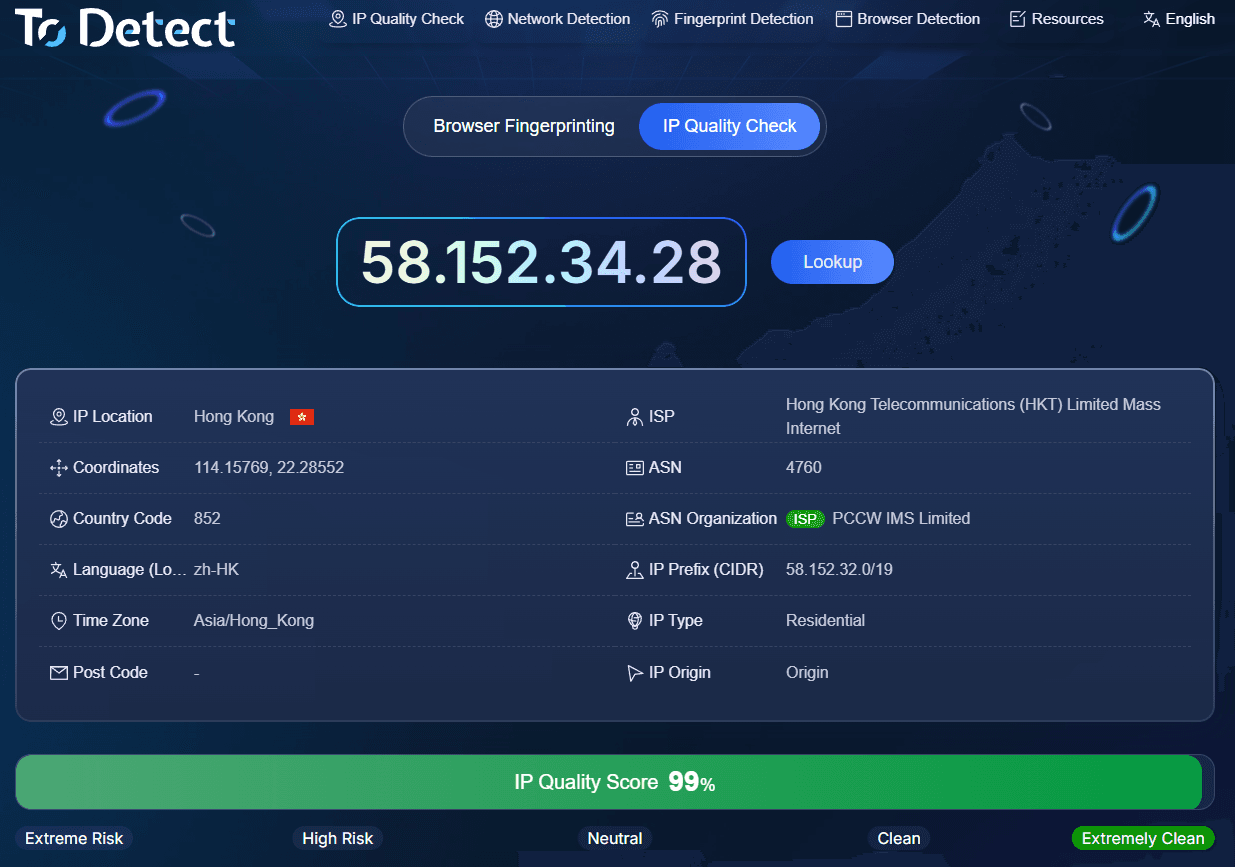
This is the fastest method. You can directly visit dedicated IP detection platforms like ToDetect, where your current public IP address, location, and ISP information will automatically display once the page loads.
For users requiring advanced checks, ToDetect also provides IP purity scores and risk assessments.
Via Operating System Command Line:
Windows Users: Open the Command Prompt, type ipconfig, and press Enter to view your local IP address. To find your public IP address, check an online IP lookup tool through your browser.
Mac Users: Go to Applications > Utilities > Terminal, and type ifconfig. Look for the address next to "inet".
Via Router Settings: Log in to your router management page (typically 192.168.0.1 or 192.168.1.1) to view the public IP address assigned by your Internet Service Provider (ISP) under the network status section.
What Information Does IP Geolocation Reveal?
An IP lookup allows websites and network engineers to retrieve specific information about your connection:
Geographic Location: Country, state/province, city, and postal code.
Network Parameters: Time zone, latitude and longitude coordinates, Internet Service Provider (ISP), and Autonomous System Number (ASN).
Location Accuracy: Generally, IP geolocation narrows down your location to a specific city or region, but it typically does not reveal a exact street address. However, skilled individuals may achieve higher precision by combining IP data with other signals.
For more accurate results, visit ToDetect to compare geolocation data across multiple IP databases, such as IP2Location, MaxMind, and DB-IP.
How to Protect Your IP Address Security
If your IP address is exposed, you may face risks such as location tracking, targeted DDoS attacks, or social engineering attempts. Here are four effective ways to safeguard your IP address:
Use Proxy Servers: Route your web traffic through an intermediary server to prevent direct exposure of your real IP.
Enable Router NAT and Firewalls: Home networks typically use Network Address Translation (NAT) to hide internal device IPs, while firewalls filter out unauthorized inbound connection requests.
Reboot Your Modem Regularly: Restarting your modem usually prompts your ISP to assign a new dynamic IP address.
Check for Leak Vulnerabilities: Even when using privacy tools, WebRTC or DNS leaks can still expose your actual IP address. It is recommended to perform regular diagnostics on ToDetect to verify that privacy protections are working properly.
Conclusion
Developing a habit of checking your connection before going online and using tools like ToDetect for IP lookups and quality evaluations can help you identify network issues early and reduce the risk of account bans and privacy leaks caused by IP anomalies.
Frequently Asked Questions (FAQ)
Q1: What can someone do if they know my IP address?
While knowing an IP address alone rarely leads to a direct device hack, attackers can use it to approximate your general location or disrupt your internet access through DDoS attacks.
Additionally, some online service providers use IP addresses to restrict access to region-specific content.
Q2: What is the difference between IPv4 and IPv6?
IPv4 is the older standard, providing around 4 billion addresses, which are now nearly exhausted. IPv6 is the modern version using a hexadecimal format, offering an virtually infinite number of addresses along with improved scalability.
Q3: What is a 192.168.x.x IP address?
This is a standard private IP address used within local area networks (LANs). It cannot communicate directly on the public internet and relies on a router to translate it to a public IP address.
Q4: Why is my IP location showing the wrong city?
IP geolocation relies on third-party database updates. If your ISP reassigns its IP pools or if you are using a proxy, the geolocation results may reflect the location of the intermediary server or the ISP's registration center rather than your actual location.