



 Resources
 Feature overview
 Ganesh
 2026-07-23 18:09
In digital offices and cross-border businesses, an IP address represents more than just the location and ownership information of a network connection; it is also a vital reference indicator for network environment analysis and security assessments.
By using professional IP detection tools, we can obtain multi-dimensional, in-depth data. Understanding the specific meaning of this data is crucial for evaluating network status, optimizing marketing strategies, and preventing potential cyber risks.

Core Ownership and Geolocation Information
The most fundamental feature of an IP lookup is identifying the "location" and "network operator" of the IP address.
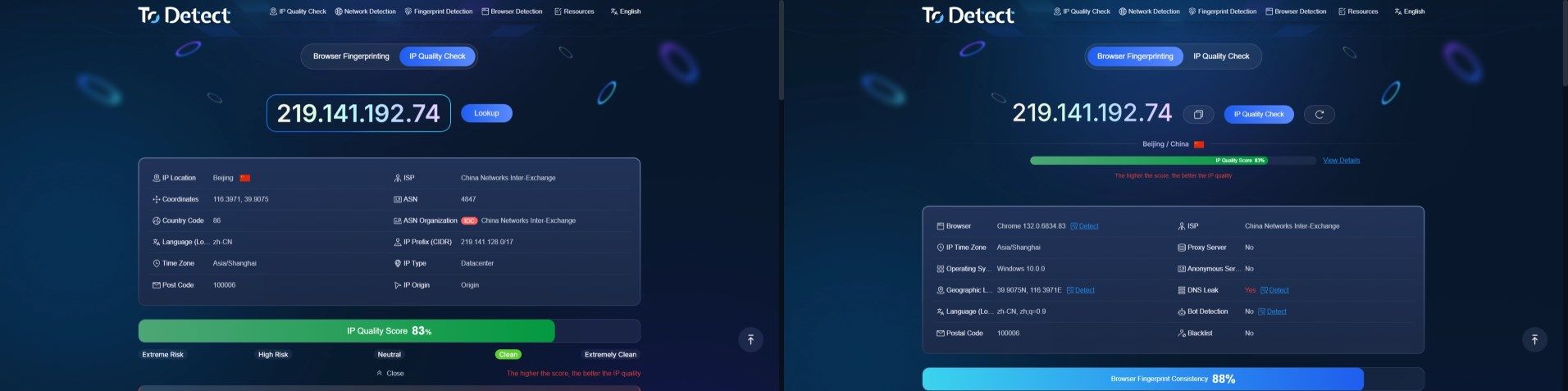
Geolocation: This displays the country, state/province, city, and zip code where the IP is located. It is worth noting that IP geolocation is generally based on statistical inferences of IP address blocks, meaning it reflects a broad region rather than pinpointing real-time, device-level locations like GPS does.
Internet Service Provider (ISP) & ASN Lookup: This identifies which network operator or cloud service provider (such as Comcast, China Telecom, Verizon, etc.) manages that specific network block.
An ASN (Autonomous System Number) lookup helps technical teams evaluate the authority and technical background of the network environment.
Coordinates and Time Zone: This includes rough latitude and longitude data, alongside the local time zone corresponding to the IP address. In scenarios where verifying user environment consistency is necessary, time zones and system settings often serve as secondary indicators for platform risk control systems.
IP Type and Reputation Assessment
For cross-border e-commerce or multi-account management, an IP's "network attributes" are often much more important than its actual physical location.
IP Type: This identifies whether the address is a residential IP, a data center (IDC/hosting) IP, or a mobile IP. Residential IPs typically carry network attributes that closely mirror average user environments, making it easier to achieve natural network performance in certain business scenarios.
IP Quality Score: Different testing platforms use different scoring systems. Usually, the results reflect the IP risk level or reputation status (for instance, a higher score represents a higher risk in some systems, while the opposite is true for others).
If an IP address has previously been involved in malicious online activity, it may be flagged by security databases or threat intelligence platforms.
Network Attribute Consistency Check: This evaluates whether there are noticeable discrepancies between the IP registration data, ASN attributes, and the actual network exit location. Consistency in ownership information is a core metric for assessing IP network quality.
Proxy and Anonymity Risk Detection
To protect platform integrity and prevent fraud, many major international systems actively check whether visitors are utilizing specific network tools.
Proxy Identification: This detects if the IP address belongs to a public proxy server or other known exit nodes.
Anonymity Service Analysis: This checks whether there are anonymized configurations behind the IP that intentionally mask the true network routing link.
Automated Access Recognition: By analyzing network attributes, browsing behavior, and browser environment profiles, this feature helps determine if the traffic source carries the risk of automated scripts or web scrapers.
Browser Fingerprinting and Network Leak Analysis
Comprehensive environment testing does not stop at the IP itself; it combines data with the "client-side environment" for an all-around consistency assessment.
DNS/WebRTC Leaks: Even if a proxy is active, actual local network details can still leak through WebRTC technology or mismatched DNS requests.
Environment Consistency Score: This dynamically evaluates variables like the User-Agent, Canvas fingerprint, WebGL, hardware core counts, and screen resolution.
When operating multiple accounts, highly similar environmental characteristics across different setups can significantly increase the risk of accounts being linked together by platform systems.
Why Do You Need Regular IP Detection?
Assisting Risk Control Evaluation: Poor IP reputation, frequent changes in your network environment, and irregular behavioral patterns can all trigger risk flags on major platforms, potentially leading to verification prompts or account lockouts.
Optimizing Marketing Resources: Businesses can analyze the geographic distribution of their target audience through IP data, allowing them to precisely allocate international marketing resources.
Cybersecurity Defense: Identifying and blocking traffic from high-risk proxies or botnets early on can greatly reduce server strain and protect core business data.
By utilizing the ToDetect Online Detection Tool, you can instantly get a detailed report covering all the dimensions mentioned above, giving you a full understanding of your current network environment status.
Frequently Asked Questions (FAQ)
Q1: Why am I still getting blocked by certain websites even though my IP lookup shows it is located abroad?
Having the right IP location alone is not enough. The target website might have detected that your IP belongs to a commercial data center network rather than a residential one. Alternatively, your browser could be experiencing a DNS leak, or the IP's risk score might already be flagged in a security database.
Q2: Are static IPs always cleaner and safer than dynamic IPs?
Not necessarily. The quality of an IP depends on its historical usage and reputation record. If a static IP has been frequently used for policy violations or abusive activities in the past, its potential risk is much higher than that of a clean dynamic IP.
Q3: Does a "clean/low-risk" IP detection result guarantee 100% safety?
No, it does not. Detection tools cross-reference public blacklists and authoritative reputation databases. Large platforms, however, typically employ their own proprietary risk models and behavioral recognition libraries.
Passing a check simply means the foundational risk of your current network environment is low, but you still need to maintain good operational practices and environment isolation.
Q4: What is the difference between a public IP lookup and a private IP lookup?
A private (internal) IP is only valid within a local area network and cannot be accessed directly from the public internet.
A public IP is your actual identifier and gateway out on the internet. When conducting cross-border business or troubleshooting network environments, you should always rely on the detected public IP information.
Q5: How can I effectively lower the risk of multiple accounts being linked by platforms?
The key lies in keeping your environments independent and logical. It is highly recommended to maintain a stable network environment during daily operations, use professional isolation tools, and regularly check IP quality and environment configuration consistency on ToDetect.