



 Resources
 Feature overview
 Ganesh
 2026-07-30 15:12
In today's digital business environment, IP reputation has become a key indicator of network asset health.
Whether for cross-border e-commerce operations or daily data collection, a good IP reputation is essential for maintaining business continuity.
Simply put, IP reputation is not determined by a single organization. It is a comprehensive assessment based on multiple factors, including IP history, network attributes, threat records, and evaluations from security databases, risk control systems, and business platforms.
Different platforms and scenarios may use different risk assessment standards.
What are the signs of declining IP reputation, and how can businesses detect risks before they become serious?
This article provides an in-depth analysis based on technical principles and practical experience.

Key Signs of Declining IP Reputation
A decline in IP reputation usually does not immediately result in a complete block. Instead, it often starts with warning signs such as access restrictions and frequent verification requests:
Email delivery issues or messages going to spam: This is one of the most common signs. Email providers such as Gmail and Outlook use IP reputation when filtering messages.
Poor IP reputation may cause even legitimate business emails to be marked as spam or blocked.
Restricted website access (403 Forbidden): When an IP is listed in a website's blacklist or risk control system, access requests may be directly rejected.
Frequent CAPTCHA challenges: Website security systems may use repeated verification to identify suspected automated activity.
In some cases, advanced invisible verification processes may also be triggered.
Abnormal page access or functionality:
Some websites may add additional verification steps, limit API requests, or block certain resources when detecting high-risk IPs, causing pages or features to work incorrectly.
Impact from network-level reputation: Some risk control systems consider ASN information and historical reputation of IP ranges.
If other IPs within the same network range have a large number of abnormal records, it may affect the risk assessment of related IPs.
How to Detect and Evaluate IP Reputation Risks Early?
Instead of dealing with problems after business disruption occurs, proactive monitoring and early detection can help reduce potential risks:
1. Use Professional Tools for Risk Assessment
Using IP detection tools to evaluate IP quality is one of the most direct and effective methods.
For example, ToDetect helps users quickly check IP location, network type (ISP/IDC), proxy status, and risk labels, providing data support for evaluating network reliability.
2. Check Historical Abuse Records
IP reputation is heavily influenced by historical activities, such as malicious traffic, high-frequency requests, and attacks.
Since risk control systems may retain historical data for a period of time, regularly checking security databases can help identify whether an IP has previous risk records.
3. Pay Attention to IP Type and Network Attributes
Different IP types may perform differently in certain risk control systems:
Residential ISP and mobile IPs are usually closer to real user networks;
while IDC data center IPs are more commonly used for automated activities and may face stricter risk evaluation.
The IP type should match the requirements of the specific business scenario.
4. Monitor Target Platform Access Performance
Reputation changes are ultimately reflected in business performance.
Regularly testing access to target websites and monitoring CAPTCHA frequency, 403 errors, login issues, or declining request success rates can help determine whether an IP has been flagged by risk control systems.
5. Maintain Network Environment Consistency
Risk control systems usually analyze multiple factors to build a user profile.
Ensure that the IP location matches device settings such as timezone and language.
Avoid DNS or WebRTC leaks that may expose inconsistent network information and trigger false risk assessments.
Practical Guide: How to Check Your IP Reputation
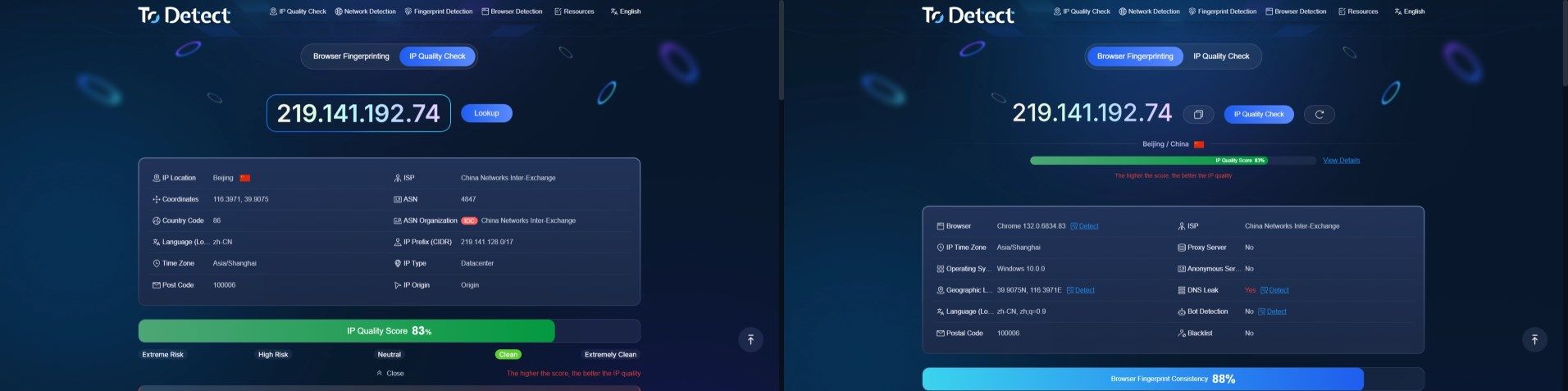
If you want to evaluate your current network environment, you can use ToDetect IP detection tool for a comprehensive check:
Check IP basics: Identify the current IP address, ISP, and ASN information.
Identify IP type: Determine whether the IP belongs to a residential ISP network or an IDC data center.
Blacklist check: Check whether the IP has risk records in known security databases.
Check environment consistency: Verify whether the IP location matches device settings such as timezone and language.
Frequently Asked Questions (FAQ)
Q1: Why does my IP reputation decline even if I have no violations?
This may be caused by shared network reputation or IP range association.
If you use a public cloud server or shared IP pool, abnormal activities from other users within the same subnet or ASN may also affect your IP reputation assessment.
Q2: Can IP reputation be restored after it declines?
Yes, but it takes time. First, stop the activities causing the issue and check for security problems.
For email-related scenarios, IP warming can be used to gradually rebuild sending reputation by increasing compliant sending volume over time.
For other scenarios, reducing abnormal behavior and waiting for risk control systems to update their assessment is usually required.
Recovery may take several days or even weeks.
Q3: How can I avoid being identified as an abnormal user in cross-border business?
Maintain consistency between your network environment, device information, and business activities.
Avoid frequently changing IP addresses in a short period of time.
Control request frequency per IP and use stable network configurations to improve overall environment reliability.
Browser Fingerprint Detection Tool
Efficiently solve multi-account management, environment isolation, and account security