



 Resources
 Feature overview
 Ganesh
 2026-07-25 11:46
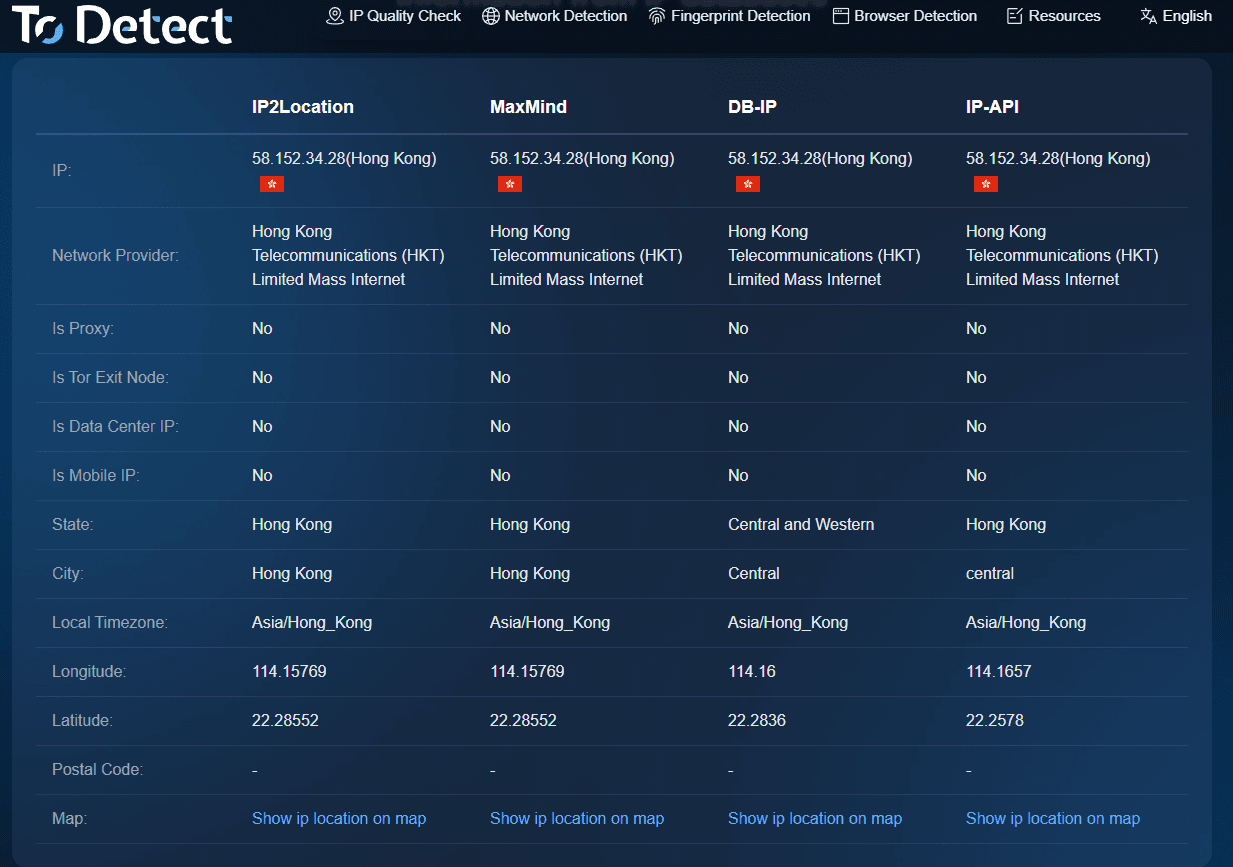
After opening an online IP lookup page, many people see a lot of technical information, such as IP location, ASN, ISP, proxy status, risk level, and other data, but they do not know what these fields actually mean.
In fact, online IP detection can not only help us understand where an IP address roughly comes from, but also determine what type of network it belongs to, whether it uses a proxy, and whether there are any abnormal risks.
Next, this article will teach you how to fully understand IP detection results. What do IP location and ASN mean? You can learn how these data work within 3 minutes.

1. What Can IP Detection Actually Find?
IP detection is a process that analyzes publicly available network information associated with an IP address to determine where the IP comes from, which network it belongs to, and whether it has proxy or security risks.
Common IP detection results usually include: the country or region of the IP, city and ISP information, ASN number, network organization name, proxy server status, whether it is a data center IP, and whether there are existing risk records.
These details are highly valuable for website operations, security analysis, cross-border business, e-commerce risk control, and troubleshooting network issues.
There are many online IP lookup services available today. Users only need to enter an IP address to quickly obtain detection results. For example, professional platforms provide IP location lookup, proxy IP detection, and IP risk analysis features to help users gain a more complete understanding of an IP address.
2. IP Location Lookup : Understanding Where an IP Comes From
In IP detection results, IP location lookup is usually the easiest part to understand. Normally, IP location information includes the country or region, province, city, and network operator.
For example, if an IP detection result shows: China Guangdong Shenzhen Telecom, it means that the IP address is most likely associated with China Telecom's network resources in Shenzhen, Guangdong.
However, it is important to understand that IP location does not represent the user's actual physical location. IP databases record network resource allocation information rather than real-time GPS positions. Location inaccuracies mainly occur because of:
ISP IP Resource Allocation
Internet service providers may allocate IP resources across different regions, so the lookup result may show a nearby city or even another area.
Enterprise Dedicated Lines or Server IPs
Enterprise servers and cloud hosting IP addresses usually display the location of the data center rather than the actual user's location. Therefore, when using IP location lookup, it is better to understand it as "where this IP resource belongs" rather than "where this person is located."
3. What Is ASN? Why Is ASN Important in IP Detection?
When checking an IP detection report, many people see a strange field called ASN. ASN stands for Autonomous System Number, which is the identification number of an autonomous system.
ASN represents the identity of an entire network organization, such as a telecom operator, cloud service provider, enterprise network, or data center. The Internet is not a single unified network, but a combination of many independent networks.
Through ASN information, you can determine what type of network an IP address belongs to.
• If an IP shows an ASN belonging to a cloud computing provider, it is likely from a cloud server rather than a residential broadband connection.
• If the detection result shows an ASN belonging to a major telecom operator, it is more likely to be a normal user network.
When analyzing website security, ASN is also an important reference for identifying abnormal access. Professional IP detection tools usually provide ASN lookup features.
4. How to Understand Proxy Status? Proxy IP Detection : What Is Its Purpose?
Proxy status refers to whether the current IP address is routed through a proxy server, IDC data center, or other network nodes. Common detection results include: non-proxy IP, proxy IP, Tor node, and data center IP.
Why do we need proxy IP detection? There are several main reasons:
1. Website Security Protection
Many websites check whether visitors are using proxy IPs. For example, during account registration, login, order submission, or promotional activities, if a large number of requests come from proxy IPs, the website may consider them potential automated operations or risky behavior.
2. E-commerce and Advertising Risk Control
Cross-border e-commerce platforms and advertising systems usually need to determine whether visitors are genuine users. If one user frequently switches between proxy IPs from different countries, it may affect account security evaluation.
3. Network Troubleshooting
Some users experiencing abnormal network access can use proxy detection to determine whether proxy software is causing the issue. However, a proxy IP does not always indicate malicious activity.
Many enterprises, developers, and overseas users use proxy services for legitimate purposes. Therefore, proxy status should be evaluated together with IP location, ASN information, and access behavior.
5. How to Choose a Reliable IP Detection Tool ?
1. Data Update Frequency
IP resources change frequently, especially proxy IPs and cloud server IPs. If a database is not updated regularly, detection results may become inaccurate.
2. Whether Detection Dimensions Are Complete
A good tool should provide more than IP location information. It should also include ASN information, ISP details, IP type analysis, proxy detection, and risk scoring to provide a more accurate IP assessment.
3. Whether Batch Queries Are Supported
Enterprise users often need to analyze large numbers of IP addresses. If a tool only supports single queries, efficiency can be limited.
4. Whether Results Are Easy to Understand
Professional data does not have to be complicated. A good tool should convert technical information into results that ordinary users can understand. For example, ToDetect's IP detection services focus on clear IP information analysis, allowing users to quickly view IP location, ASN, and proxy risk information.
6. What Do Different IP Detection Results Mean?
| IP Detection Item | Common Examples | Meaning | Practical Application Value |
|---|---|---|---|
| IP Type | Residential broadband, enterprise dedicated line, data center, mobile network | Reflects how the IP connects to the Internet. Different IP types represent different usage scenarios. | Helps determine whether the visitor source looks like a real user and supports website risk analysis. |
| Network Line | Telecom, Unicom, Mobile, overseas carriers, cloud service networks | Indicates the network connection or service provider used by the IP. | Used to analyze access speed, regional coverage, and the user's network environment. |
| IP Activity Status | Active IP, inactive IP, historically risky IP | Determines whether the IP has recent high-volume activity or abnormal behavior records. | Helps identify potentially risky access sources. |
| Risk Level | Low risk, medium risk, high risk | A comprehensive evaluation of IP reliability based on multiple data dimensions. | Used for account security, transaction review, and blocking abnormal access. |
| Blacklist Status | No match, suspected risk, recorded | Determines whether the IP has appeared in abnormal behavior databases. | Allows enterprises to detect potential threats in advance. |
| Usage Scenario Analysis | User IP, crawler IP, proxy node, server IP | Estimates the possible purpose of an IP based on network characteristics. | Helps distinguish normal visitors from automated requests. |
| Location Reliability | Matched, deviation, abnormal | Compares the IP location with the user's declared region. | Commonly used for login security verification and cross-border business analysis. |
7. How to Understand IP Detection Results in 3 Minutes
If you only want to quickly determine whether an IP is normal, follow these steps:
Step 1: Check IP location. Confirm whether the country, region, and ISP match expectations.
Step 2: Check ASN. Determine whether the IP belongs to residential broadband, an enterprise network, or a cloud data center.
Step 3: Check proxy status. Confirm whether the IP uses a proxy or another hidden network method.
Step 4: Evaluate based on the actual business scenario.
For example: normal user login → residential broadband IPs are usually more reasonable; bulk account registration → large numbers of proxy IPs require more attention; server access → data center IPs are normal in this situation.
Once you understand these steps, most IP detection results can be interpreted quickly.
Conclusion
By checking IP location, you can understand the approximate source of network resources. By analyzing ASN information, you can identify the organization behind the IP. Combined with proxy status, risk level, and other data, you can further determine whether the IP has abnormal characteristics.
IP detection is no longer just a simple "IP address lookup". After understanding IP location, ASN, and proxy detection, you can quickly identify the key points even when facing complex IP reports.
By mastering these three core pieces of information, you can truly understand IP detection reports instead of facing a large amount of data without knowing what it means. For website security, network analysis, account protection, and business operations, these insights provide practical value.