



 Resources
 Feature overview

 Ganesh
 2026-05-28 11:32
Have you also encountered situations where a newly registered account becomes abnormal within days, ads suddenly get restricted, a shop requires frequent login verification, or you receive risk control warnings even without doing anything? This happens because your IP is judged by the platform as “unclean” or “high-risk due to association.”
That’s why more and more people are paying attention to online IP lookup and IP detection tools, to evaluate their network environment in advance and avoid losing accounts at the starting stage.
Today we will explain what makes an IP “safe”, how to quickly determine whether a proxy IP is reliable, and whether it is possible to complete a full IP quality check within minutes.

1. Why Do IP Anti-Association Checks Matter? Many People Overlook This From the Start
Platforms don’t just look at what you do—they also evaluate whether you are the same user.
For example: logging into multiple accounts from the same IP, frequently switching IPs with identical device fingerprints, using low-quality proxy IPs, or mixing IPs from different regions abnormally. All of these can trigger risk control systems—light cases may reduce traffic, severe cases may lead to account bans.
Therefore, in account operations today, IP lookup and online IP detection are commonly used to identify risks in advance instead of fixing problems after they occur.
2. What Can Online IP Lookup Actually Reveal?
Many people think “IP lookup” only shows location, but it actually reveals much more through professional tools:
• IP geolocation (country/city)
• ISP information
• Whether it is a datacenter IP or residential IP
• Whether a proxy is being used
• IP risk score (provided by some tools)
These details are crucial in multi-account operations because platforms are especially sensitive to “datacenter IPs” and “proxy traces.”
3. The Core Value of Online IP Detection: It’s Not About IP, It’s About Risk
The real value of IP quality detection is determining whether an IP may bring risk to your account.
□ IP environment detection: identifies whether the IP comes from a datacenter, residential network, or mixed source.
□ Proxy detection: checks whether VPN or proxy usage is detected.
□ Blacklist risk analysis: identifies whether the IP has been flagged or used for violations.
□ Multi-account correlation analysis: detects whether multiple accounts share the same network exit.
□ Network stability evaluation: analyzes latency and stability for long-term operations.
□ Device & IP consistency check: evaluates whether the login environment shows abnormal mismatches.
4. IP Detection Methods Comparison Table (Quick Selection Guide)
| Detection Method | Use Case | Pros | Limitations | Recommendation Score |
|---|---|---|---|---|
| Browser basic IP lookup | Quick daily IP geolocation check | Simple, no tools required | Shallow information, cannot detect risk | ★★☆☆☆ |
| Online IP lookup tool | Basic network environment check | Shows ISP, location, etc. | No deep risk analysis | ★★★☆☆ |
| Online IP detection system | Multi-account risk screening | Detects proxy usage and risk scoring | Some features are paid | ★★★★☆ |
| Proxy IP security checker | Cross-border e-commerce / matrix operations | Checks IP cleanliness and blacklist status | Requires setup cost | ★★★★★ |
| Comprehensive risk control platform (ToDetect tool) | Long-term multi-account operations | IP + device + behavior analysis | None | ★★★★★★ |
5. Proxy IP Security Detection: A Key Step for Cross-Border E-Commerce and Matrix Operations
Many users use proxy IPs for multi-account operations, but the problem is—not all proxies are safe.
Issues include shared IP abuse, IPs already flagged by platforms, low-weight datacenter IPs, and frequent IP switching causing anomalies. Therefore, it is recommended to run a proxy IP security check before use.
Focus on IP cleanliness (history), residential vs datacenter type, blacklist status, latency, and stability.
6. ToDetect in Practical IP Anti-Association Use Cases
In practice, many users use the ToDetect tool for pre-login risk screening.
Its core function is to determine whether an IP is usable before logging in—for example: whether a new proxy IP is safe, whether the current IP is contaminated, whether multiple accounts share the same IP risk, and whether it is suitable for e-commerce/social media platforms.
For users on platforms like TikTok, Facebook, Amazon, and Shopee, this step is critical. Many bans are not due to operations, but because the IP environment was already risky.
7. 3-Minute Quick Online IP Detection Workflow (Practical Steps)
To quickly determine whether an IP is safe, follow these steps. The entire process takes about 3 minutes.
Step 1: Basic online IP lookup
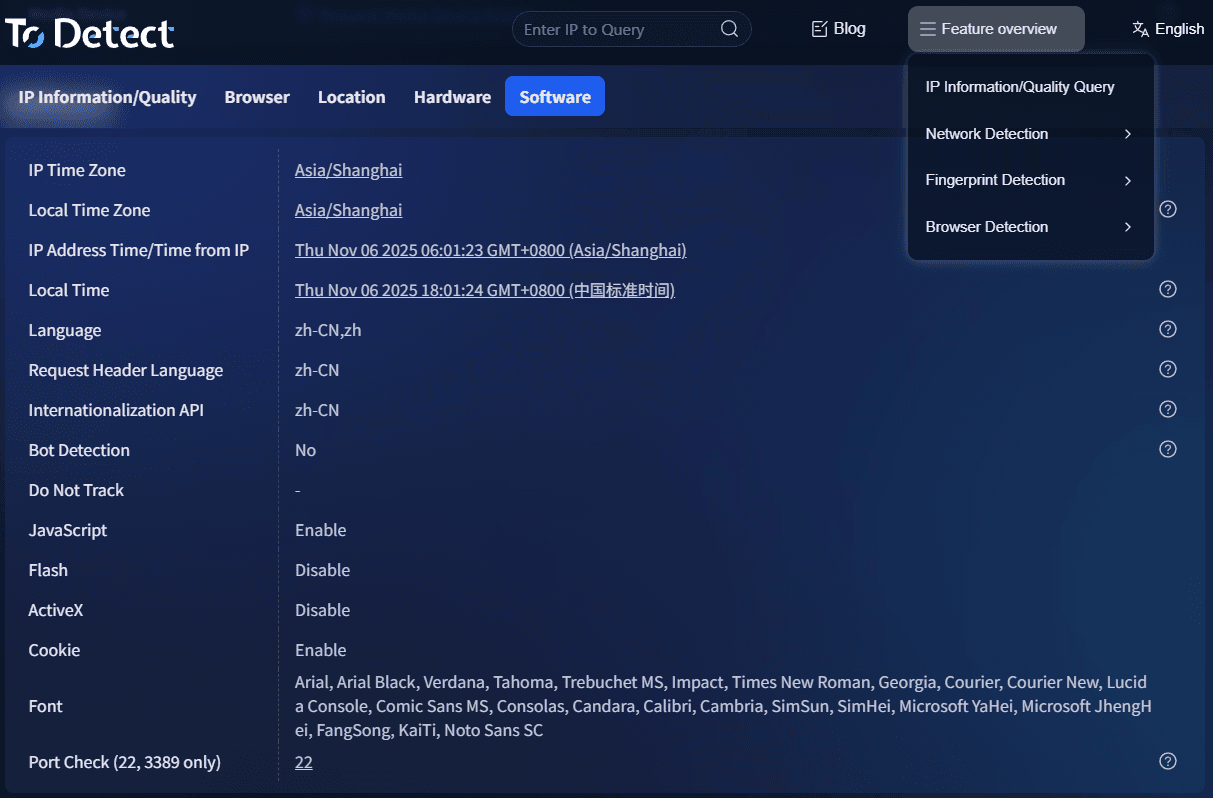
First, use an IP lookup tool to check the IP’s location, ISP, and network type to ensure it matches your business scenario.
Step 2: Check whether the IP is a proxy
Use IP detection to determine whether proxy traces exist.
Step 3: Evaluate IP risk score
Check whether the IP has abnormal history or blacklist records.
Step 4: Confirm IP type
Confirm whether it is residential or datacenter IP.
Step 5: Proxy IP security test
If using a proxy, check whether it is shared or blacklisted.
Step 6: Multi-account login simulation
Test different accounts under the same IP to see if anomalies occur.
Step 7: Final decision
Decide whether the IP is suitable for production use.
8. FAQ: Online IP Check & Detection
- Why am I still flagged as related even after changing IPs?
Many people think “changing IP = safe”, but platforms also analyze device fingerprints and behavior. If only the IP changes while everything else remains the same, you may still be identified as the same user.
- Are free proxy IPs reliable for multi-account operations?
Generally not recommended. Free proxies are often reused and may already be blacklisted, increasing risk instead of reducing it.
- Can online IP detection fully prevent account bans?
No. IP detection only helps identify risks in advance; account safety also depends on behavior, content, and overall strategy.
- Why do some accounts get banned while others remain fine under the same IP?
Because platforms use combined account-level and environment-level risk evaluation. Different accounts carry different historical weights.
Conclusion:
Many failures in account operations are not caused by content quality, but by the “cleanliness” of the underlying network environment.
Whether doing cross-border e-commerce or social media matrix operations, it is recommended to always check IP status before logging in or operating accounts.
Tools like ToDetect essentially help shift risk management earlier, rather than fixing issues after damage occurs. The cleaner the environment, the more stable the accounts; the earlier the detection, the more controllable the risk.
