



 Resources
 Feature overview
 Ganesh
 2026-07-31 11:24
When engaging in cross-border e-commerce, managing overseas social media, or nurturing TikTok accounts, the biggest fear is running into unexplained account bans, shadowbans, or triggering secondary verification right after registration.
In fact, most of these issues stem from using IP nodes with a "dirty history." Once a platform detects that you are using a datacenter IP, a blacklisted IP, or an abused node shared by multiple users, it will immediately flag your account as high risk.
How can cross-border beginners check IP purity? Which IP quality testing websites on the market offer accurate data? Today, we've compiled a comprehensive guide to checking IP purity and analyzing disguise scores.

1. Three Core Dimensions for Measuring IP Purity
Before using online IP checking tools, we need to understand what metrics risk management systems are monitoring. Evaluating an IP's "health level" mainly depends on:
1. IP Type (Type / ISP)
• Native Residential IP (Residential IP): IPs assigned to residential home users by real local internet service providers (such as AT&T, Comcast, etc.). They offer the highest purity, and risk control systems perceive them as genuine human users.
• Datacenter IP (Data Center IP): IPs allocated by server data centers. They are inexpensive but extremely easy to detect. Most platforms maintain high vigilance against datacenter IPs or block them outright.
• Broadcast IP (Announced IP): IPs broadcasted from Country A's datacenter to be used in Country B by certain providers. These IPs frequently fail location-matching checks and have extremely low disguise scores.
2. Fraud Score & Blacklist Records (Fraud Score / Blacklist)
Global risk control databases (such as MaxMind, Spamhaus, etc.) rate IPs based on historical behavior. If an IP was previously used for sending spam, fake order farming, web scraping, or frequent account switching, its Fraud Score will surge and it will be blacklisted.
3. Environment Alignment & Disguise Score (Disguise Rate / Fingerprint Alignment)
Having a clean IP alone isn't enough; whether your device environment (such as system time zone, language, DNS address, and WebRTC configuration) perfectly matches the IP's location is equally critical. Discrepancies like "being in the US while the IP is in the UK" or "a DNS address exposing your real local ISP" will significantly lower your disguise score.
2. Top Recommended Cross-Border IP Quality Testing Websites
To help you quickly screen high-purity nodes, here is a summary of the most frequently used detection platforms with comprehensive data dimensions in the cross-border industry:
1. ToDetect (Comprehensive Node & Fingerprint Testing Platform)
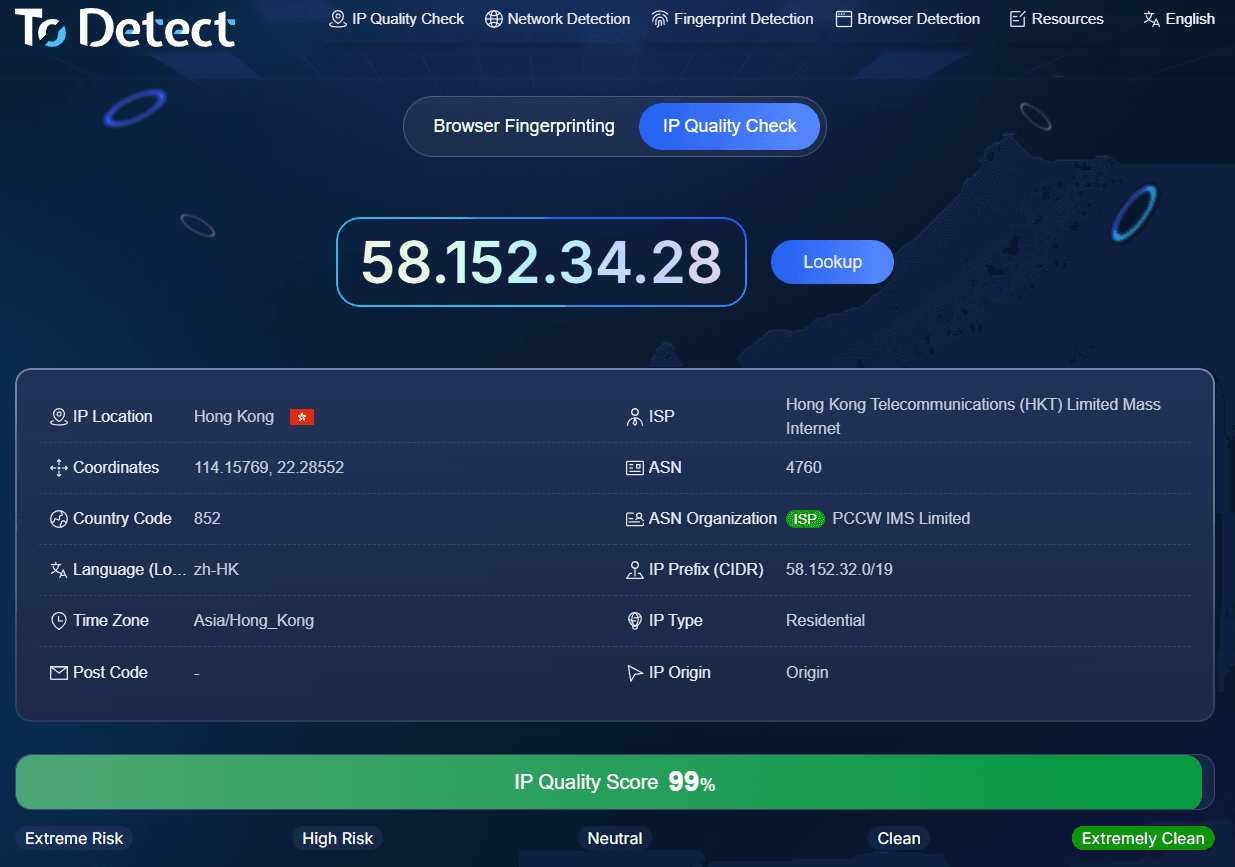
Among numerous IP purity checking tools, ToDetect has been widely recommended by cross-border veterans in recent years. Its strength lies in tightly combining "IP fraud risk analysis" with "device fingerprint disguise degree."
Core Features: After entering a target node, ToDetect quickly identifies whether the IP is residential, datacenter proxy, or mobile data, and provides an intuitive fraud risk score.
Disguise Analysis: It simultaneously checks for WebRTC leaks, verifies if the DNS location aligns with the IP, and checks if browser environment parameters match, helping users spot configuration flaws at a glance.
2. Scamalytics
Scamalytics is one of the key reference sources for risk control databases across major global platforms, focusing primarily on IP risk scoring.
Scoring System: Fraud scores range from 0 to 100. Lower scores indicate a cleaner IP; scores above 30 warrant caution, and if it reaches 70 or above, it is generally recommended to abandon the IP immediately.
Detailed Report: Clearly lists whether the IP carries high-risk tags such as Anonymizers, Tor nodes, or Public Proxies.
3. Whoer.net
Whoer is one of the earliest and most widely used websites for online IP lookup and disguise testing.
Intuitive Display: Its interface is very straightforward, displaying a percentage score directly (e.g., 90%, 100%). If it falls below 100%, the reasons for score deductions are listed item by item below, such as time zone mismatches or enabled WebRTC.
Use Case: Ideal for a quick self-check of device environment and IP consistency before logging into overseas accounts.
4. Pixelscan
Pixelscan is suited for users performing refined multi-account anti-association checks.
Key Features: Beyond querying IP geolocation and proxy attributes, it deeply inspects your browser's Canvas fingerprint, WebGL fingerprint, font list, and other parameters to see if these hardware traits match common device specifications in the IP's location.
5. IP138 / IP2Location / AbuseIPDB
If you want to check an IP's history of abuse records, AbuseIPDB is an excellent auxiliary site. Users can enter an IP to view abuse reports, attack logs, or unauthorized packet transmission history over the last 90 days.
3. IP Purity Testing Tools Comparison Overview
| Tool Name | Core Testing Dimensions | Rating Format | Best Business Use Cases | Recommended Safety Threshold / Target Standard |
|---|---|---|---|---|
| ToDetect | IP Type (Residential/Datacenter/Mobile), Fraud Risk, Fingerprint Environment, DNS/WebRTC Leaks | Comprehensive Risk Score + Environment Vulnerability Checklist | Multi-account anti-association, environment configuration self-check, multi-dimensional comprehensive diagnosis | Low Risk and no leak warnings |
| Scamalytics | Fraud Score, Blacklist Records, Anonymizer / Tor / Datacenter Flags | 0 - 100 Quantified Score (Lower is better) | Quick screening of IP history, filtering high-risk nodes for cross-border e-commerce & social media | Below 15 points (Exercise caution above 30) |
| Whoer.net | System Time Zone, Language Matching, WebRTC/DNS Leaks, Basic Disguise Score | 0% - 100% Disguise Score Percentage | Quick environment consistency self-check before logging in, basic troubleshooting | Disguise score reaches 90% - 100% |
| Pixelscan | Browser Canvas/WebGL Fingerprints, Font & Hardware Traits, Deep IP Attribute Comparison | Abnormal Fingerprint Flags & Diagnostic Analysis | Anti-detect browser configuration verification, refined account nurturing & multi-account management | Shows no abnormal fingerprints (No inconsistent fingerprints) |
| AbuseIPDB | Past 90 days abuse records, malicious traffic/attack/scraper report counts | Abuse Confidence Score percentage (Abuse Confidence Score) | Long-term fixed node inspection, deep historical background tracing for dedicated IPs | Abuse Confidence Score at 0% |
4. Practical Recommendations for Building a High-Purity Account Environment
• Establish a Routine Leak Inspection:
Before connecting to a new node or launching an anti-detect browser, run an IP purity check using ToDetect or Scamalytics. Pay special attention to the Fraud Score and IP type, ensuring it is a genuine dedicated residential IP before proceeding with account login.
• Fix DNS & WebRTC Leaks:
If your disguise score consistently receives deductions, check whether WebRTC is disabled in your browser settings or if DNS routing under global proxy mode is operating correctly to prevent your real local network from leaking.
• Avoid Frequent IP Changes:
For sensitive platforms like Amazon, Etsy, or TikTok, frequently switching IPs across different regions is far more dangerous than using a slightly average IP consistently. Binding a single account to a single dedicated IP remains the core principle for long-term account stability.
Browser Fingerprint Detection Tool
Efficiently solve multi-account management, environment isolation, and account security