



 Resources
 Feature overview

 Ganesh
 2026-06-23 13:40
Many people managing multiple YouTube accounts eventually encounter a very practical problem: accounts start running into issues over time. Sometimes reach gets limited, sometimes abnormal login alerts appear, and in more serious cases, accounts may even get suspended.
Therefore, before officially logging into YouTube, there is one step that should never be skipped—performing an IP online lookup and environment check to verify whether your current network environment is truly "clean."
In this article, we'll discuss how to perform an IP online lookup, how to evaluate the security of a proxy IP through proxy IP detection, and how tools like ToDetect can help reduce account association risks.
1. Why Does YouTube Account Management Require an IP Online Lookup?
As a platform under Google, YouTube operates with a highly sophisticated risk-control system. The platform not only records account login activity but also analyzes IP addresses, ISP information, browser fingerprints, cookies, and device details.
If multiple accounts frequently log in from the same IP address, or if the IP location does not match the account’s target region, the platform may trigger risk-control mechanisms.
Therefore, performing an IP online lookup before each login to verify that the current network environment matches expectations has become a standard procedure for many professional operation teams.
2. What Can an Online IP Lookup Detect?
1. Current Public IP Address
Verify whether the displayed IP has successfully changed. For example, if your original network shows 203.xxx.xxx.xxx and after connecting to a U.S. proxy it shows 23.xxx.xxx.xxx, the proxy is functioning correctly.
2. IP Geolocation
Check the country and city associated with the IP address. If your YouTube account targets the U.S. market, it is recommended that the detected location shows information such as United States, New York, Los Angeles, or Chicago.
3. ISP Information
Check the ISP associated with the IP address. Examples include Comcast, Verizon, AT&T, and Spectrum. High-quality residential proxies usually display legitimate ISP information rather than data center providers.
4. Time Zone Matching
Many users change their IP but forget to adjust their system time zone. If a U.S. IP is combined with a China time zone, the platform may still identify the environment as suspicious.
5. DNS Information
DNS leaks are a major source of account association risk. Even if the proxy is connected successfully, a DNS server still showing your local network may expose your real location. Therefore, DNS synchronization should always be checked during proxy IP detection.
3. Essential IP Environment Security Checks Before Logging Into YouTube
| Check Item | Purpose | Healthy Example | Risk Warning |
|---|---|---|---|
| IP Country | Verify proxy region accuracy | U.S. account with U.S. IP | Region mismatch may trigger risk controls |
| IP Type | Determine whether it is residential | Residential IP | Data center IPs generally carry higher risk |
| ISP | Validate network authenticity | Comcast, AT&T, Verizon, etc. | Unknown ISPs may reduce account trust |
| DNS Location | Prevent real network exposure | DNS and IP both located in the U.S. | DNS leaks may expose your real location |
| WebRTC Check | Check local IP exposure | Only proxy IP is visible | Local IP exposure increases association risk |
| Browser Language | Maintain environment consistency | English (United States) | Chinese-language browsers may appear unusual for overseas accounts |
| System Time Zone | Match target operating region | UTC-5 (Eastern U.S.) | IP and time zone mismatches may appear suspicious |
| Blacklist Records | Check IP reputation history | No abnormal records | Previously abused IPs carry higher risk |
| Proxy Anonymity Level | Evaluate concealment quality | Elite Proxy | Transparent proxies are easier to detect |
| Fingerprint Consistency | Reduce account association probability | Independent browser fingerprint | Shared fingerprints across accounts increase risk |
4. How to Use ToDetect for IP Online Lookup
Step 1: Connect a Proxy IP
Open your proxy software and select the desired country node, such as a U.S. residential IP, U.K. residential IP, or Canadian residential IP. Once connected successfully, do not rush to log into your YouTube account.
Step 2: Open the ToDetect Detection Page
After entering ToDetect, the system will automatically scan your current network environment. No browser extensions or plugins are required.
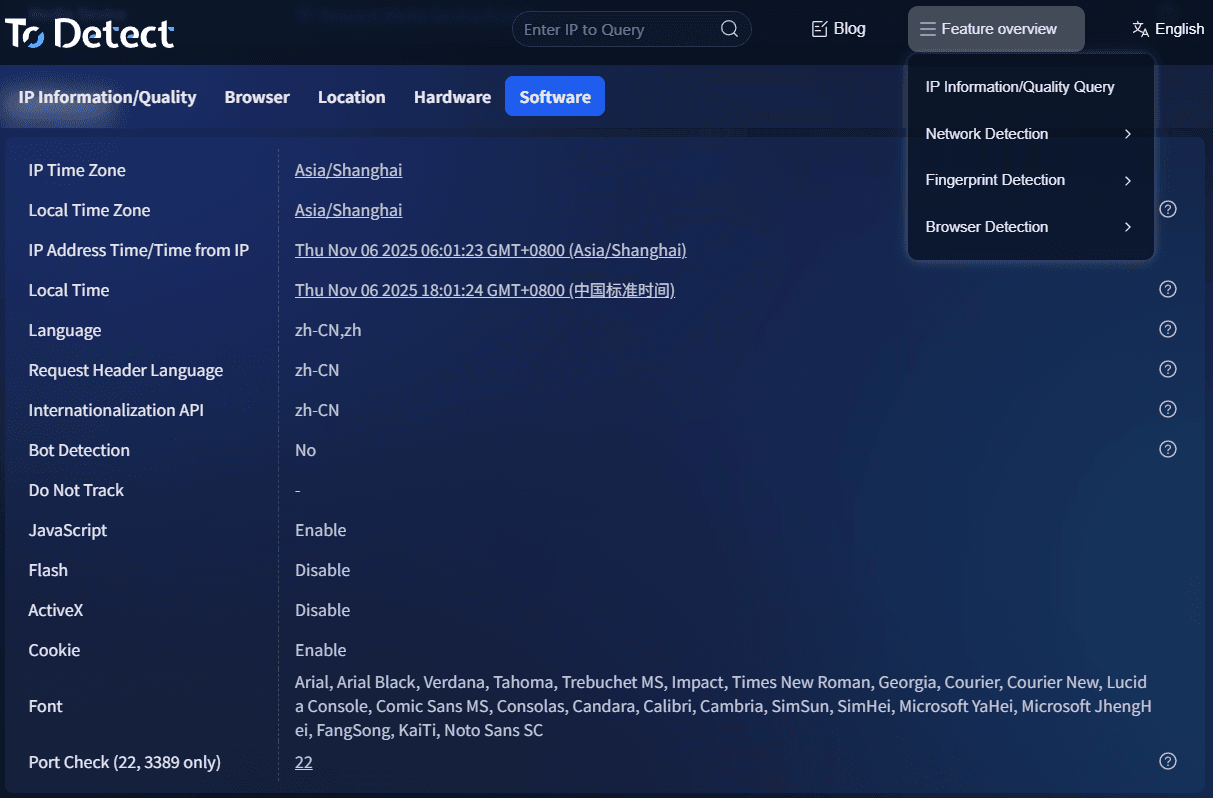
Step 3: Review IP Information
The page will display your current IP address, country, city, ISP, and time zone information. Verify that these details match your proxy route.
For example, if the IP country is United States, the city is Dallas, and the ISP is Spectrum, the proxy connection is functioning properly.
Step 4: Check DNS Status
Continue reviewing the DNS detection results. Ideally, the IP location and DNS location should match. If the IP shows the United States while DNS shows China, a DNS leak has occurred and your network configuration should be adjusted.
Step 5: Test the Browser Environment
In addition to IP detection, ToDetect can also check User Agent, WebRTC, Canvas, and Language settings. If you manage multiple YouTube accounts, using a fingerprint browser alongside these checks can further reduce account association risks.
5. Important Considerations During Proxy IP Detection
Many users switch IP addresses but still encounter abnormal detection results. The most common causes include the following.
Using Low-Quality Shared IPs
These IPs often carry blacklist records, past violations, or traces of extensive account activity. Even if the connection succeeds, they may still trigger platform risk-control systems. Residential IPs, static residential IPs, and dedicated proxy IPs are generally preferred.
Browser Cache Not Cleared
Logging into a new account immediately after switching IPs can expose association signals. A recommended workflow is: Close Browser → Clear Cookies → Change IP → Log Into Account.
Many browsers enable WebRTC by default. Even when a proxy is working properly, your real IP may still be exposed. During proxy IP detection, WebRTC should be checked carefully for potential leaks.
Time Zone and Language Mismatch
For example, a U.S. IP combined with a Chinese-language browser and Beijing time clearly does not reflect normal user behavior. It is recommended to synchronize your browser language, system time zone, and regional settings with the target country.
6. IP Online Lookup FAQs
FAQ 1: Why does the detected location still appear incorrect after switching proxy IPs?
Some proxy providers advertise U.S. IPs, but IP databases may still identify them as another country or city. Use ToDetect to verify IP geolocation, ISP details, and time zone information. If necessary, switch to a higher-quality residential proxy IP.
FAQ 2: Proxy IP detection looks normal, but my YouTube accounts still show association risks. Why?
Shared browsers, cookies, device fingerprints, or similar login behaviors can still create association signals. Combining independent browser fingerprints, dedicated IPs, and isolated account environments can help reduce risk.
FAQ 3: Do I need to perform an IP online lookup every day when managing multiple YouTube accounts?
If you frequently switch proxy nodes, it is recommended to perform an IP online lookup before every login. Some proxy IPs may disconnect unexpectedly, experience DNS leaks, or change addresses, and detecting issues beforehand can prevent account security problems.
FAQ 4: What happens if ToDetect finds a DNS leak?
A DNS leak means the platform may be able to identify your real network location. If a DNS leak is detected, immediately review your proxy settings and run another proxy IP detection test to ensure the IP address and DNS location remain consistent.
Conclusion
As YouTube's risk-control systems continue to evolve, account security is no longer simply about managing usernames and passwords. It now involves comprehensive management of the entire network environment.
With tools like ToDetect, you can quickly determine whether your current network environment is secure and aligned with your target region, helping support the long-term stability of your YouTube operations.
For businesses and creators focused on international markets, true account security is not about solving problems after they occur—it is about preventing them before they happen.
