



 Resources
 Feature overview
 Ganesh
 2026-10-20 10:46
If you run IP purity checks often enough, you'll hit this sooner or later: you're on an ordinary home broadband line and IPQS hands you a score in the 40s. Meanwhile another IP shows an 80 and nothing about the connection feels off. So what counts as normal? And does a high score automatically mean the IP is bad?
The thing is, an IPQS score is only one reference point for judging IP risk. To actually know whether your network environment is healthy, you need to read it alongside the IP type, its history, and the rest of your results.

1. What Counts as a Normal IPQS Score?
IPQS (IPQualityScore) reports a Fraud Score on a scale of 0–100, and the higher it goes, the more pronounced the risk signals it picked up. The score mainly reflects how strongly an IP address is associated with suspicious activity and past abuse. It says nothing directly about your connection speed or stability.
Based on the scoring guidelines IPQS publishes, these are the ranges to keep in mind:
| IPQS score | Risk level | How to read it |
|---|---|---|
| 0–39 | Low risk | Few risk signals; generally within the normal range |
| 40–75 | Suspicious | Some risk history present; worth a closer look |
| 76–84 | Elevated risk | Fairly clear anomalies detected |
| 85–89 | High risk | Possibly a larger volume of recorded anomalous activity |
| 90–100 | Very high risk | Strong correlation with recent or repeated abuse |
These ranges are useful for getting oriented, but they aren't a verdict on whether an IP is usable. A score in the 40s doesn't necessarily mean something is seriously wrong, while anything above 90 usually deserves a proper investigation.
2. Why Does Perfectly Normal Broadband Get a High Score?
IPQS isn't judging only what you're doing right now. It also weighs the history attached to that IP address and the network resources behind it.
If your home connection uses a dynamic IP, the address you've been assigned may have belonged to someone else before you. Shared carrier NAT and public networks work the same way — the activity of many users can pile up behind a single public IP.
On top of that, residential IPs, mobile network IPs and data center IPs all behave differently. A data center IP isn't automatically a bad IP, but in checks designed around ordinary home users it tends to carry a different risk profile.
So when you see a high score, checking which carrier owns the IP, what kind of connection it is, and what its recent history looks like will tell you far more than jumping straight to "my network is bad."
3. Checking IP Quality Goes Beyond the Fraud Score
Beyond the overall score, a few other fields in the IPQS result are worth your attention.
• Recent Abuse. Tells you whether any anomalous activity involving this IP has been logged recently.
• Abuse Velocity. Shows how frequently that anomalous activity has been occurring lately; it needs to be read together with the other indicators.
• Bot Status. Flags risk signals associated with automated activity on the IP.
• Connection Type. Helps you tell residential, mobile, corporate and data center sources apart.
• ISP and ASN. Identifies the carrier and the autonomous system behind the IP, so you can confirm where the address actually belongs.
Here's an example. Say a residential IP has a Fraud Score of 47, Recent Abuse reads True, but Bot Status is False. That means a recent risk record was found — but it doesn't prove anything anomalous is happening on the network right now. You'd still want to check where the record came from and when it was logged.
4. How to Run an IP Purity Check with ToDetect
Looking up an IPQS score gives you a risk judgment from one particular scoring system. If you want a fuller picture of what your connection looks like right now, ToDetect's online IP check will show you a lot more.
Open the ToDetect site and the page displays quality information for your current IP. Start with the IP address itself, the carrier, the geolocation and the IP quality score, and confirm they match what you'd expect for your connection.
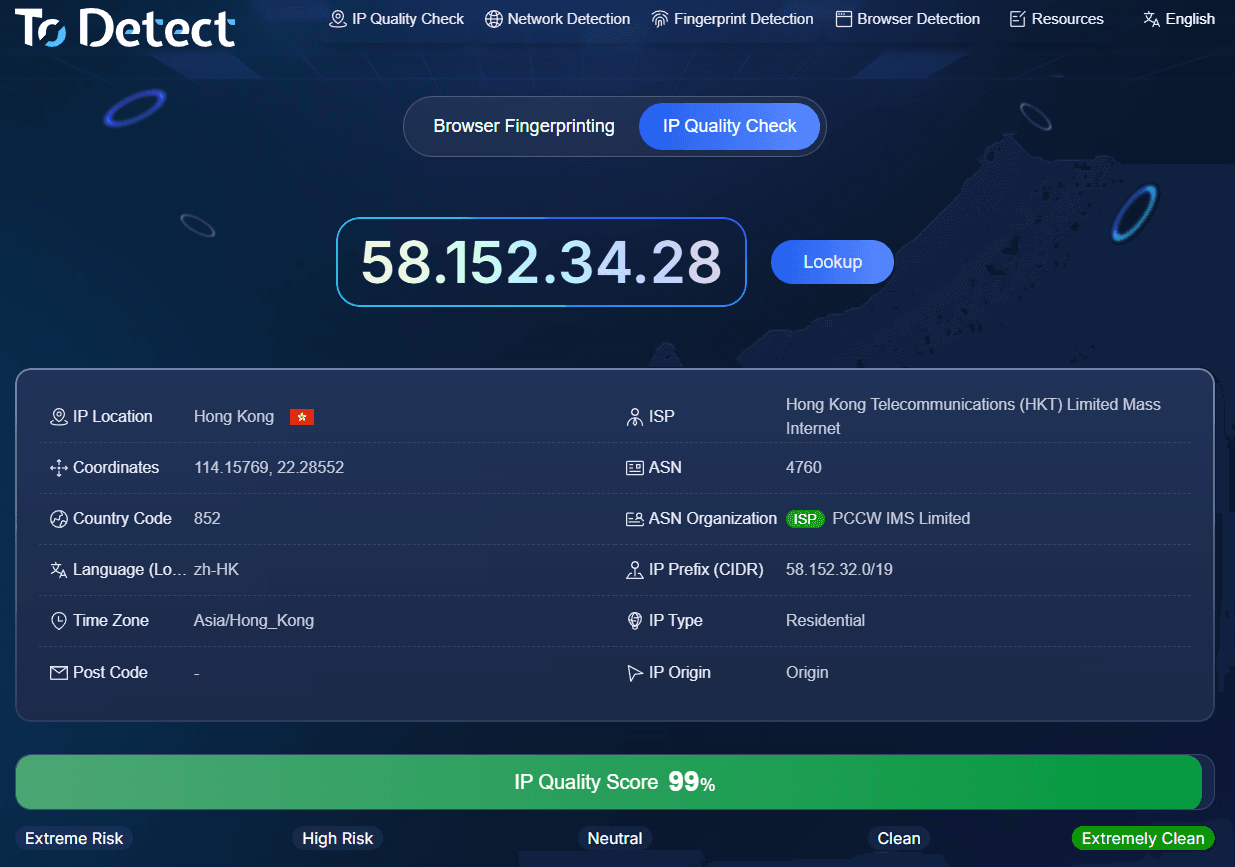
Next, look at the DNS results to see which servers are handling your domain resolution, then check the time zone, language and system values in the browser fingerprint for any configuration mismatches worth chasing down.
One detail trips people up: with IPQS, a higher Fraud Score means higher risk, while with ToDetect a higher IP quality score means better quality. The two scales mean different things and are calculated differently, so you can't compare the numbers directly.
DNS and browser fingerprint checks also measure different things entirely — their results aren't stand-ins for an IPQS score. Put all of that information side by side and you get a much more complete read on the state of your network.
5. What If Your IP Purity Score Suddenly Jumps?
If the same IP was sitting at 20 a few days ago and now reads 60, don't draw conclusions from a single change.
First confirm whether your public IP address actually changed. After a dynamic line gets reassigned, the history that comes back can look completely different.
If the IP hasn't changed, check the recent abuse records and re-run the test at a different time. It helps to save the test date, IP type, risk score and the main anomaly fields so you have something to compare against later.
For a connection you use long term, rechecking at regular intervals is far more informative than testing once. If the score stays high and several anomaly records show up at once, contact your provider to sort it out.
6. IP Purity Checks: Common Questions
Can an IP still work normally with an IPQS score in the 40s?
A score in the 40s usually isn't enough on its own to call an IP problematic. Combine it with the recent abuse records, the connection type and how the network actually behaves before deciding.
Is a residential IP always cleaner than a data center IP?
Not necessarily. A residential IP can carry its own history of anomalies, and plenty of data center IPs have clean records. Network type alone doesn't determine quality.
Is it normal for IPQS and ToDetect to disagree?
Yes. Different tools draw on different data sources, metrics and scoring directions. IPQS leans toward risk assessment, while ToDetect covers IP quality plus browser environment and other dimensions.
Can a high-risk IPQS score recover?
It can. As risk data is updated, the score may move, though there's no guarantee on timing. If you believe the result is a false positive, you can contact the scoring provider to have it reviewed.
Wrapping Up
The value of an IP purity check isn't the number you end up with — it's understanding where the risk signals are coming from. IPQS is good for looking up an IP's risk history, and ToDetect fills in the gaps with IP quality, DNS and browser environment data. Comparing results over time tells you far more than chasing a single low score.