



 Resources
 Feature overview

 Ganesh
 2026-06-22 12:01
Cross-border multi-account operations are easily flagged by platforms as being associated. In mild cases, this leads to traffic restriction; in severe cases, account bans. What truly determines account safety is your entire “browser environment.”
Many people have heard of fingerprint browsers but don’t know how to use them; some even set up the environment correctly but still get linked and banned. The main reason is that they don’t know the exact operational steps.
Today, the editor will teach you how to build a browser environment and how to combine tools to achieve truly stable multi-account anti-association operations. Even beginners can follow step by step.

1. Why Is Multi-Account Anti-Association Necessary?
Platforms identify users through a series of “browser fingerprint information,” such as IP address, browser version, system fonts, screen resolution, timezone/language, Canvas/WebGL data.
These pieces of information together form your “digital ID.” If multiple accounts operate under the same environment, they can easily be identified as the same operator—this is what “account association” means.
Therefore, the core idea of multi-account anti-association is: make each account appear as a completely independent real-user environment.
2. What Is the Core Principle of a Fingerprint Browser ?
Its purpose is not just to change IP addresses, but to generate multiple independent browser environments. Each environment has its own fingerprint information, such as isolated cookies, cache, browser fingerprint parameters, and support for binding different proxy IPs.
In this way, each account runs in a separate “virtual device,” significantly reducing the probability of being identified as linked accounts. That’s why fingerprint browsers are a standard tool in cross-border e-commerce, ad account matrices, and social media operations.
3. Correct Steps for Building a Browser Environment (Practical Focus)
1. Prepare Basic Tools and Planning
Before starting, prepare fingerprint browsers, proxy IPs, and account resources. Also plan account usage in advance (e-commerce, social media, or ad matrix). This step determines whether your environment becomes messy later.
2. Create Independent Browser Environments and Organize Them
When creating environments in a fingerprint browser, name and classify them using a logic like “account = environment = purpose,” e.g., by country, platform, or business type. This prevents confusion and reduces multi-account association risks.
3. Bind Dedicated and Stable Proxy IPs
Each browser environment should have an independent IP. Prefer residential IPs or high-quality static IPs, and ensure one IP corresponds to one account environment to reduce detection risks.
4. Configure Fingerprint Parameters Naturally
Do not aim for “fully random” settings. Instead, simulate real devices by matching timezone, language, OS version, and resolution properly. Make the environment look like a real user device rather than a mass-generated setup.
5. Initialize and Test the Environment
After configuration, do not log in immediately. First perform basic access tests (search engines or platform homepages) to verify network, IP, and fingerprint integrity.
6. Log In Gradually and Observe Early Behavior
After login, avoid high-frequency actions. Start with browsing, staying, and light interactions so the system gradually recognizes the account as a normal user, improving stability and reducing risk control triggers.
4. Understanding the Logic of “Multi-Account Anti-Association”
Many people think anti-association means “hiding yourself,” but in essence it is about simulating real users. Platforms prefer natural behavior rather than perfectly consistent machine operations. Therefore:
Do not log into all accounts simultaneously, vary operation timing, simulate real browsing habits, and avoid bulk copy-paste actions. In short: make each account behave like a different person.
5. Fingerprint Browser Detection Mechanisms and ToDetect Tool Usage
Modern platform risk control may check whether Canvas fingerprints match, whether WebRTC leaks real IP, whether font lists are abnormal, whether timezone matches IP location, and whether hardware information looks reasonable. Inconsistencies or overly “clean” data may raise suspicion.
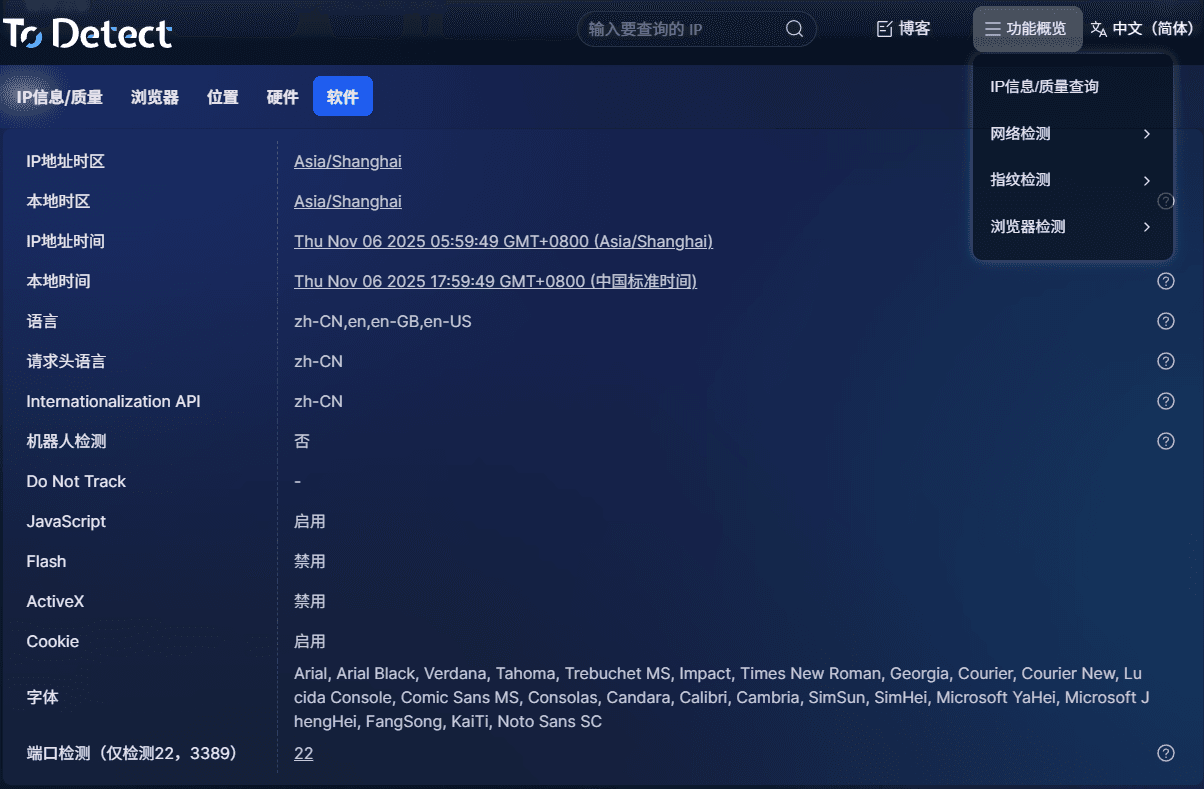
ToDetect helps quickly detect whether your browser environment has fingerprint exposure issues, such as IP leaks, fingerprint uniqueness, WebRTC leaks, and environment realism—so you can verify before logging into accounts.
6. Common Fingerprint Browser Mistakes
1. Multiple Accounts in One Environment
Switching accounts within the same environment mixes cookies and fingerprints, making it easy for platforms to detect association.
2. Frequent IP Switching
Switching from US IP today to Japan IP tomorrow looks unstable and can trigger risk systems.
3. Identical Fingerprint Parameters
If multiple environments share identical resolution, fonts, and Canvas data, it becomes easier to detect batch behavior.
4. Mechanical Behavior Patterns
All accounts performing identical actions at the same rhythm (likes, browsing, posting, purchasing) appear automated and trigger risk control.
7. Fingerprint Browser Detection FAQ
1. Will a fingerprint browser guarantee no account linking?
No. It reduces risk by simulating independent environments, but platforms still evaluate behavior, login habits, and content consistency. True safety requires combining environment, behavior, and IP separation.
2. Must residential IPs be used?
Not mandatory, but recommended. Residential IPs resemble real users and are more stable. Datacenter IPs are cheaper but easier to detect.
3. Why do accounts still get banned?
Common reasons include shared environments, frequent IP switching, identical fingerprints, or overly mechanical actions. Platforms judge “user authenticity,” not just tools used.
Summary
If you are just starting with multi-account operations, there is no need for complex setups at the beginning. A stable browser environment is the priority.
Start with “one environment per account,” then scale gradually. Use ToDetect tools to continuously optimize your setup.
In short: multi-account anti-association is not a technical trick, but a detail-oriented process. Get the details right, and your accounts will remain stable.
