



 Resources
 Feature overview
 Ganesh
 2026-07-31 12:25
In today's internet landscape, proxy IPs have become widely used for market research, cross-border e-commerce, data scraping, and personal privacy protection.
However, many users find that even with a proxy enabled, websites can still detect it and impose restrictions.
How exactly do websites detect proxy IPs? And how can you evaluate and optimize your network environment?
This article dives deep into the technical mechanics behind proxy detection and offers a practical guide to testing and optimizing your setup.

How Do Websites Detect Proxy IPs?
Websites don't rely on a single method to tell if you're using a proxy. Instead, they cross-reference data across multiple dimensions to assess risk.
1. IP Attributes and Database Lookups
This is the most direct and effective approach. Websites query specialized databases such as IP2Location, MaxMind, or DB-IP to verify an IP's registration and hosting details.
If an IP belongs to a data center, cloud provider, or hosting facility (IDC), risk control systems will automatically bump up its risk score.
That's because, compared to residential networks, data center IPs are far more likely to run automated scripts, batch ops, or proxy services.
2. HTTP Request Headers and Environment Checks
Transparent or low-anonymity proxies attach specific fields in HTTP request headers (like X-Forwarded-For or Via), instantly giving away the proxy.
Even with high-anonymity proxies, risk control systems compare the User-Agent header against system parameters collected via JavaScript.
If your User-Agent claims you're on Windows Chrome, but underlying Canvas/WebGL rendering profiles reveal macOS traits, that mismatch flags a warning.
3. Dual-Stack Mismatches (IPv4 vs. IPv6)
Modern network environments commonly support dual-stack IPv4 and IPv6 routing.
If your proxy service routes only IPv4 traffic while leaving your real IPv6 exposed to the ISP, websites pick up on this dual-stack discrepancy and flag the connection as suspicious.
4. Browser Fingerprinting
For high-security operations, websites use JavaScript to harvest hardware signatures like Canvas, WebGL, AudioContext, and installed system fonts to build a browser fingerprint.
If these fingerprints show obvious signs of synthetic spoofing or feature extremely rare parameter combinations, security systems may block the request.
5. Behavioral Analytics
Even with a clean IP reputation, a high request frequency, robotic browsing paths, abnormal cookie states, or impossible cross-border geographic jumps within minutes will trigger fraud detection and CAPTCHA checks.
How to Test If Your Proxy IP Is Easily Detected
Now that you understand how websites detect proxies, you can evaluate your network setup's cleanliness and safety in three steps:
1. Use Professional Tools for a Comprehensive Risk Check
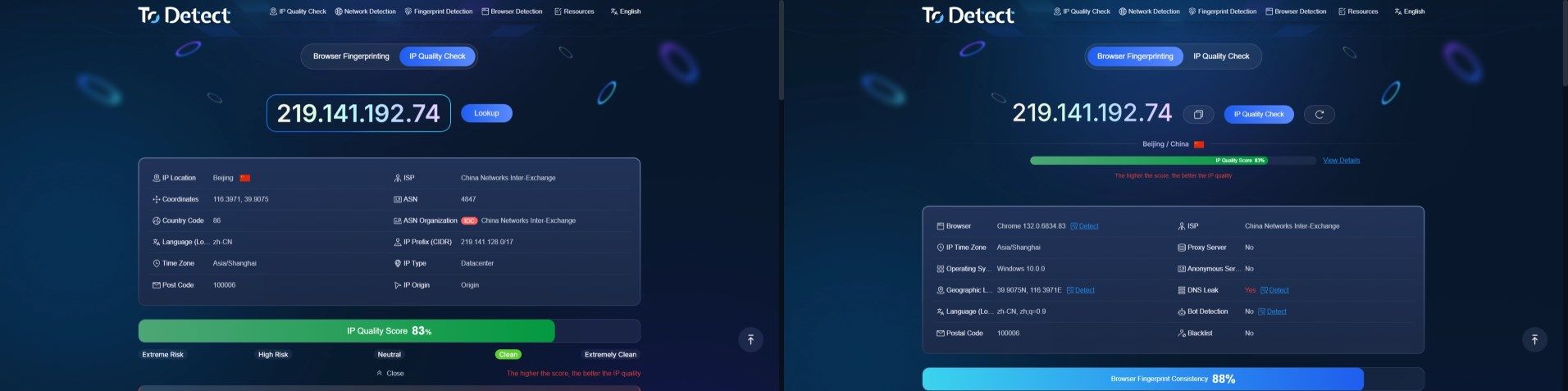
Dedicated IP detection platforms like ToDetect give you a full risk assessment report at a glance:
Check IP Type: Verify whether your IP is labeled "Residential" or "Data Center (IDC)". Residential IPs come from genuine ISP networks and blend in much better with organic traffic.
Check Risk Score and Tags: A low score usually signals a high-risk node, a public proxy, or a history of abuse (like spamming or malicious scanning).
2. Test for DNS and WebRTC Leaks
With your proxy connected, check for privacy leaks:
DNS Leaks: If DNS requests bypass the proxy and hit your local ISP's resolvers directly, your real network identity is exposed.
WebRTC Leaks: Ensure your browser isn't leaking your local or public IP address through WebRTC protocols.
3. Audit Time Zone and Location Consistency
Check whether your IP's geolocation aligns with your browser's system time zone and language settings.
While a minor time zone mismatch won't trigger an instant ban on its own, maintaining logical environment consistency helps keep risk scores low.
Best Practices to Improve IP Quality and Connection Stability
1. Match Residential IPs to the Right Use Case
For tasks requiring high trust—like managing e-commerce stores or social media accounts—quality residential IPs carry significantly lower proxy footprints than budget data center IPs.
Keep in mind that IP trust still relies on historical usage patterns and subnet sharing.
2. Enable Proxy Authentication to Prevent Abuse
Always secure private proxy servers with authentication (such as username/password credentials or IP whitelisting).
While authentication doesn't directly raise your IP's score in databases, it stops unauthorized third parties from abusing your proxy and ruining its reputation.
3. Warm Up Account Behavior Gradually
When onboarding new accounts or launching automated operations, avoid dumping high-volume requests right out of the gate.
Mimic human behavior by ramping up activity over time to avoid triggering behavioral anti-bot filters.
4. Keep Endpoint Devices Secure
Ensure servers or local devices running proxies remain free from malware infections. Preventing unauthorized spam or botnet traffic preserves your IP's overall trust rating.
Frequently Asked Questions (FAQ)
Q1: Are residential proxy IPs completely undetectable?
No. While residential proxies originate from real home networks, an IP can still be flagged by risk engines if it has been heavily shared, used for aggressive scraping, or associated with past abuse.
Q2: Why do different IP lookup tools show different locations?
Lookup platforms query different GeoIP databases (such as MaxMind or IP2Location), each with its own update cycles.
Additionally, IP geolocation reflects network topology and ISP filings rather than pinpoint physical coordinates.
Q3: Does disabling IPv6 prevent proxy detection?
Disabling IPv6 is a common workaround to prevent dual-stack leaks.
However, it isn't a silver bullet—it won't fix poor IP reputation, mismatched browser fingerprints, or suspicious browsing behaviors.
Q4: What happens if my IP score is low, and how can I fix it?
A low trust score leads to frequent CAPTCHAs or outright access blocks on major e-commerce platforms, social media, and financial sites.
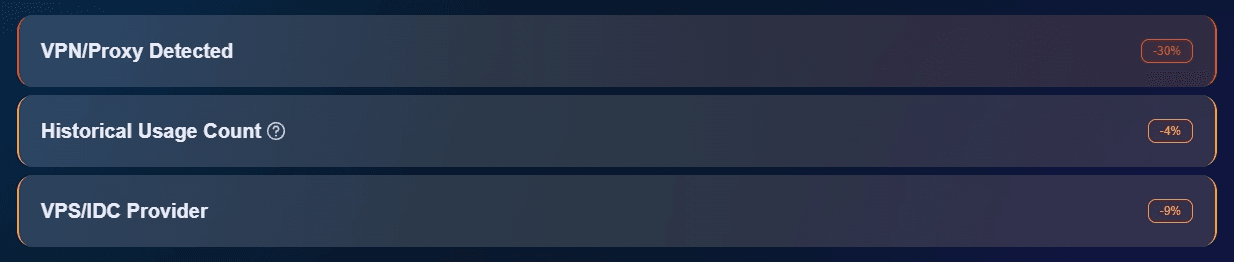
You can run a check using ToDetect IP Checker to pinpoint specific deductions (like ASN risk or proxy tags) and switch to a cleaner node or adjust your setup accordingly.
Browser Fingerprint Detection Tool
Efficiently solve multi-account management, environment isolation, and account security