



 Resources
 Feature overview
 Ganesh
 2026-07-23 16:17
When managing cross-border e-commerce shops, social media accounts, or multi-account matrices, many operators often face a frustrating hurdle:
Even though their operations follow every rule and they tread carefully, their accounts get suspended or flagged for frequent verification before even passing the "newbie period."
More often than not, it is not just about what you do on the account—the network environment you use can be a decisive factor in how a platform judges risk. If your IP address is already on a risk management watchlist, it will quietly put your operations at a major disadvantage.
What is IP "Reputation"? How Does it Affect Environment Stability?
What people usually call a "clean" IP is an address with a clean history, zero flags in mainstream security databases, and a stable connection profile.
While a clean IP is not exactly the same as a "dedicated IP" (used by just one person), high-purity IPs generally enjoy much higher success rates in cross-border business.
On the flip side, you have "polluted IPs" or "low-reputation IPs."
If an IP address has a history of heavy sharing, erratic login patterns, automated bot traffic, or policy violations (such as spamming or malicious scraping), major platforms like Google, Amazon, and Facebook will log it in their risk-control systems and downgrade its trust score.
💡 A Core Misconception: Platforms rarely ban an account outright just because an "IP is blacklisted."
Modern risk control systems rely on a "risk signal stacking" mechanism. Accounts usually get throttled, hit with endless CAPTCHAs, or restricted only when multiple risk factors—like a low-reputation IP, an abnormal device environment, and suspicious behavioral patterns—trigger at the exact same time.
Is Your Network Environment Actually Safe? Four Key Indicators Broken Down
To know if an IP is fit for complex cross-border operations, you cannot just check if it loads a webpage. You need professional IP reputation tools to analyze it across several dimensions:
Reputation History: Professional tools run deep checks against multiple authoritative global reputation databases and blacklists to see if the IP has been linked to malicious activity.
IP Source and Network Type: In highly secure environments, residential IPs typically look much more like an average user than data center (IDC) IPs, earning them a lot more trust.
Geolocation and Timezone Consistency: This checks whether the IP's physical location, time zone, and language settings match. Any mismatch is a massive red flag for risk systems.
Proxy Detection: This determines if the IP has been flagged as a public proxy or commercial , which platforms watch closely.
Common Pitfalls: What Beginners Miss in Network Testing
Checking Location But Ignoring Purity: Many beginners just make sure the IP points to their target country and log right in, completely ignoring the IP's risk score and overall reputation.
Overlooking the Fluctuations of Dynamic IPs: Dynamic IPs change every time you reconnect. This means their reputation score can change completely with each reset, so you have to test their quality every time—you cannot just set it and forget it.
How to Properly Test IP Purity and Environment Safety
To keep multi-account setups stable over the long haul, it is best to run a full network reputation and environment "health check" before launching your business.
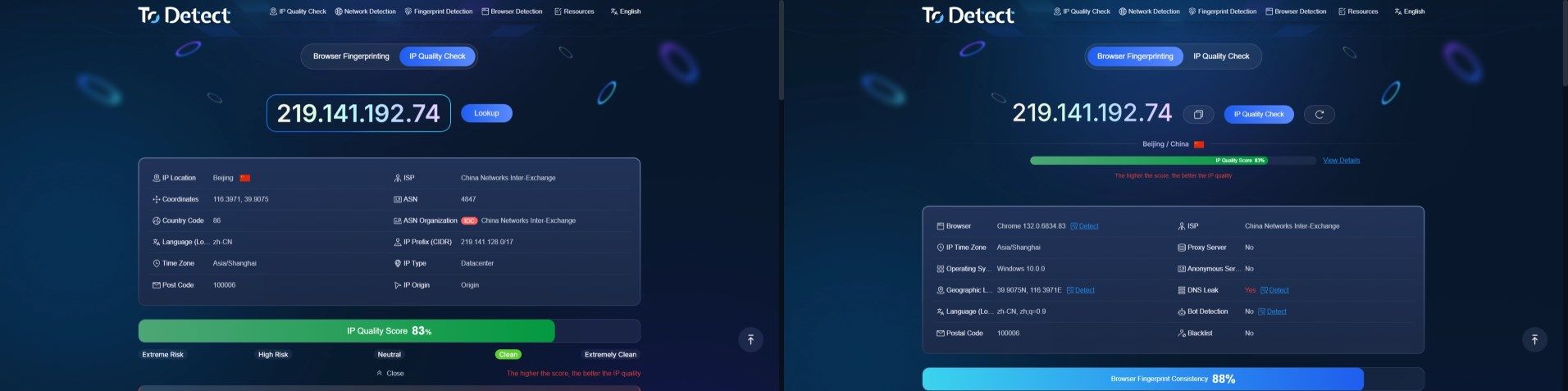
ToDetect provides an all-in-one solution covering everything from IP quality scoring and ASN lookups to browser fingerprint detection.
With ToDetect, you can quickly check:
IP Quality Scores: Get a clear look at your IP's reputation tier (Clean, Neutral, High Risk, etc.) to steer clear of potential risk traps.
ISP / ASN Lookups: Dig into the network provider's background to easily spot the difference between high-trust residential networks and basic data center hosts.
Fingerprint Consistency & Leak Checks: Beyond the IP itself, the platform accurately catches issues with time zones, languages, WebRTC leaks, and DNS leaks to ensure your underlying spoofing setup is completely airtight.
Pro Tips: How to Build a Highly Stable Operating Environment
Keep Your Network Stable and Consistent: Try to stick to the same network nodes on your everyday devices. Avoiding sudden, unrealistic shifts in login locations is key to mimicking normal human behavior.
Extra Steps to Lock Down Account Security: Make sure to set up recovery emails, two-factor authentication (2FA), and authenticator apps. That way, even if your network fluctuates a bit, you have a secure way to verify your identity and protect your account.
Monitor and Maintain Regularly: IP reputation changes dynamically based on overall network usage. Because of this, routinely checking your IP's reputation and risk score with professional tools is highly recommended.
If you want to know the real quality of your current network environment or need to troubleshoot hidden risk issues, head over to ToDetect for professional technical support and deep analytics reports.
Frequently Asked Questions (FAQ)
Q1: Are static IPs always cleaner than dynamic IPs?
Not necessarily. Cleanliness depends entirely on the IP's history, not how it is assigned. A heavily abused static IP can carry a much higher risk score than a freshly released, clean dynamic IP.
Q2: What should I do if an IP shows a high risk score?
The most effective fix is to swap it out for a higher-quality network line. It is not worth running core business tasks or handling important accounts on an IP with obvious reputation flaws or high-risk flags.
Q3: Why am I getting endless CAPTCHAs on certain sites even though my IP location is correct?
This usually happens because the IP, despite being in the right place, is heavily shared or has a poor trust rating in the platform's risk database. The site marks it as a "low-reputation" source and triggers extra security hurdles.
Q4: Can I switch IP nodes whenever I want while managing accounts?
It is not a good idea. Frequent network changes that do not match natural user behavior (like jumping between different cities or countries in a short window) make risk systems much more likely to flag your account as compromised.
Keeping your setup stable and logical is the foundation of account safety.
Your IP environment is a major piece of the puzzle platforms use to assess risk. Using tools to scientifically check IP quality helps you catch issues early and avoids unnecessary setbacks from flying blind.