



 Resources
 Feature overview
 Ganesh
 2026-07-21 11:46
More and more platforms determine whether users are trustworthy through multiple dimensions such as IP reputation and access behavior. Once an IP is marked as abnormal by the system, problems such as restricted access, account risk control, and increased CAPTCHA verification may occur.
Therefore, before dealing with an "IP blacklist" issue, it is very important to understand the actual status of the current IP, check whether the IP has risk records, and determine whether the current IP quality is suitable for continued use.
Today, we will introduce the common reasons why IPs get blacklisted and explain how to use IP detection tools such as ToDetect to quickly check IP risk levels, helping you accurately identify IP issues and find effective solutions.

1. Why Does an IP Get Blacklisted? What Are the Common Reasons?
1. Abnormal IP Access Behavior
If an IP generates a large number of requests within a short period of time, such as frequently refreshing pages, repeatedly logging in, or making bulk API requests, it can easily trigger a website's risk control system. Even legitimate user operations may be mistakenly identified as bot-like behavior if the access pattern appears abnormal.
2. Using a High-Risk Proxy IP
If an IP address has previously been used for spam emails, malicious scraping, traffic manipulation, or other harmful activities, it may continue to carry risk labels even after being assigned to another user. This is why many users need to perform proxy IP detection before using proxy services to determine whether an IP is clean.
3. Risky Network Environment Associated with the IP
Compared with ordinary residential broadband IPs, these types of IP addresses are more likely to appear in risk control databases. Therefore, when registering accounts, accessing overseas websites, or conducting business testing, it is necessary to perform IP quality checks in advance.
4. Frequent IP Address Changes
Some users frequently switch IP addresses to avoid restrictions. However, excessive switching frequency may also be considered abnormal behavior by platforms, resulting in a higher risk level.
2. How to Determine Whether Your IP Has Been Blacklisted?
Many users directly change their network connection or purchase a new proxy IP after encountering IP restrictions, but this approach does not solve the root problem. A more effective method is to perform an online IP lookup first.
Through an online IP lookup tool, you can check: IP location; network provider; whether it is a proxy IP; whether it is marked as a risky IP; whether blacklist records exist; IP reputation score, and more.
There are many IP detection tools available today, but their detection dimensions and accuracy vary. An excellent detection tool should not only provide IP ownership information but also offer risk identification capabilities, such as proxy detection, data center classification, and blacklist analysis.
3. How Can an IP Detection Tool Quickly Check IP Risk Levels?
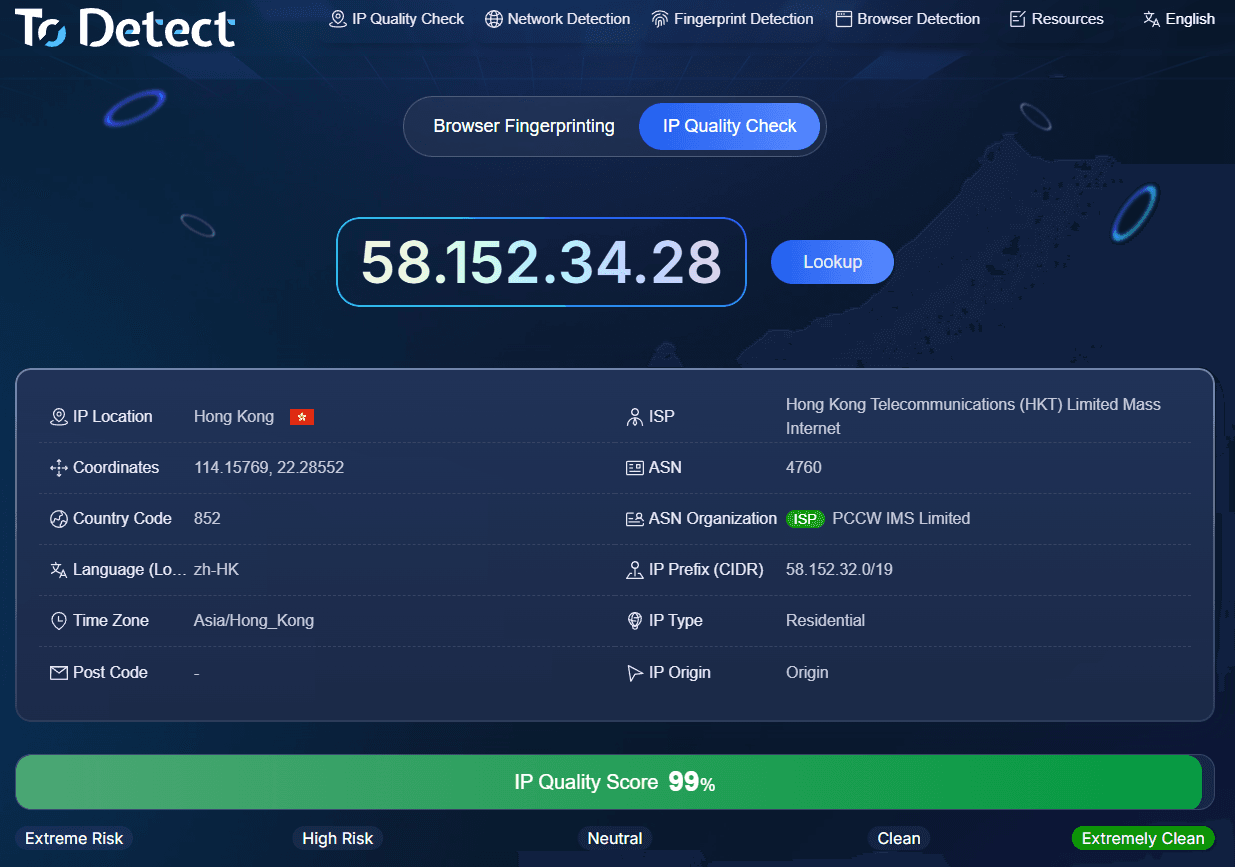
Taking professional IP detection tools like ToDetect as an example, users do not need complicated operations. They only need to enter the IP address they want to check to quickly obtain detection results:
Step 1: Open the IP Detection Page
After entering the IP detection tool page, the system will usually automatically identify your current device IP. You can also manually enter a specific IP address for checking. If you are using a proxy server, you can directly enter the proxy IP for detection.
Step 2: Check Basic IP Information
The detection results usually display: IP address; country or region; ASN information; ISP information; network type. These basic details help users determine whether the IP source is normal.
For example, if your business target is the US market, but the detected IP shows a location in another country, it may affect account registration or access performance.
Step 3: Check the Risk Level
Determining whether an IP has risks is based on comprehensive scoring across multiple data dimensions, including: whether it is a proxy IP; whether it is a data center IP; whether blacklist records exist; and historical risk behavior.
Through IP risk lookup results, users can quickly determine whether the current IP is suitable for continued use. If the risk level is high, it is recommended not to use it directly for important activities such as account registration, advertising campaigns, or large-scale access operations.
4. What Is IP Quality Detection? Why Is It Becoming Increasingly Important?
Many platforms not only verify user identity but also analyze IP quality. IP quality detection refers to evaluating whether an IP is stable, trustworthy, and secure through multiple indicators.
A high-quality IP usually has the following characteristics: clean IP history; no large-scale abnormal access activity; not shared by many users; clear network attributes; and a low risk score.
In contrast, low-quality IPs may experience: frequent login failures; increased CAPTCHA challenges; restricted page access; and accounts being more likely to trigger reviews.
For industries such as cross-border e-commerce, overseas marketing, social media operations, and data analysis, IP quality detection has become an important part of daily operations.
5. What Should You Do After Your IP Is Blacklisted?
If an IP detection tool confirms that your IP does have risks, you can try the following solutions.
1. Replace the IP Address with a New One
This is the most direct method. If the current IP has already entered a risk database, replacing it with a new IP with a better reputation can usually restore normal access. However, the new IP should also be tested in advance to avoid switching to another problematic IP.
2. Reduce Abnormal Access Frequency
If the IP was blacklisted due to abnormal access behavior, simply changing the IP cannot solve the problem. Recommendations include: reducing large numbers of requests within a short period; avoiding frequent login and logout actions; controlling access speed; and simulating normal user behavior. Stable and consistent access patterns are safer than frequently switching IPs.
3. Use Higher-Quality Proxy IPs
If your business relies on proxy IPs, do not focus only on price. IP quality is equally important. When choosing a proxy service, you can first test IP conditions through a proxy IP detection tool to confirm the proxy type, risk level, and stability.
4. Perform Regular IP Risk Checks
Many companies and individual users only check IPs after problems occur. A better approach is to conduct preventive checks regularly. Through online IP lookup and IP risk detection, potential issues can be discovered early, reducing the possibility of business interruptions.
6. What Features Should You Pay Attention to When Choosing an IP Detection Tool?
When choosing between different IP detection platforms, users should focus on the following aspects:
Whether Detection Data Is Comprehensive
A good IP detection tool should not only provide simple IP location lookup but also include risk scoring, proxy identification, IP type analysis, and other functions.
Whether Detection Speed Is Stable
For batch operations, detection speed is extremely important. If every query requires a long waiting time, overall work efficiency will be affected.
Whether Risk Assessment Is Accurate
The core value of IP detection is helping users evaluate risks, so data accuracy is extremely important. Tools like ToDetect use multi-dimensional data analysis to help users quickly understand the current status of an IP.
7. Proxy IP Detection Frequently Asked Questions
Q1: If an IP is blacklisted, can changing to another IP solve the problem?
Answer: Not necessarily.
If it is only a temporary access restriction, changing the IP may work. However, if the issue is caused by abnormal access behavior, it is recommended to first use an IP detection tool to check whether the IP has blacklist records, proxy attributes, or risk indicators before deciding whether to replace it.
Q2: Why does an account still trigger risk control after using a proxy IP?
Answer: The main reason is unstable proxy IP quality.
Many proxy IPs may be repeatedly used by multiple users or may already have abnormal records. Even if they can access websites normally, platforms may still identify them as high-risk IPs. Through proxy IP detection and IP quality detection, users can check IP reputation and choose IPs with lower risks and better stability.
Q3: How can I quickly determine whether my IP is safe and usable?
Answer: Using a professional IP detection tool is the fastest method.
Through an online IP lookup tool such as ToDetect, users can quickly check IP location, network type, proxy status, and risk level. If the detection result shows a low-risk IP, it can usually be used normally for access and business operations. If the risk level is high, it is recommended to replace the IP or optimize the usage method.
Conclusion: Detect First, Solve Later, Avoid Blindly Changing IPs
An IP blacklist issue is not something to fear. The key is identifying the real cause. In many cases, the problem is not the device, account, or network connection itself, but that the current IP has already been marked as high risk by the system.
By using ToDetect's professional IP detection tool, users can quickly complete online IP lookup, proxy IP detection, IP risk lookup, and IP quality detection to determine whether an IP is safe.
IP-related issues are not difficult to handle when using the right approach. First detect the IP risk level, then take appropriate actions based on the results. This helps maintain more stable and secure network access while ensuring smoother future business operations.