



 Resources
 Feature overview
 Ganesh
 2026-09-05 10:33
When engaging in cross-border business, data collection, or using proxy IPs, you often hear terms like "Residential IP," "Datacenter IP," or "Server IP." Before purchasing a proxy IP, many people wonder: If a vendor claims it is a residential IP, is it guaranteed to be one? Is there a way to verify it yourself?
In fact, looking at an IP address string alone makes it hard to tell whether it originates from residential broadband or a datacenter. The simplest method is using an IP lookup website to check and understand an IP's actual network attributes from multiple dimensions.
Today, let's break down the exact differences between residential IPs and datacenter IPs, which metrics you should focus on during proxy IP detection, and how to properly evaluate the test results.

1. What Are Residential IPs and Datacenter IPs?
A Residential IP refers to an IP address with residential network attributes, usually associated with an Internet Service Provider's (ISP) consumer network. Based on IP database records and network ownership info, it closely mimics the environment used by ordinary home broadband users for daily Internet browsing.
A Datacenter IP typically comes from data centers, server hosting providers, or cloud platforms, primarily designed for servers and cloud instances. These IP resources exist in large quantities, are easy to deploy, and offer stable network speeds, making their overall cost lower than residential IPs.
However, this is just a simplified explanation to help distinguish the two. When conducting a real residential IP check, you cannot determine its type simply by how the IP address looks, as a plain string of numbers reveals virtually nothing about the underlying network type.
2. What Is the Difference Between Residential IPs and Datacenter IPs?
The core difference lies in the source network behind the IP, which subsequently impacts IP pricing, risk scores, and practical performance.
First is the difference in network attributes. Residential IPs are tied to consumer ISP networks, whereas datacenter IPs are linked to categories like Hosting, Cloud, or Datacenter. Using professional proxy IP lookup tools, you can often spot these clues from the carrier, ASN, and network type.
Second is the cost of IP resources. Datacenter IPs can be deployed in bulk using server infrastructure, making acquisition and maintenance costs easily controllable. Residential IP resources are significantly harder to acquire and manage, which is why residential proxies on the market are generally more expensive than standard datacenter proxies.
Additionally, some security platforms evaluate risk based on IP usage history, network type, and access behaviors. A datacenter IP shared heavily by multiple users might accumulate risk flags more quickly. However, this does not imply that "residential IPs are always clean" or "datacenter IPs are inherently high-risk."
3. Can IP Detection Websites Distinguish Residential IPs from Datacenter IPs?
| Detection Item | Key Indicator | Typical Residential IP Characteristics | Typical Datacenter IP Characteristics |
|---|---|---|---|
| IP Type | Tags like Residential, Datacenter, Hosting, etc. | Usually labeled with Residential attributes | Commonly tagged as Datacenter, Hosting, etc. |
| ISP / Carrier | The service provider owning the IP | Mostly local telecom carriers and broadband ISPs | Mostly cloud providers, server hosts, or hosting services |
| ASN Info | Autonomous System & network organization of the IP | ASN usually corresponds to local ISP networks | ASN belongs to data centers or cloud platforms |
| Network Attribution | Underlying purpose and organization behind the IP | Closer to standard consumer networks | Geared toward servers, cloud instances, etc. |
| Proxy Attributes | Presence of proxy-related characteristics | Requires verification via detailed test results | Also requires checking specific IP attributes |
| IP Risk Score | Presence of noticeable risk flags or abuse history | Residential IPs can also carry medium-to-high risk | Datacenter IPs are not automatically high-risk |
| Geolocation | Country, region, city, and location details | Verify if it matches the purchased residential location | Determine the approximate location of the server node |
4. How to Check Online If an IP Is Residential?
The actual process is straightforward. You can visit IP lookup tools like ToDetect, navigate to the IP lookup feature to scan your current IP, or enter a target IP address manually. Once the report is generated, don't rush straight to the "Risk Score." Instead, inspect the parameters in this order: "IP Type → ISP → ASN → Risk Flags."
Conversely, if a provider advertises an IP as "Residential," but your lookup reveals a carrier tied to a cloud provider with network tags like Hosting or Datacenter across multiple databases, that raises a red flag worth investigating.
Keep in mind that IP blocks undergo transfers, reassignments, or usage shifts over time, and third-party databases do not sync simultaneously. Consequently, you may occasionally see differing results across different lookup platforms.
When encountering such discrepancies, don't immediately assume a specific tool is wrong. Instead, cross-analyze the ISP, ASN, network type, and risk intelligence holistically.
5. Why Run a Proxy IP Test Immediately After Purchasing Residential IPs?
Many proxy buyers focus purely on price, location, and pool size, using the IPs right after purchase. Adding one simple step—testing before deploying—makes a big difference.
This is especially crucial when purchasing static residential IPs meant for long-term use. If an IP suffers from abnormal network classifications, location mismatches, or elevated risk scores right out of the box, troubleshooting later becomes much more troublesome.
An online proxy check allows you to verify essential baselines: whether the target country/city matches your order, whether the IP type matches the vendor's claims, whether the ISP/ASN appear normal, and whether the IP carries severe risk flags.
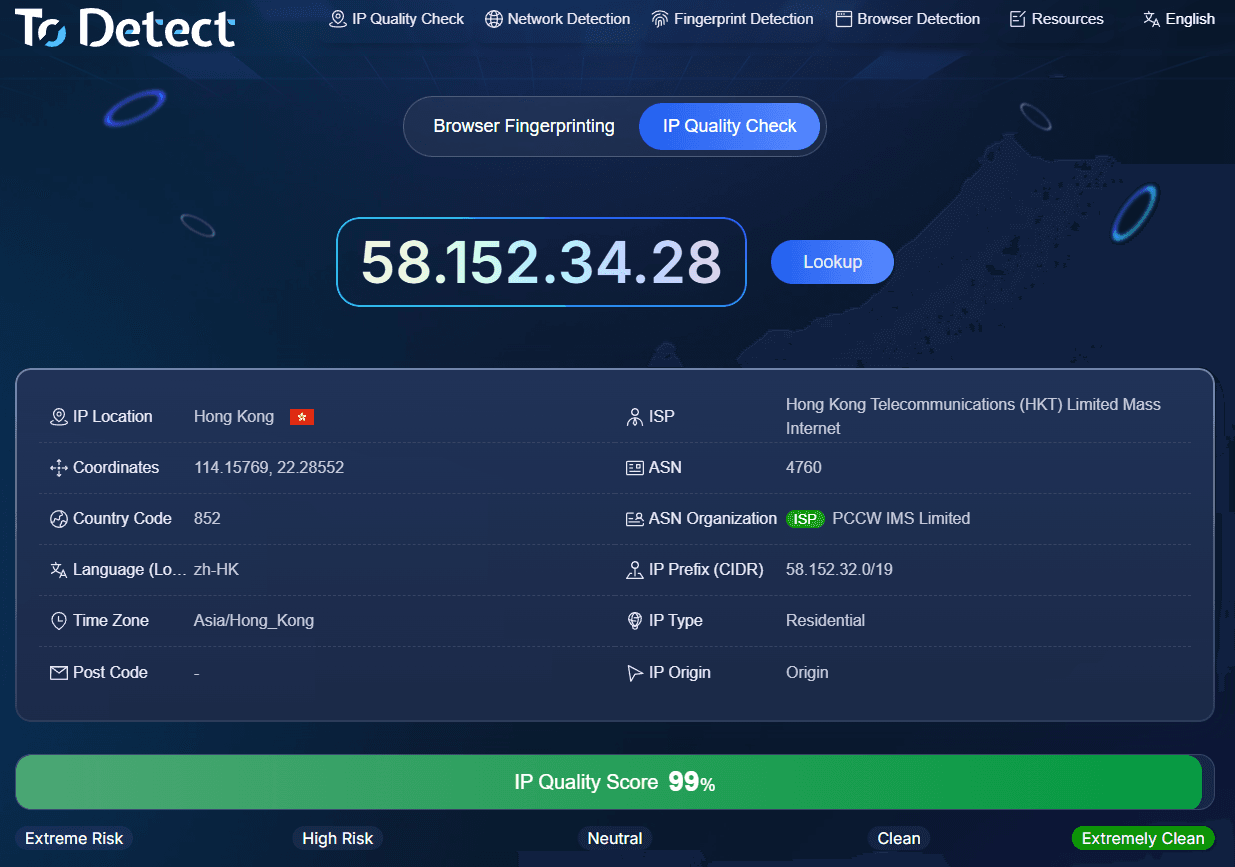
Users focused on IP quality can take further steps by checking IP purity, risk scores, geolocation accuracy, and ASN details. This offers far actionable insight than simply knowing "this is a residential IP."
6. Does a "Residential" Label Guarantee High Quality?
A common misconception among beginners using residential IP checkers is equating "residential" with high quality. "Residential" describes the IP's network classification, while "quality" depends on broader operational factors.
To evaluate residential IP quality efficiently, follow this practical checklist: Check IP Type → Verify ISP & ASN → Assess Risk Score.
If the IP type, ISP, and ASN align seamlessly with residential traits, and the risk score remains clean across proxy detection modules, you can feel confident in the IP's reliability.
7. Proxy IP Lookup FAQs
1. How can I check if my current IP is a residential IP?
You can run a query on online IP lookup tools like ToDetect, focusing on IP type, ISP, ASN, and network organization data. If multiple indicators align with residential broadband patterns, the result is reliable.
2. What does it mean when an IP tool shows "Datacenter"?
This indicates that the IP belongs to a data center or server hosting network. If you bought a residential proxy but detect clear Datacenter or Hosting classifications, cross-reference the ISP and ASN with your supplier.
3. Why do different IP check websites show conflicting results?
Different platforms pull from varying data providers with different update schedules. Additionally, IP assignments and routing usages evolve. Seeing slight variations across tools is normal—evaluate overall metrics rather than relying on a single tag.
4. Is it normal for a residential IP to have a high risk score?
Yes, it can happen. Residential status does not guarantee a low risk score. If a residential IP has a history of heavy scraping or suspicious traffic, it can still accumulate bad reputation metrics. Always check risk scores alongside residential attributes.
Summary
Can IP lookup websites accurately detect residential and datacenter IPs? The short answer is yes—they serve as powerful diagnostic tools. Using platforms like ToDetect to examine IP type, ISP, ASN, proxy flags, and risk metrics gives you a complete, transparent view of an IP's real standing.
Particularly after buying residential proxies, running a preliminary proxy check is a smart practice. Rather than blindly trusting a vendor's "Residential IP" marketing label, verifying the parameters yourself is the quickest and most direct way to judge IP quality.
Ultimately, a residential label doesn't guarantee zero risk, nor does a datacenter classification inherently mean low quality. The most logical workflow is simple: verify the IP type first, then evaluate its overall quality and suitability for your specific use case.