



 Resources
 Feature overview
 Ganesh
 2026-07-30 12:03
Why can't a newly purchased IP log in to the platform? Why do accounts frequently trigger verification? Why is website access suddenly restricted? In fact, these issues are often related to IP quality and IP reputation.
An IP address that has previously been heavily abused, involved in attack records, or marked as high risk may affect subsequent business operations even if it can access the internet normally.
Next, we will introduce which IP risk score checking websites are practical, how to accurately perform IP quality checks, and how to understand the various data in the detection results.

1. What is IP Risk Score Detection ? Why check IP security levels?
IP risk score detection uses professional databases and detection algorithms to perform security assessments on an IP address and determine whether it has any risk records.
A normally used residential IP or business IP usually has a lower risk score, while IPs that are widely shared, frequently used for account registration, sending spam requests, or performing abnormal activities are often flagged by security systems.
IP risk detection usually focuses on whether the IP is listed on blacklists; whether it has a history of malicious attacks; whether it belongs to a data center IP; whether it has spam sending records; IP location and ISP information; and IP reputation score (IP Reputation).
Many platforms, such as social networks, e-commerce platforms, payment systems, and gaming platforms, use IP reputation for risk control decisions. Therefore, checking IP quality before using a new IP can effectively reduce potential problems later.
2. Common IP Risk Score Checking Websites List
There are many websites available for online IP security level detection. Different platforms focus on different aspects. Below are some commonly used IP detection tools for different needs.
1. ToDetect : Comprehensive Online IP Detection Tool
ToDetect is one of the IP detection services that has gained attention in recent years. It is mainly used to check IP risk status, proxy attributes, and network environment quality.
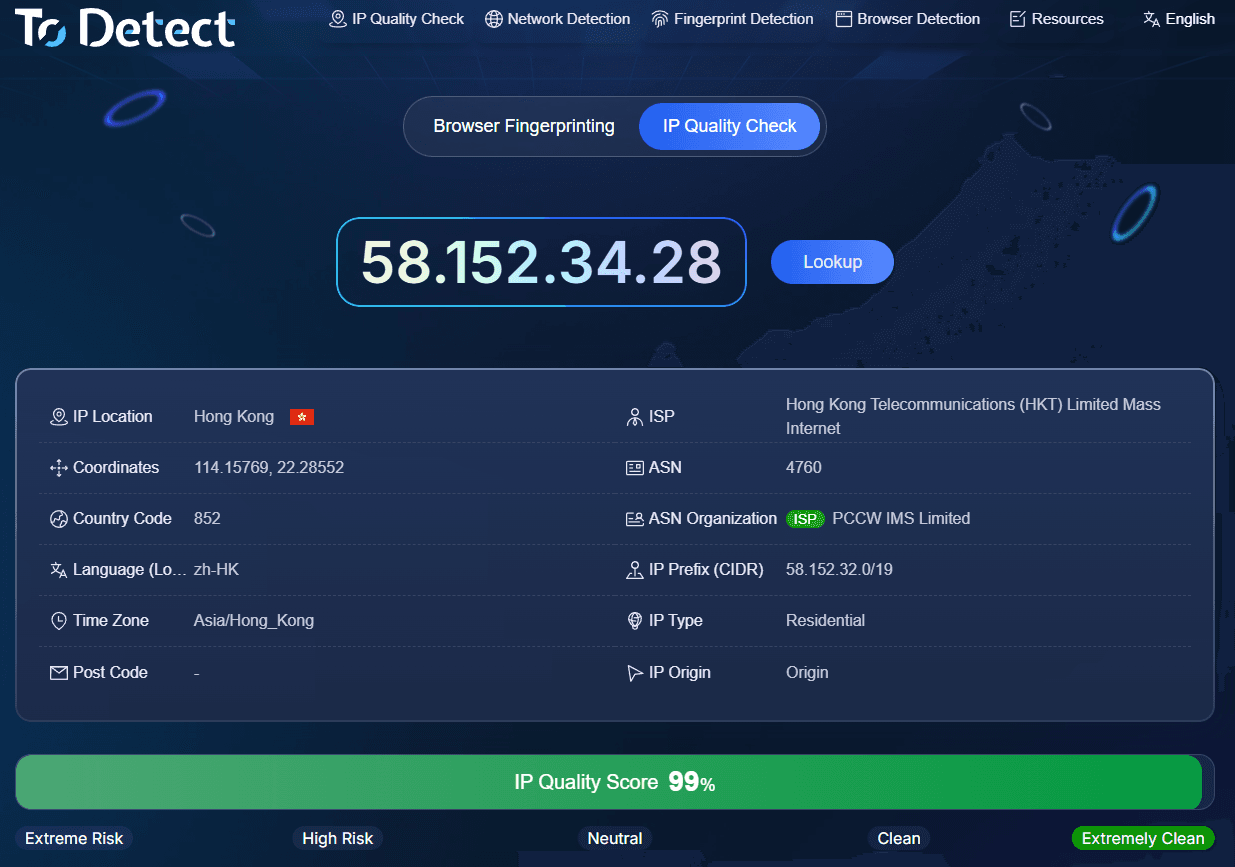
When using ToDetect for online IP queries, users can quickly obtain IP-related information, including: IP location; network provider; whether it is a proxy IP; whether risk tags exist; and IP reputation status.
For users who need to perform batch IP resource checks, ToDetect provides rich detection dimensions and is suitable for overseas business, account operations, proxy IP screening, and other scenarios.
If your work involves managing large amounts of IP resources, such as cross-border marketing, data analysis, or multi-account operations, using tools like ToDetect for regular online IP checks can help filter out low-quality IPs in advance.
2. IPQualityScore : Professional IP Reputation Detection Platform
IPQualityScore is a well-known IP risk analysis service overseas. Many companies use it to determine whether visitors have potential fraud risks.
Its detection features include: proxy detection; Tor node detection; fraud scoring; and Bot behavior analysis. For overseas website operators, these tools can help determine whether traffic sources are trustworthy.
3. AbuseIPDB : Check IP Attack Records
AbuseIPDB focuses more on the cybersecurity field and is mainly used to check whether an IP has records of malicious activities.
Examples include: brute-force attacks; scanning attacks; spam requests; and malicious crawlers. If you discover abnormal server access or a large number of unfamiliar IP requests in logs, you can use such platforms for investigation.
4. VirusTotal : Multi-Engine Security Detection
VirusTotal is a commonly used detection tool among security professionals. It can use multiple security engines to analyze IPs, domains, files, and other objects. For ordinary users, it can quickly determine whether an IP has been flagged by multiple security vendors.
3. How to Perform Online IP Query ? What is the specific detection process?
Many beginners feel that IP detection is complicated when they first encounter it. In fact, the actual process is very simple. Online IP detection only requires the following steps:
Step 1: Obtain the IP address that needs to be checked, such as a server IP, proxy IP, or website visitor IP.
Step 2: Open an IP risk query tool. Choose a platform that supports IP reputation analysis and enter the IP into the detection box.
Step 3: Review the detection results.
1. Risk Score
Many detection websites provide an IP risk score, such as low risk, medium risk, or high risk. Generally, the lower the risk, the better the IP reputation.
2. Proxy Attributes
If the detection result shows: Proxy; Hosting; Datacenter; it indicates that the IP may not be a normal residential network but a proxy or server IP.
3. Blacklist Records
This is a very important factor. If an IP has been reported many times in the past, it may affect business usage.
4. IP Type
Common types include: Residential IP; Mobile IP; Datacenter IP. Different businesses have different requirements for IP types. For example, advertising and account operations usually pay more attention to IP authenticity.
4. What Indicators Should Be Considered in IP Quality Checks?
Many people only focus on a single risk score when checking an IP. In fact, evaluating IP quality requires considering multiple indicators.
IP history records. A completely new IP and an IP that has been abused for a long time have completely different values. If an IP has frequently been used for abnormal activities in the past, it may still have potential risks even if there are currently no issues.
IP location. Some businesses are highly sensitive to geographic regions. For example, businesses targeting European and American markets may require IPs from those regions. If the IP location appears abnormal, it may trigger platform reviews.
Network type. Residential IPs are usually closer to real user environments than ordinary datacenter IPs, so they may have higher acceptance in certain scenarios.
Number of risk tags. If an IP has multiple risk tags at the same time, such as Fraud; Spam; Abuse; Bot; extra caution should be taken when using it.
5. Common IP Risk Detection Indicator Explanation Table
| Detection Field | Explanation | Key Judgment Points |
|---|---|---|
| Risk Score | IP Risk Score | Evaluates the overall security level of the IP. A higher value usually indicates greater potential risk. |
| Proxy Detection | Proxy Detection | Determines whether the current IP belongs to a proxy server or intermediary network. |
| Abuse Report | Abuse Records | Checks whether the IP has a history of attacks, spam requests, or violation reports. |
| ISP Information | ISP Information | Analyzes the IP source, including network provider and IP ownership type. |
| Location Accuracy | Location Accuracy | Determines whether IP location information is accurate and reliable, avoiding regional abnormalities. |
6. What Should You Consider When Choosing an IP Detection Website ?
There are many free IP query tools available online, but the quality of detection results varies significantly. When selecting a tool, it is recommended to pay attention to the following points:
First, check the data sources. Reliable platforms usually have larger IP reputation databases, resulting in more accurate detection results.
Second, check the detection dimensions. Simply checking IP location only solves basic needs. For business security requirements, you should pay attention to risk scores, proxy identification, blacklist records, and other factors.
Third, check the update frequency. IP risk status changes over time, and outdated data sources have limited reference value.
Fourth, choose according to business requirements. Free tools are suitable for basic queries, while enterprise operations and bulk IP management are better served by professional services.
Conclusion
Through proper IP risk detection, potential IP issues can be identified in advance. Using online IP query services allows users to quickly understand IP ownership, risk status, and network type, helping them select more stable and secure network resources.
For users who need to operate online businesses for the long term, choosing a suitable detection platform, such as ToDetect, and regularly checking IP status is an effective way to reduce risks and improve efficiency.
A good IP environment cannot guarantee 100% business success, but a high-risk IP often creates many unnecessary problems. Therefore, as internet operations become increasingly refined, performing IP security checks has become an essential foundation that cannot be ignored.
Browser Fingerprint Detection Tool
Efficiently solve multi-account management, environment isolation, and account security