



 Resources
 Feature overview
 Ganesh
 2026-09-08 11:06
When buying proxy IPs, most people look at price, country, city, and bandwidth first. But after using them for a while, you'll realize that the scariest thing isn't a high price tag, but buying a "dirty IP."
Even if it is labeled as a residential IP or dedicated IP, it is recommended to run your own IP purity check and proxy IP detection. After all, actual test results are far more valuable than marketing claims.
Today, let's talk about how to tell if an IP is clean or not. What key data points should you focus on during IP quality detection? And does a high risk score mean it's completely unusable?

1. What does a "dirty IP" actually mean?
"Dirty IP" isn't a strict technical term; it is more of a casual phrase used by proxy users to describe IPs that are high-risk, have a poor history, or exhibit abnormal network attributes.
The IP you hold right now may have been used by other users previously. If it was used at a high frequency in the past, or if the IP subnet has a history of spam requests, automated abuse, or suspicious traffic, it may have left records in risk databases.
For example, the purchase page might claim it's a residential network in a specific region, but after performing proxy IP detection, you discover that the ASN, ISP, or network type noticeably contradicts the advertised information.
Therefore, judging whether an IP is clean requires more than checking if "it connects." A more practical approach is to evaluate IP geolocation, network type, ASN, risk data, proxy flags, and current network environment together.
2. Perform these 5 steps of IP quality detection before buying proxy IPs
If you have just received a test IP and don't know where to start, follow this order to check it thoroughly.
Step 1: Verify IP country, city, and ISP
Open an online IP lookup tool and verify basic information such as the IP address, country/region, city, ISP operator, and ASN to see if they match what the seller provided.
Keep in mind that IP geolocation databases do not update in real-time. Occasional city-level location discrepancies across different lookup sites are completely normal. Don't label an IP as poor quality based solely on a city mismatch.
Step 2: Check the actual network type
Many users focus only on buzzwords like "Residential," "Static," or "Dedicated" without verifying the underlying network attributes.
Once you get the IP, use an online IP checker like ToDetect to inspect detailed attributes, focusing particularly on ISP, ASN, and network type results.
If the detected network properties align with the product type you purchased, proceed with further tests. If there is a major mismatch, refrain from deploying it directly into your primary workflow.
A quick reminder: residential status does not guarantee 100% purity, nor does a data center classification mean the IP is unusable—IP type and IP purity are two distinct concepts. Genuine IP quality assessment requires weighing risk logs alongside real usage requirements.
Step 3: Review IP risk and historical reputation
During IP risk checking, pay special attention to clear risk indicators, abuse records, blacklist entries, and abnormal network flags.
If an IP is flagged as high-risk across multiple threat databases or displays extensive history of abuse, it is not recommended for critical tasks, regardless of how cheap it is.
Conversely, if only a single detection site gives a lower score, don't write the IP off immediately. The safest strategy is using a multi-source tool first, then cross-verifying any flagged anomalies.
Step 4: Conduct proxy IP detection for abnormal flags
Some IPs connect without issue, but might already be categorized in threat databases as public proxies, hosting services, or other high-risk categories. If you bought an IP expected to offer stable, long-term performance, these details matter greatly.
When running proxy IP quality tests, do not assume an IP is bad simply because you see "Proxy: Yes."
What truly matters is *why* it was flagged, what its network type is, how high its risk score reaches, and whether it carries other abnormal tags. This provides much more insight than a simple yes/no flag.
Step 5: Inspect the overall environment, not just the IP
Sometimes the IP itself tests clean, but issues persist during actual use. The problem might not stem from the IP alone.
For instance, tools like ToDetect allow you to analyze DNS leaks, WebRTC exposure, and browser environment settings alongside IP metrics. Evaluating these factors together makes identifying root causes much easier than checking an IP risk score in isolation.
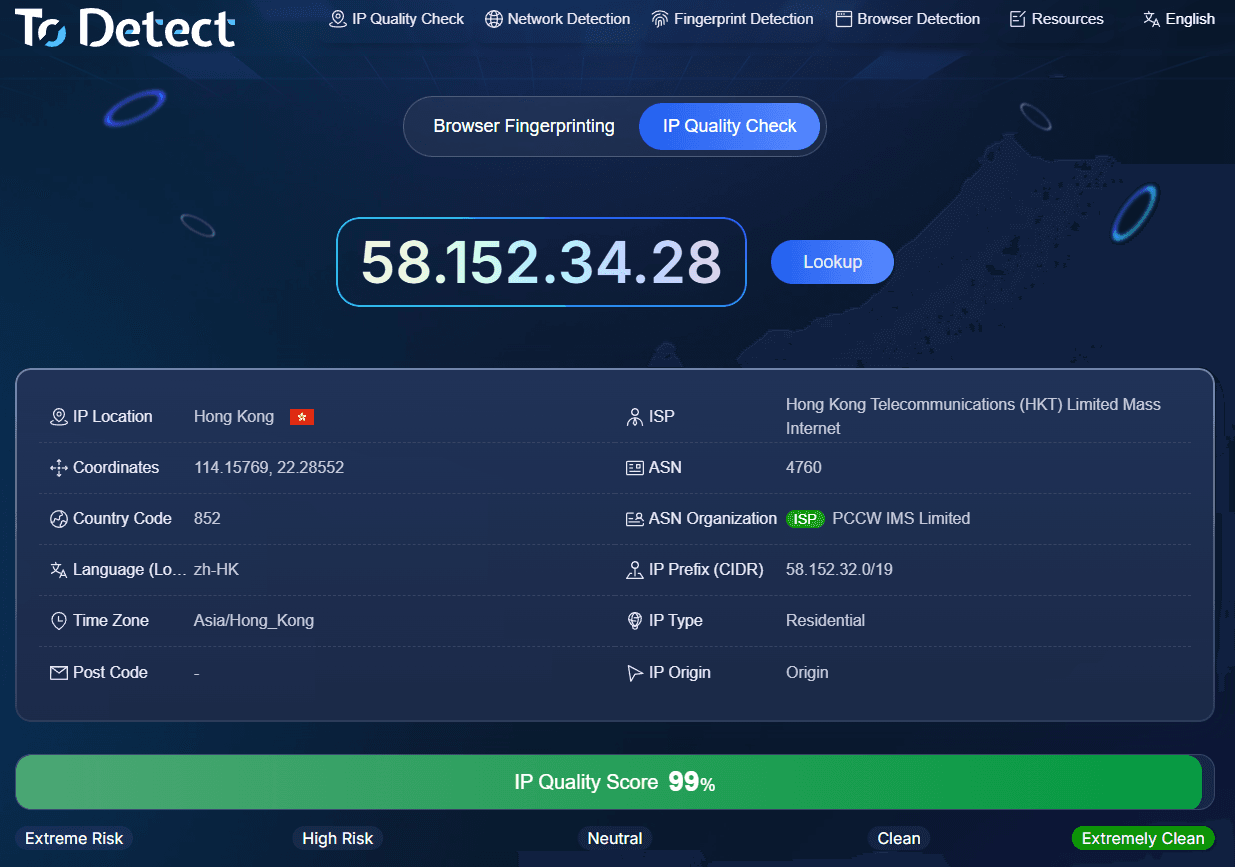
3. How to interpret results using ToDetect for IP purity checking?
After navigating to ToDetect's IP purity detection page, you can analyze your current active connection or search target IP addresses using supported lookup methods. Once you get your results, follow this evaluation order:
Check basic IP location → Verify ISP & ASN → Identify network type → Inspect proxy flags → Review risk history → Check environment factors (DNS, WebRTC, etc.).
For example, if you bought a static overseas IP for long-term use, ensure at least that the real country matches your purchase target, ISP/ASN looks standard, network attributes align with expectation, and there are no severe risk tags.
If a single metric looks off, don't jump to conclusions—run a secondary check with a different online IP tool.
However, if multiple databases point to the same anomaly—such as mismatched network type, elevated risk scores, or extensive abuse history—approach that IP with caution.
4. What IP purity score is considered passing?
This is the most common question regarding IP purity lookups. In reality, there is no single "passing score" that applies universally across all websites and business scenarios.
Scoring models vary by detection platform; a score of 80, 90, or a "Low Risk" label is simply a reference based on that specific provider's proprietary data.
Instead of fixating on achieving a specific score, focus on these three core checks:
1. Do the IP's network attributes match what was advertised?
2. Are there severe historical risk markers or abnormal tags?
3. Does the overall network configuration satisfy your actual operational needs?
Summary
Many users wait until issues arise before checking risk scores and network properties. A far more efficient strategy is the exact opposite: test first, then decide if the IP is worth deploying.
A practical workflow: Acquire test IP → Online IP lookup → IP purity check → Proxy property analysis → Risk record inspection → Network environment check → Small-scale trial →
Full deployment once verified.
Tools like ToDetect serve best as pre-purchase screening and troubleshooting instruments. Catching clear anomalies before deployment allows you to request replacements early, saving your business from risking operations on suspicious IPs.
Buying proxy IPs is like acquiring any other network resource—cheaper upfront doesn't always mean saving money. A cheap IP plagued by frequent issues can easily cost far more in troubleshooting and replacement time in the long run.