



 Resources
 Feature overview

 Ganesh
 2026-06-03 10:34
Your proxy settings seem perfectly fine, yet the target website suddenly becomes inaccessible; account logins frequently trigger verification checks; data collection tasks stop midway; or even worse, a large number of requests start getting rejected.
If you're experiencing any of these issues, it may indicate that your proxy IP has been blocked by the target website or has become invalid. If not addressed promptly, it can reduce operational efficiency at best and lead to account-related issues at worst.
So, how can you tell if a proxy IP has been blocked? Are there any quick ways to verify it? In this article, we'll share 5 practical proxy IP detection methods to help you identify issues early and improve the efficiency of your proxy resources.

1. Why Do Proxy IPs Get Blocked?
Generally speaking, when an IP generates a large number of requests within a short period, frequently logs into accounts, triggers anti-fraud systems, or is repeatedly used by multiple users, the target website may place that IP on a blacklist.
In addition, some low-quality proxy IPs already have a history of violations. Even if you've just purchased them, they may already be restricted. Therefore, performing regular IP quality checks and proxy IP testing is an essential step in maintaining stable business operations.
Method 1: Check Access Status Using an Online IP Lookup Tool
After successfully connecting to a proxy IP, you can visit IP detection websites to verify whether the displayed outbound IP has changed. If your real local IP is still being shown, there may be a problem with your proxy configuration.
Besides checking the IP address itself, pay attention to details such as geographic location, ISP information, ASN number, whether it belongs to a data center, and whether it is flagged as a proxy.
If the results show abnormal IP information or fail to return valid data, the proxy IP may have already become invalid.
For users who need to test proxy resources in bulk, professional online IP lookup tools can significantly improve efficiency.
Method 2: Test Whether the Target Website Is Accessible
Sometimes the proxy IP itself works fine but has been blocked by a specific website. For example, you may still be able to access search engines and regular web pages, but not the target platform, which returns status codes such as 403 or 429.
This situation is commonly referred to as a "targeted block." The test is simple: connect through the proxy IP and visit the target website directly to observe the response.
If you frequently encounter messages such as:
• Access Denied
• Forbidden
• Too Many Requests
• Verify You Are Human
Then it's highly likely that the proxy IP has already been detected and restricted by the target platform. This is one of the most commonly used proxy IP testing methods among cross-border e-commerce sellers and social media operators.
Method 3: Perform an IP Quality Check
Some proxy IPs can still access the internet normally but have extremely poor reputation scores and have already been marked as high-risk IPs by multiple platforms. In such cases, you should perform a professional IP quality check:
• Blacklist Records
• Fraud Risk Score
• Spam Records
• Proxy Detection Status
• TOR Node Identification
If the results show a high Fraud Score, multiple blacklist hits, or the IP is identified as an anonymous proxy, then it carries a high risk of being blocked even if it is currently usable.
Regular IP quality checks can often help identify potential issues before they impact your business.
Method 4: Monitor Connection Success Rate and Response Speed
Before a proxy IP gets completely blocked, there are often warning signs.
For example, increased request timeouts, higher connection failure rates, slower page loading speeds, and abnormal API responses may indicate that the target server has started restricting the IP.
It is recommended to regularly monitor Ping latency, TCP connection time, HTTP response time, and request success rates. If a proxy IP's success rate continues to decline, it may already be under risk-control observation even if it still works temporarily.
Method 5: Use ToDetect for Comprehensive Analysis
For users who want to quickly evaluate the status of a proxy IP, professional testing platforms are often more efficient. Tools like ToDetect can comprehensively analyze proxy IPs from multiple dimensions.
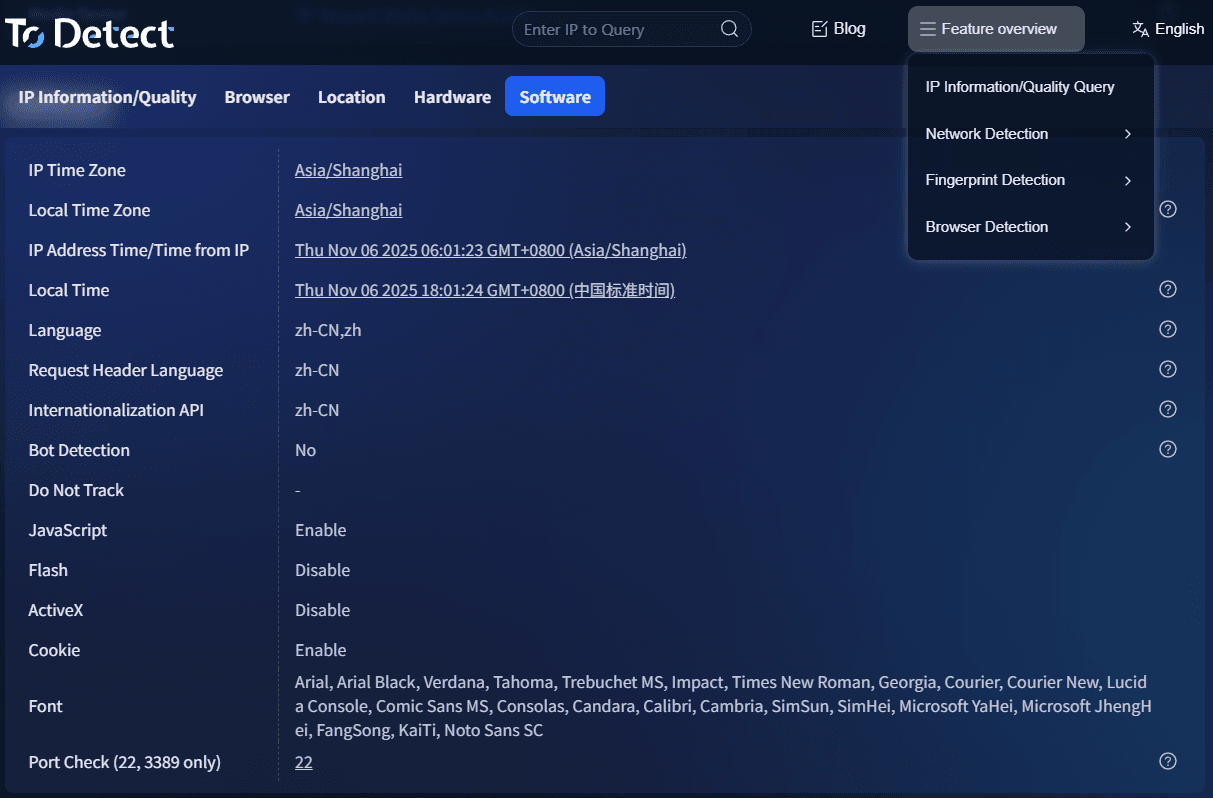
• It can help detect IP authenticity, proxy detection status, anonymity level, IP reputation score, blacklist records, geographic consistency, DNS leaks, and more.
• Compared with ordinary IP lookup tools, these platforms not only determine whether a proxy is available but also assess how likely it is to trigger website anti-fraud systems.
For use cases such as cross-border e-commerce, overseas social media management, and digital advertising, checking IPs with ToDetect in advance can effectively reduce account association and suspension risks.
7. How to Reduce the Risk of Proxy IPs Being Blocked?
Besides conducting regular testing, using proxy IPs properly is equally important. Here are some recommendations:
🔶 Control Access Frequency
Avoid sending large numbers of requests within a short period and try to mimic real user behavior.
🔶 Use High-Quality Proxy Resources
Prioritize residential proxies, static residential IPs, or reputable dedicated proxies.
🔶 Rotate IPs Regularly
Using the same IP for an extended period increases the likelihood of triggering anti-fraud systems.
🔶 Perform IP Quality Screening
Run IP quality checks before deployment to avoid using contaminated or high-risk IPs.
🔶 Combine with Professional Detection Tools
Continuously monitor proxy status using online IP lookup platforms and tools like ToDetect to identify anomalies in time.
Conclusion
A truly high-quality proxy IP should not only provide stable connectivity but also maintain a strong reputation, low risk score, and a highly authentic online environment.
Developing the habit of regularly performing IP lookups and proxy IP testing is crucial. Professional platforms like ToDetect can help you conduct IP quality assessments and identify potential risks before they become problems.
We hope the five testing methods shared in this article will help you identify invalid proxy IPs more efficiently and build a more stable and secure proxy usage environment.
