



 Resources
 Feature overview

 Ganesh
 2026-09-28 10:28
When opening TikTok, some users get a normal For You Page with smooth loading for both live streams and videos; while others frequently face repeated verification prompts, slow loading speeds, or even no obvious traffic growth after publishing new content for a long time.
When encountering such issues, network connection is only one of the troubleshooting directions. Instead of checking every setting step by step after problems occur, it is more efficient to run a complete TikTok IP quality check before you start using the platform, to get a clear view of your IP, DNS and browser environment status.
This article mainly introduces 6 core IP metrics, plus two easily overlooked detection items: DNS leak test and browser fingerprint inspection.

1. Why Should You Run an IP Quality Check Before Using TikTok?
A full detection usually needs to verify multiple data points at the same time: IP geolocation, IP type, ISP information, ASN, and historical risk records. If there are obvious inconsistencies between these data, it is worth further checking your network configuration.
It is important to note that a single test only represents the status at that specific moment.
IP addresses can be reassigned and network egress points may change over time, so a normal test result today does not guarantee the same status forever. For long-term overseas network users, keeping records of test results and running periodic retests provides far more reference value than a one-time check.
2. 6 Key Metrics to Check in TikTok IP Quality Test
The following 6 items can be used as your basic inspection checklist:
| Check Item | What to Focus On | Solutions for Abnormal Results |
|---|---|---|
| IP Type | Residential, mobile network, data center, etc. | Verify the actual network source to confirm it matches your usage requirements |
| IP Geolocation | Country, region, city and other location details | Cross-validate with your actual network egress location |
| ISP & ASN | Internet Service Provider name, ASN ownership information | Check if the ISP and the detected region are consistent |
| Native Attribute | Whether the IP is allocated by the local carrier in the target region | Cross-reference IP registration records and official ISP documentation |
| Historical Risk | Blacklist listings, risk records, previous usage history | Double confirm the status with multiple independent risk databases |
| Sharing Level | Whether the IP is shared by multiple users | Pay attention to the usage density and long-term stability of the IP segment |
Do not judge these metrics in isolation. For example, an IP showing location in the US does not guarantee everything is normal. You still need to check its corresponding ISP, ASN and network type. When multiple data points all point to the same region, the final judgment will be far more reliable.
3. How to Identify IP Type? What Is the Difference Between Residential IP and Datacenter IP?
In IP quality detection, IP type is usually one of the most straightforward items to read.
Datacenter IPs mostly come from servers or data center networks, while residential IPs are generally associated with civilian home broadband connections, and mobile IPs correspond to cellular mobile networks.
There is no absolute rule that one type is always better than others. The core standard is whether the IP type fits your actual usage scenario.
In addition, do not take the "residential IP" label for granted as a guarantee that it comes from a real household device. Different databases have different identification standards, so it is always recommended to verify together with ISP, ASN and IP registration information.
4. What Does Native IP Mean? How to Check Dual ISP Properties?
The term "native IP" mainly emphasizes whether the region, carrier and network attributes of the IP are fully consistent with each other.
For example, if an IP is detected to be located in the US, and its corresponding ISP, ASN and other information also perfectly match the US network environment, this set of data will have much higher consistency.
As for the "dual ISP" description, it is only a label for network line or carrier attributes, and cannot be used as a single standard to judge IP quality.
Therefore, when checking native IP, it is not recommended to only look at a single tag on the page. You should compare IP location, ISP, ASN and actual network egress status together.
5. How to Check IP Purity?
Many users searching for "how to check IP purity" directly look for a single risk score. In fact, the risk score can only be used as a reference, not a final conclusion.
You can focus on two core aspects: first, whether the IP appears in public blacklists or risk databases; second, whether there are obvious historical abnormal records associated with this IP.
If different detection platforms give different results, it does not necessarily mean one of the tools is wrong. Different databases have different update frequencies, judgment rules and data sources.
Therefore, when you get a high-risk result, you can cross-validate it with another detection tool, instead of drawing a conclusion immediately based on only one number.
6. Do Not Ignore DNS Leak Detection
After confirming your IP status is normal, you can continue to run a DNS leak test.
Simply put, DNS is responsible for translating domain names into IP addresses. During the test, you mainly check where the DNS server is located, what its corresponding carrier and region are, and whether this information generally matches your current network egress.
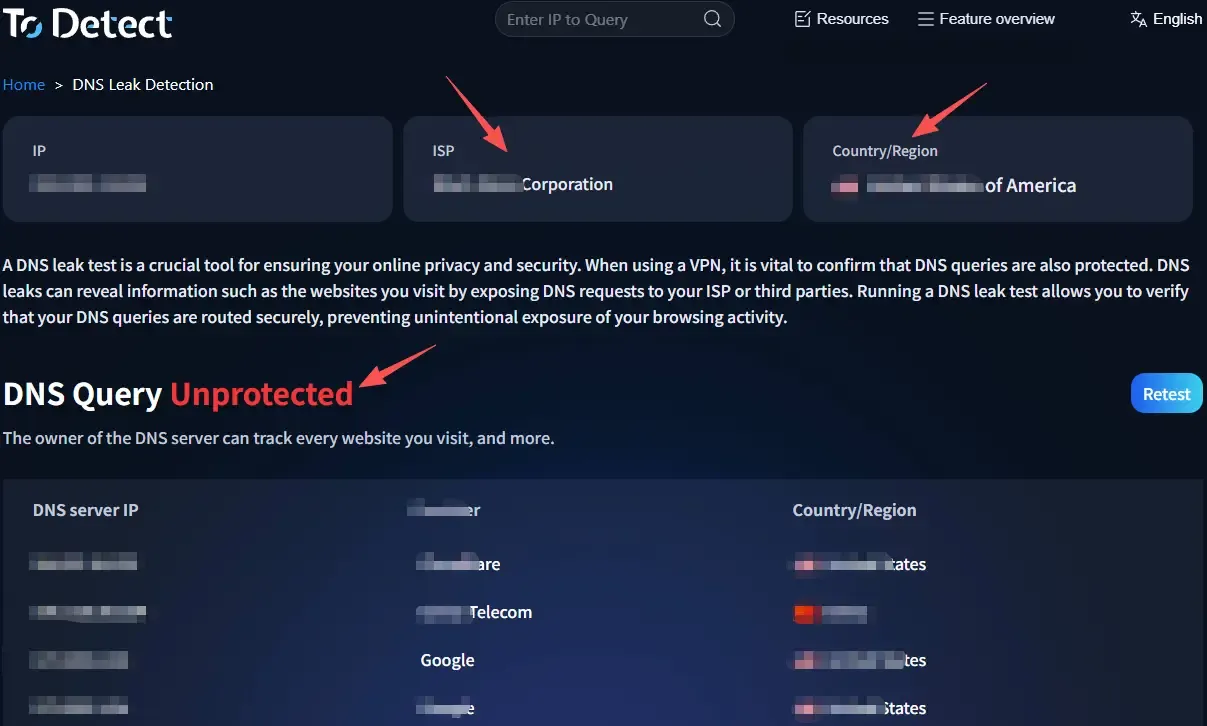
For example, if your network egress shows location in the US, but your DNS server consistently points to another region, it is worth further checking your DNS configuration.
However, a DNS location different from your egress location does not necessarily mean there is a leak. DNS service providers usually have distributed nodes around the world, so you need to make a comprehensive judgment combining server, carrier and location information.
7. You Also Need to Inspect Browser Fingerprint
Apart from IP and DNS, another frequently overlooked item is your browser environment. Browser fingerprint detection usually covers system language, time zone, screen resolution, WebGL, Canvas, installed fonts and other parameters.
If your IP shows one region, but your system time zone, language and other settings permanently correspond to a completely different region, it may indicate that your network environment and device settings are not consistent.
Browser updates, adding or removing extensions, and modifying system settings can all change part of your fingerprint parameters. So after you make any environment adjustments, you can run the detection again to get the latest status.
8. IP Quality Check FAQ
How Often Should I Run an IP Quality Check?
There is no fixed cycle. You can re-run the test after changing your network, adjusting DNS, or when any network environment change happens. For long-term usage, you can also save a test result periodically as a comparison baseline.
My IP Shows the Target Country, Do I Still Need to Check DNS?
Yes. IP is only part of the network environment, while DNS belongs to another independent information layer. Checking both together gives you a far more complete view of your current network configuration.
My IP Test Shows Normal Status, Does That Mean the Entire Environment Is 100% Safe?
You cannot draw that conclusion. The test result only reflects the status at that specific moment, and data in different databases will also be updated over time. A more reasonable approach is to treat the detection result as a baseline record of your current network environment.
What Is the Difference Between Native IP and Residential IP?
Native IP emphasizes the consistency of region, carrier and registration attributes; while residential IP mainly describes that the network source is closer to civilian home broadband. They focus on completely different dimensions, and you cannot simply equate them.
Conclusion
When performing TikTok IP quality check, you do not need to fixate on a single risk score. The 7 basic inspection items: IP type, geolocation, ISP, ASN, native attribute, historical record and sharing level, combined with DNS leak test and browser fingerprint detection, can help you get a full picture of your current network environment.
If you do not want to open multiple separate tools one by one, you can also use an all-in-one detection tool to view all related data at once. ToDetect centrally displays IP location, network type, DNS resolution and browser environment information, making it easy to complete a full basic check quickly before you start using TikTok.
For your final judgment, the core standard is whether all data points are generally consistent with each other, and whether the retest result changes after you make targeted adjustments.
