



 Resources
 Feature overview
 Charles
 2026-09-16 11:01
When checking network environments, many people often see both "WebRTC Leak Detection" and "IP Purity Check" features simultaneously. This easily leads to a question: Are WebRTC leak detection and IP purity checking the exact same thing?
In fact, these two tests focus on completely different aspects. WebRTC leak detection focuses more on checking the network addresses currently exposed by the browser, while IP purity checking mainly evaluates the IP address itself—including its type, ownership, risk history, and overall quality.
Let's break down what the exact differences between WebRTC leak detection and IP purity checking are, what data points you should look for in each, and which one you should test first during an online IP check.

1. What is WebRTC Leak Detection?
WebRTC is a suite of real-time browser communication technologies. Essentially, the test checks whether the network addresses retrieved by the browser via WebRTC match your current public network exit IP.
When performing an online WebRTC test, you should focus on a few key data points: whether your browser supports WebRTC, which IP addresses are detected, whether any local network addresses are exposed, and whether the WebRTC detection result matches your current public IP.
Therefore, the main goal of WebRTC leak testing is not to answer "Is this IP of good quality?", but rather "Is the browser exposing extra network addresses?".
2. What Does IP Purity Checking Inspect?
It revolves mainly around the current public IP itself, including IP type, ISP/carrier, ASN, geographic location, historical usage, risk level, and listing status across various public databases.
When doing an online IP check, pay attention to: whether the current IP belongs to a residential or data center network; whether the country, region, and city are normal; whether the ISP and ASN match; whether the IP has a high public risk score; and whether different IP databases show consistent results for the address.
In short, an IP purity check is like performing a "background check" on your current IP address. If an IP shows wildly different locations across databases, abnormal ASN info, or a high risk score, further verification of that IP is needed.
3. Key Differences: WebRTC Leak Detection vs. IP Purity Check
| Comparison Item | WebRTC Leak Detection | IP Purity Check |
|---|---|---|
| Main Subject | Network addresses retrieved by the browser via WebRTC | The currently used public IP address |
| Primary Objective | Check whether the browser exposes extra or mismatched public IPs | Evaluate the quality, type, and risk profile of the current IP |
| Common Data Inspected | Public IP, Local IP, WebRTC Status, Browser Network Info | IP Type, ISP, ASN, Location, Risk Score, Historical Records |
| Core Focus | Whether the WebRTC-detected IP matches the current public IP | Whether the current IP has anomalies, risk records, or misclassifications |
| Checks IP Purity? | No | Yes |
| Checks Browser Leaks? | Yes | Generally No |
| What Anomalies Mean | The browser may be exposing additional network addresses | The IP itself may carry high risk, classification errors, or past abuse records |
| Best Used For | Verifying browser network environment consistency | Evaluating IP quality, IP type, and overall safety |
| Can Replace Each Other? | No | No |
In Simple Terms:
WebRTC leak detection focuses on "which IPs your browser is revealing," while IP purity checking focuses on "how clean and trustworthy this current IP address actually is."
4. Why Test Both WebRTC and IP Purity Together?
A thorough network environment check shouldn't rely on a single metric. For example, if you open an online IP checker and see that your public IP, location, and ISP all look fine, that only proves your basic web traffic exit point is functioning as expected.
Running a WebRTC leak test right after will tell you if the browser is quietly leaking alternative addresses behind the scenes. Combining both gives you a much fuller picture.
A practical testing workflow:
• Check current Public IP first: verify Country, Region, ISP, and ASN information;
• Review IP Purity and public risk scores;
• Run the WebRTC Leak Test;
Finally, confirm DNS, browser timezone, and general browser environment settings match. This is far more informative than simply relying on an "IP Normal" status.
5. How to Read Online WebRTC Test Results?
When testing WebRTC online for the first time, fields like Local IP, Public IP, and WebRTC Enabled can look confusing. Here is what matters most:
• Public IP: Look at the public address returned by WebRTC. If this address matches the standard public IP reported by the webpage, your baseline setup is consistent.
• Multiple Public IPs: Check if a second, entirely different public IP appears.
• Discrepancies: If normal IP lookup displays one address while WebRTC reveals another public IP, you should troubleshoot browser settings, network adapters, or proxy/VPN configurations.
Regarding Local IP (e.g., 192.168.x.x or 10.x.x.x addresses): these are standard local network IPs. Evaluate them based on context—seeing a Local IP is common and not automatically a failure or vulnerability.
6. What Can You Check Using ToDetect?
If you want to check both WebRTC leaks and IP purity in one place, you can use an online testing platform like ToDetect.
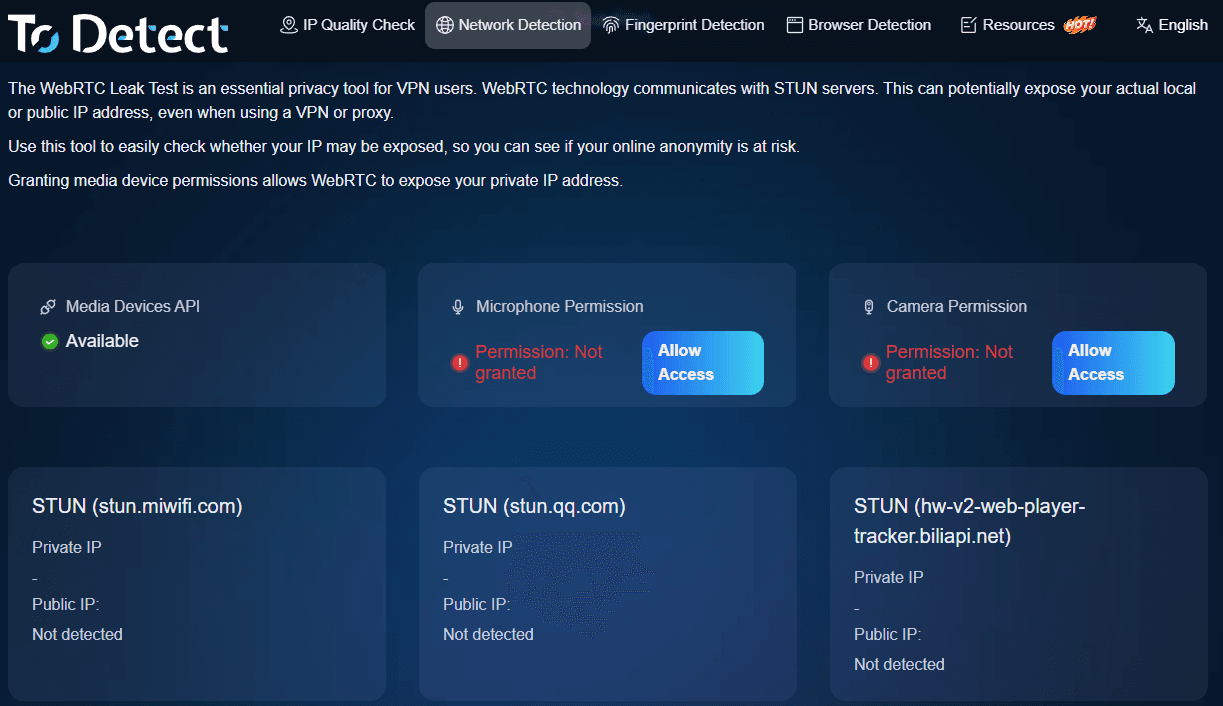
Through ToDetect's online IP analysis, you can view your current IP address, geo-location, ISP, ASN, IP type, and technical metrics. Simultaneously, you can run WebRTC leak tests, DNS leak checks, and browser footprint inspections.
For regular users, the main advantage is convenience: you don't need to visit multiple separate tools. If WebRTC passes, you can immediately continue auditing IP purity, DNS, ASN details, or browser environment settings on the same screen.
7. If WebRTC Check is Normal, Do You Still Need an IP Check?
Yes. A clean WebRTC test only means your browser isn't leaking secondary public IPs; it says nothing about whether your primary IP itself is trustworthy or blacklisted.
Similarly, a great IP purity score cannot rule out WebRTC leaks. The best practice is treating them as complementary checks:
WebRTC verifies network address consistency, while IP Purity verifies IP health and history.
If you regularly audit network setups, it's also worth checking DNS leak status, IP risk scores, ASN/ISP details, basic browser fingerprinting, and system timezone consistency.
Summary
WebRTC Leak Detection checks whether your browser reveals extra IP addresses, whereas IP Purity Checking evaluates the current public IP's type, source, risk score, and history. They serve different purposes and cannot replace one another.
Confusion usually happens when these distinct checks are lumped together. Once you separate WebRTC leaks from IP purity, interpreting your results becomes much clearer.
All-in-one tools like ToDetect make it easy to audit these dimensions in a single run. When troubleshooting scenarios where "the IP looks normal, but web services still detect inconsistencies," WebRTC leak testing is often the exact missing clue.
Browser Fingerprint Detection Tool
Efficiently solve multi-account management, environment isolation, and account security