



 Resources
 Feature overview

 Charles
 2026-09-28 10:36
Many people, when using a static residential IP, first check the IP address, region, and network type. After confirming that this information has no obvious anomalies, they start using it directly. But one thing is often overlooked: DNS.
In fact, IP and DNS belong to two different network layers. A static residential IP mainly reflects the IP attributes of the current network exit, while DNS handles domain name resolution requests. The former appearing normal does not mean the latter is necessarily problem-free.
So, does a static residential IP need DNS leak detection? It is recommended to test, especially if you plan to use it long-term, or if the current network supports both IPv4 and IPv6, it is best to check IP and DNS together.

1. Why does a static residential IP still needDNS leak detection?
A static residential IP solves the network exit problem, while DNS solves the domain name resolution problem. They are not the same thing.
Therefore, to determine whether DNS is abnormal, you should not focus only on a single region field. Instead, you should look at the DNS server, ISP, and both IPv4 and IPv6 results together.
| Detection Item | Main Purpose | Relationship with DNS Detection |
|---|---|---|
| IP Information | View the basic attributes of the current network exit | Determine whether the current exit meets expectations |
| ISP, ASN | Understand the ISP and network organization corresponding to the IP | Can help determine network attribution |
| DNS Server | View the server used for domain name resolution requests | Determine whether the resolution path meets expectations |
| IPv4 / IPv6 DNS | View the resolution status of the two networks separately | Determine whether the dual-stack configuration is consistent |
| WebRTC | View network information that the browser may expose | Another check at the browser level |
As you can see, IP detection and DNS detection are best used together. Checking only one of them will always give incomplete information.
2. How do DNS leaks usually occur?
Many DNS problems are not caused by a change in IP type, but by incomplete synchronization of network configuration.
After a computer connects to the network, DNS information may come from router DHCP, system network settings, or the browser's own secure DNS feature. If these places use different resolution methods, different DNS results may appear.
Common situations can be understood as follows:
| Situation | Possible Result | Troubleshooting Direction |
|---|---|---|
| Router continues to issue default DNS | Local ISP DNS detected | Check router DHCP settings |
| System uses the original DNS | DNS does not change synchronously after IP changes | Check network adapter configuration |
| Browser uses independent DNS | Browser and system results differ | Check browser secure DNS settings |
| IPv6 side is not synchronized | IPv4 and IPv6 show different resolution results | Check IPv6 DNS |
| Application uses independent resolution method | A program and browser results differ | Compare network settings of different programs |
So when DNS results do not meet expectations, you do not need to immediately attribute the cause to the static residential IP. First check the router, system, and browser; it is usually easier to locate the problem.
3. Does IPv6 cause DNS leaks?
IPv6 itself does not cause DNS leaks. What is truly prone to problems is a dual-stack network environment. Dual-stack means that IPv4 and IPv6 participate in network connections at the same time.
The two protocols can have different addresses, routes, and DNS configurations. If only IPv4 is adjusted but IPv6 is not checked, the device may still complete some network requests through the IPv6 path.
For example, the current IPv4 network has been configured, and the DNS server also meets expectations, but IPv6 still uses the DNS provided by the network by default. When the browser or system preferentially uses IPv6 for certain resolutions, the DNS detection page may show two different sets of resolution results at the same time.
Therefore, when performing DNS leak detection in a dual-stack environment, it is best not to look only at IPv4 results. If the detection page also provides IPv6 DNS information, you should compare the two sets of results together.
4. If there is no IPv6, does it mean there is a problem with the network configuration?
Not necessarily. Some lines do not provide IPv6 service at all, so no IPv6 result on the detection page is normal. The absence of IPv6 does not mean DNS detection failed, and there is no need to modify the network configuration just to make IPv6 appear on the detection page.
On the contrary, if the current network does support IPv6, then you need to pay attention to whether IPv6 participates in the actual network connection and whether its corresponding DNS configuration is normal.
You can refer to the following table when judging:
| Detection Result | General Interpretation |
|---|---|
| IPv6 not detected | The line may not provide IPv6; usually not an anomaly |
| IPv6 detected, DNS results consistent with expectations | IPv6 itself does not need to be treated as an anomaly |
| IPv4 and IPv6 DNS attribution clearly different | Recommend checking dual-stack configuration |
| Local ISP DNS appears | Check router and system DNS settings |
| DNS servers from multiple regions appear | Further judge based on ISP, node location, and other information |
| IPv4 normal, IPv6 results clearly abnormal | Prioritize checking the IPv6 side configuration |
There is one easily confused point here: the region where the DNS server is located and the region where the current IP is located being inconsistent cannot alone prove that a DNS leak exists.
5. How exactly should you read DNS leak detection results?
After opening the DNS detection page, it is not recommended to look only at the "normal" or "abnormal" conclusion given by the page. What is truly worth paying attention to is the specific DNS servers detected.
First look at what network the DNS server belongs to. If the current network has already switched to a new network exit, but the detection result still shows obvious local ISP DNS, it is worth further checking the system and router settings.
Then look at the region and ISP corresponding to the DNS server. If only the region is different, but it uses a common large public DNS service, this situation is not necessarily a problem.
Therefore, DNS leak detection is more suitable for a "comparison" approach, rather than looking at only one result.
| Key Observation | What to Pay Attention To |
|---|---|
| DNS Server | Whether unfamiliar resolution servers appear |
| DNS ISP | Whether it still shows the original network ISP |
| DNS Region | Whether there is an obvious difference from other network information |
| IPv4 DNS | Whether IPv4 resolution matches the current configuration |
| IPv6 DNS | Whether IPv6 resolution uses a different set of DNS |
| Multi-region resolution nodes | Whether it can be explained by provider and node information |
6. If the DNS region and IP region are inconsistent, is it necessarily a leak?
Not necessarily. The attribution region of an IP and the region where the DNS server is located do not have to be exactly the same. DNS providers may deploy resolution nodes in multiple regions, and the registration information recorded in databases may differ from the actual node locations.
For example, the current IP shows the United States, while the DNS detection shows a server located in Canada. This result alone cannot directly lead to the conclusion of a "DNS leak."
A more reasonable approach is to continue looking at the ISP corresponding to the DNS server. If it belongs to a common public DNS service, then judge together with other detection information. In other words, DNS detection cares more about whether the whole is self-consistent, rather than requiring every region field to be exactly the same.
7. Before using a static residential IP, it is recommended to check IP and DNS together
If you plan to use a static residential IP, you can first perform a complete network environment check.
First confirm the basic information of the current IP, including attribution region, ISP, ASN, and network type, to see whether it matches the actual network environment in use. Then perform DNS detection, focusing on the DNS server, ISP, and the two sets of resolution results for IPv4 and IPv6.
If these results are relatively normal, you can save this detection result as a baseline. Later, if you change the network, modify DNS, adjust browser settings, or the line changes, test again and you can compare what is different from the previous results.
This is more useful than simply remembering a conclusion that "the test was normal," because the network environment is not fixed.
8. After DNS detection is completed, why is retesting still recommended?
DNS detection reflects the network state at the time of detection; it is not a permanently valid result.
Network configuration may change, the router may reassign DNS, browser settings may be adjusted, and the connection status of IPv4 and IPv6 may also change. Therefore, a single normal detection only means that the configuration at the time basically met expectations.
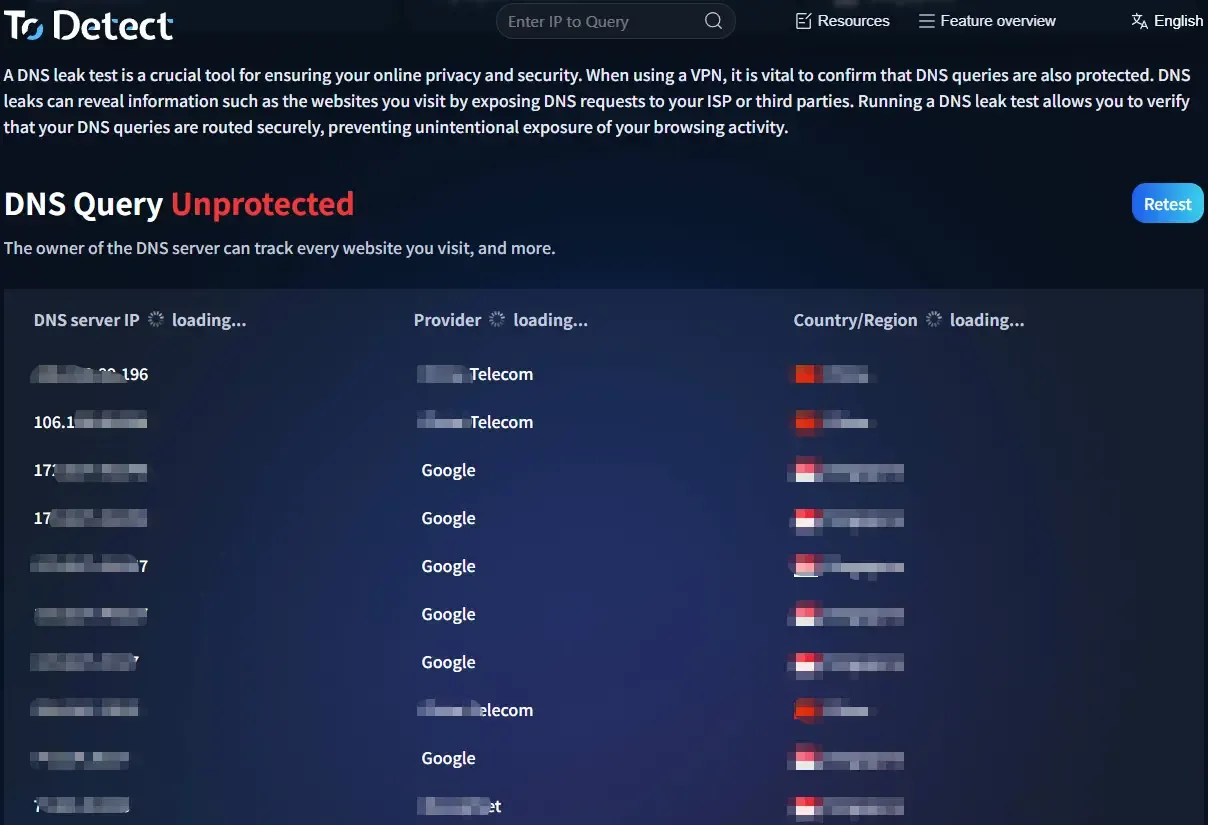
If you later replace network equipment, modify DNS, adjust browser settings, or find that web page access performance differs from before, just perform another DNS detection and compare the results.
For people who frequently adjust the network environment, keeping a detection record is also convenient. Putting the two results together before and after usually makes it easier to spot changes than looking at a single detection page alone.
9. Static residential IP and DNS leak detection FAQs
After using a static residential IP, do I still need to detect DNS?
It is recommended to detect. A static residential IP mainly corresponds to the network exit, while DNS is responsible for domain name resolution. They belong to different network layers. Even if the IP information meets expectations, it does not mean that DNS resolution necessarily uses the same network path. Therefore, checking DNS once before formal use is relatively safe.
Is IPv6 the main cause of DNS leaks?
No. IPv6 itself does not cause DNS leaks. What is more likely to cause problems is inconsistent IPv4 and IPv6 configurations. Especially in dual-stack networks, if the IPv4 side has adjusted DNS but the IPv6 side is not synchronized, two sets of resolution results may appear.
What should I do if the DNS server region and IP region are different?
Do not directly judge it as abnormal first. DNS providers may use remote nodes to provide resolution services, and the server location may not be exactly the same as the IP attribution city. You can further check the DNS ISP, IPv4 and IPv6 results, and system network configuration to comprehensively determine whether there is a real configuration problem.
DNS detection did not find IPv6. Is the detection failed?
Not necessarily. If the current line does not provide IPv6, not detecting IPv6 is normal. The focus is not "whether there is IPv6," but whether the actual network connection and DNS resolution match the current configuration.
Does browser secure DNS need to be turned off?
You cannot simply judge by "on" or "off." Browser secure DNS itself is a DNS resolution feature. What really needs attention is whether it conflicts with the DNS configuration of the system and router. If after modification the system and browser detection results are inconsistent, you need to further check the specific resolution path.
Summary
Static residential IP and DNS leak detection are actually two different issues. IP mainly reflects network exit attributes, while DNS involves the domain name resolution path. Therefore, even if the attribution region, ISP, and network type of the static residential IP all meet expectations, it is still recommended to check DNS once more.
IPv6 is likewise not equal to DNS leaks. For dual-stack networks that support IPv4 and IPv6, what really needs attention is whether the two sets of DNS configurations are consistent, rather than assuming there is a problem just because IPv6 is seen.
If you want to check the network environment more completely, you can first use ToDetect to record the current status of IP and DNS, and then retest in combination with the browser environment. This way you can see the current network situation and also make it easier to compare before and after subsequent configuration adjustments.
