



 Resources
 Feature overview

 Ganesh
 2026-08-20 11:10
Just because an IP address can open web pages normally does not mean it is a high-quality IP. Some IPs show no abnormalities at first, but after a while, issues like frequent CAPTCHAs, restricted access, or repeated account verifications start to occur.
Because of this, more and more users are paying attention to IP quality detection, hoping to verify an IP's location, ISP, network type, proxy attributes, and risk status before officially using it.
Next, we will explain how to determine if an IP is clean, what the differences are among various online IP lookup tools, and which IP detection tools provide more valuable reference data.

1. Why is IP Quality Detection Becoming Increasingly Important?
In the past, when checking an IP address, most people only cared about two things: which country the IP was in and whether it was their public IP. However, as platform risk control mechanisms become more sophisticated, simply knowing the IP location is far from enough.
Therefore, a truly valuable online IP quality check should evaluate at least: whether the IP belongs to a residential or data center network, whether it is identified as a proxy, if there are blacklist or risk records, whether the location matches the ISP, and whether overall network environment anomalies exist.
This is especially true for scenarios like cross-border e-commerce, overseas social media management, and ad campaigns, where an IP may be repeatedly used across multiple workflow stages. If IP filtering is not conducted upfront, troubleshooting after encountering risk controls often wastes a significant amount of time. Thus, rather than checking after issues arise, it is better to perform an IP quality test beforehand.
2. Hands-on Experience with ToDetect: Comprehensive Detection Dimensions
Among common online detection platforms, ToDetect stands out by integrating IP checking with network environment analysis. Its website currently offers IP quality detection, DNS leak testing, WebRTC leak testing, browser fingerprint testing, and more.
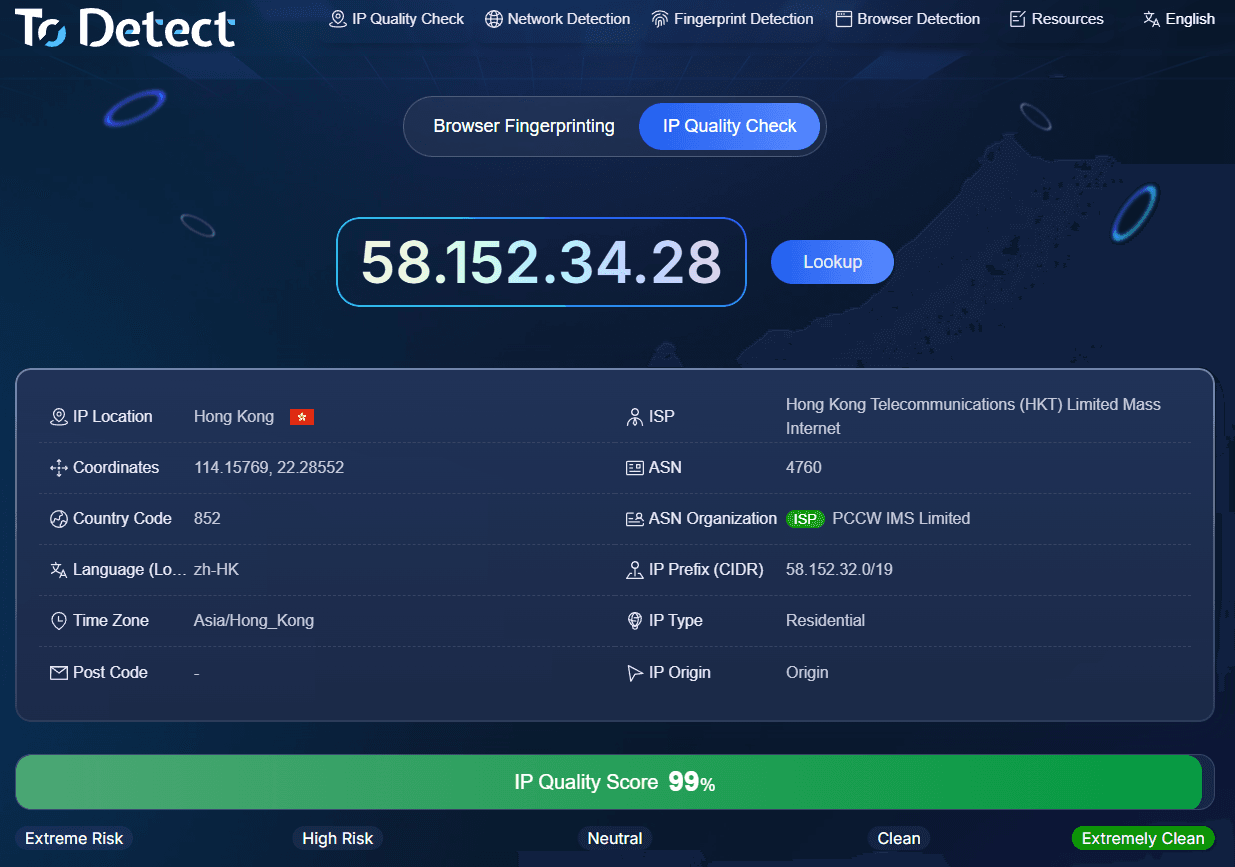
During actual use, ToDetect does not just display a plain IP address. Instead, it analyzes the IP type, proxy attributes, risk details, and relevant network environment. For non-technical everyday users, this presentation style is easy to understand.
Another practical aspect is its ability to combine IP checking with browser environment analysis. In reality, an issue-free IP address alone does not guarantee a safe account environment.
3. Comparison Dimensions of Common IP Quality Detection Tools
If proxy IP screening, cross-border operations, or account environment checks are involved, the dimensions covered by IP quality testing tools become crucial.
Category 1: Basic IP Lookup Tools.
Advantages include simplicity and high speed; entering an IP immediately reveals location and ISP info. The drawback is limited analysis of IP risk. Suitable for everyday queries, but less suited for strict IP quality screening.
Category 2: IP Reputation and Risk Detection Tools.
These tools focus on whether an IP has risk logs, belongs to a proxy node, or appears on blacklists. They are very helpful for pre-screening purchased proxy IPs. Some professional platforms also provide risk scores, allowing users to assess IP status intuitively.
Category 3: Comprehensive IP Detection Tools.
These tools examine not only the IP address itself, but also DNS, WebRTC, browser fingerprints, and other parameters. They offer greater utility for cross-border e-commerce, overseas social media management, and multi-environment network testing. ToDetect falls into this category, currently supporting IP quality testing alongside multiple network environment checks.
4. How Should You Evaluate IP Purity?
Many sites like to display a direct "purity percentage." While it looks intuitive, you shouldn't rely solely on a single score during actual evaluation.
First, check the IP type. Generally, residential networks and data center IPs carry different network attributes in the eyes of platforms. Second, look at proxy or Tor tags; if an IP is explicitly identified as a proxy node, its intended use case must be re-evaluated.
Third, check risk and blacklist records. If an IP was previously involved in spam, abnormal access, or other abuse activities, it shouldn't be deemed high-quality simply because it connects normally now.
Additionally, IP geolocation checks should not be overlooked. For instance, if you require a US IP but the test results reveal clear discrepancies in network location, ISP, or ASN information, extra caution is advised.
5. How to Choose the Right Real-Time IP Quality Detection Tool?
| Real-Time IP Quality Tool | Star Rating | Key Detection Focus | Overall Evaluation |
|---|---|---|---|
| ToDetect | ★★★★★ | IP purity, proxy detection, IP risk, DNS, WebRTC, browser fingerprinting, etc. | Highly comprehensive test items, ideal for complete network environment troubleshooting |
| IPinfo | ★★★★☆ | IP location, ASN, ISP, IP type, network organization details | Rich basic IP information, great for verifying network background |
| MaxMind | ★★★★☆ | Geolocation, network type, risk and fraud detection | Tailored toward enterprise risk control with strong IP risk detection capabilities |
| AbuseIPDB | ★★★★☆ | Abuse logs, report counts, historical risk data | Convenient for checking historical abuse reports to assess IP trust |
| IPQualityScore (IPQS) | ★★★★☆ | Proxy, Tor, fraud risk, IP reputation | Extensive test metrics, suitable for in-depth IP risk analysis |
| WhatIsMyIPAddress | ★★★☆☆ | Public IP, geolocation, ISP, basic information | Simple to operate, great for everyday IP checks, though deep detection is limited |
6. Recommended IP Testing Workflow in Practice
If you have a newly purchased proxy IP, the safest approach is not to immediately link it to your core tasks, but to run a full inspection first.
Step 1: Perform an Online IP Lookup
Confirm foundational details such as the IP address, country, region, ISP, and ASN.
Step 2: Conduct an IP Quality Test
Pay close attention to residential vs. data center type, proxy detection tags, risk levels, and blacklist records.
Step 3: If Using the IP Long-Term for Cross-Border Work
Run DNS and WebRTC leak tests to ensure there is no mismatch between your real network exit and your proxy exit.
Step 4: Verify the Browser Environment
Even if the IP has no obvious issues, a severe mismatch between your browser language, time zone, or operating system and the IP's location can still trigger risk alerts.
The benefit of this workflow is its simplicity and ability to isolate "IP issues" from "browser environment issues." When encountering frequent account verifications or login anomalies, this targeted approach is far more effective than blindly swapping IPs.
Summary:
Based on practical testing, ToDetect's main advantage lies in its unified checkup feature, which covers IP quality along with DNS, WebRTC, and browser fingerprinting—making it ideal for users wanting a complete environment check in one go.
If you only need to check a public IP address, basic tools are sufficient. However, if your work involves proxy IPs, cross-border e-commerce, social media management, or digital advertising, consider IP type, proxy flags, risk logs, location data, and network leak status as a whole.
Ultimately, checking IP quality isn't about chasing a perfect score; it's about spotting issues before they hit your workflow. Spending a few minutes running an online IP purity test is far more cost-effective than troubleshooting after account anomalies occur.
