



 Resources
 Feature overview

 Ganesh
 2026-08-19 11:12
When you open an IP detection website and enter an IP address, you can usually see details like location, ISP operator, network type, and risk status. But a question arises — how accurate are these online IP lookup results?
Furthermore, different platforms often provide varying results. Even for the exact same IP, checking it on different IP detection tools can yield discrepancies in displayed location and network type.
Today, let's dive into whether online IP lookup is actually accurate, how to judge IP quality, and what key aspects to keep in mind when choosing an IP detection tool.

1. Is Online IP Lookup Accurate?
Bottom line first: Online IP lookup has valuable reference worth, but it is hard to achieve 100% accuracy.
IP databases are usually compiled and matched through ISP provider information, network routing, historical logs, and third-party data sources. Therefore, since different platforms rely on different data sources, the query results can naturally vary.
This is especially true for mobile networks, cloud servers, proxy IPs, and IDC data centers, where the actual usage location of an IP address often differs significantly from its registered location in databases.
Consequently, for everyday online IP queries, it is recommended not to focus solely on the "City" metric. Instead, make a comprehensive judgment by considering the ISP, ASN, network type, and risk tags altogether.
2. Truly Valuable IP Detection Goes Beyond Finding a Location
First comes basic IP information, such as IPv4 or IPv6 address, country/region, city, ISP, ASN, etc. These parameters help users quickly understand the general network properties of an IP.
Next is the network type. Whether an IP belongs to residential broadband, a mobile network, a data center, or a proxy network has a huge impact on actual operational results.
Then comes risk information, including flags for proxies, Tor, spam logs, blacklist records, or other anomalous behavior tags. This part is especially critical for assessing IP quality.
Therefore, a truly professional IP lookup website should show users not just "where the IP is", but rather "what this IP is, how good its quality is, and whether it carries risk".
3. How to Interpret Online IP Lookup Results? Quick Reference Table
| Detection Field | Common Format | What It Represents | How to Evaluate |
|---|---|---|---|
| IP Status | Active / Valid | The current IP is in a normal, recognizable state. | Normal is fine, but it does not guarantee high IP quality. |
| Country / Region | China, USA, Japan, etc. | The country or region recorded in the IP database. | Assess whether the IP location matches your specific business needs. |
| City Location | Beijing, Tokyo, Los Angeles, etc. | The estimated city location inferred by the database. | City-level geolocation is for reference only; databases often differ. |
| ISP Operator | China Telecom, AT&T, AWS, etc. | The internet service provider associated with the IP address. | Used to determine network origin and operator attributes. |
| ASN | AS number prefix & organization name | The Autonomous System to which the IP belongs. | Combine with ISP and IP type to further judge routing and network ownership. |
| IP Type | Residential / Datacenter / Mobile | Whether the IP belongs to home broadband, data centers, or mobile networks. | Select according to business needs; no single type is inherently "best". |
| Proxy Detection | Detected / Not Detected | Checks if the IP exhibits proxy signature characteristics. | Focus on this when filtering proxy IPs, combined with other results. |
| Hosting Detection | Yes / No | Determines if the IP belongs to hosting or cloud server networks. | Pay close attention if target services are sensitive to data center IPs. |
| Risk Level | Low / Medium / High | Comprehensive risk evaluation provided by the platform based on multi-source data. | Use high-risk IPs with caution and check specific risk sources. |
| Abuse Records | Yes / No | Indicates if the IP has records of malicious usage or network abuse. | If records exist, inspect record types, timestamps, and severity. |
| Blacklist Status | Clean / Listed | Indicates whether the IP is listed in relevant threat blacklists. | When "Listed", verify the exact blacklist sources rather than relying on status alone. |
| Reverse DNS | Domain Name / No Record | Indicates whether a PTR (Reverse DNS) record exists for the IP. | Serves as auxiliary information to evaluate server or network properties. |
| IPv4 / IPv6 | IPv4 or IPv6 | The network protocol version currently used by the IP. | Choose based on target website compatibility, devices, and operational environment. |
| Detection Time | Specific Date and Time | The exact timestamp corresponding to the current query dataset. | Dynamic and proxy IPs change rapidly; keep timeliness in mind. |
4. Key Metrics to Look For When Choosing an IP Detection Tool
1. Continuous IP Database Updates
IP data is far from static. Internet service providers continuously adjust IP ranges, cloud providers reallocate address blocks, and proxy IPs change even more frequently.
If an IP lookup platform's database goes long periods without updating, even the most feature-packed interface will yield obsolete results. When choosing a tool, check whether the platform actively maintains its IP databases and provides thorough diagnostic detail.
2. Comprehensive Detection Dimensions
A quality IP detection tool should simultaneously provide basic location information, ASN, ISP provider, IP network type, and risk scoring.
If you only need to check your public IP occasionally, simple online lookup tools are sufficient. However, for batch IP screening or auditing, platforms offering comprehensive IP quality analysis are much more practical and efficient.
3. Capability to Identify Proxies and Datacenter IPs
This is an aspect many users overlook. Two US IP addresses might look identical on the surface, but one could be authentic residential broadband, another a cloud VPS server, and another a proxy node.
Their stability and website trust scores in practical use are vastly different. Therefore, when selecting an IP lookup tool, pay attention to its ability to accurately classify IP network types.
4. Provision of Risk Scores and Blacklist Intelligence
If an IP address has previously been used extensively for web scraping, spamming, bulk registrations, or other high-risk activities, it is likely to trigger security verifications (like CAPTCHAs) even if its geolocation appears clean.
For scenarios such as proxy IP management, cross-border e-commerce, and multi-account operations, risk intelligence within IP quality reports is often far more important than plain geographical location.
5. The Value of Professional IP Detection Tools Like ToDetect
If you need to query IP addresses regularly, consider using full-featured professional tools such as ToDetect.
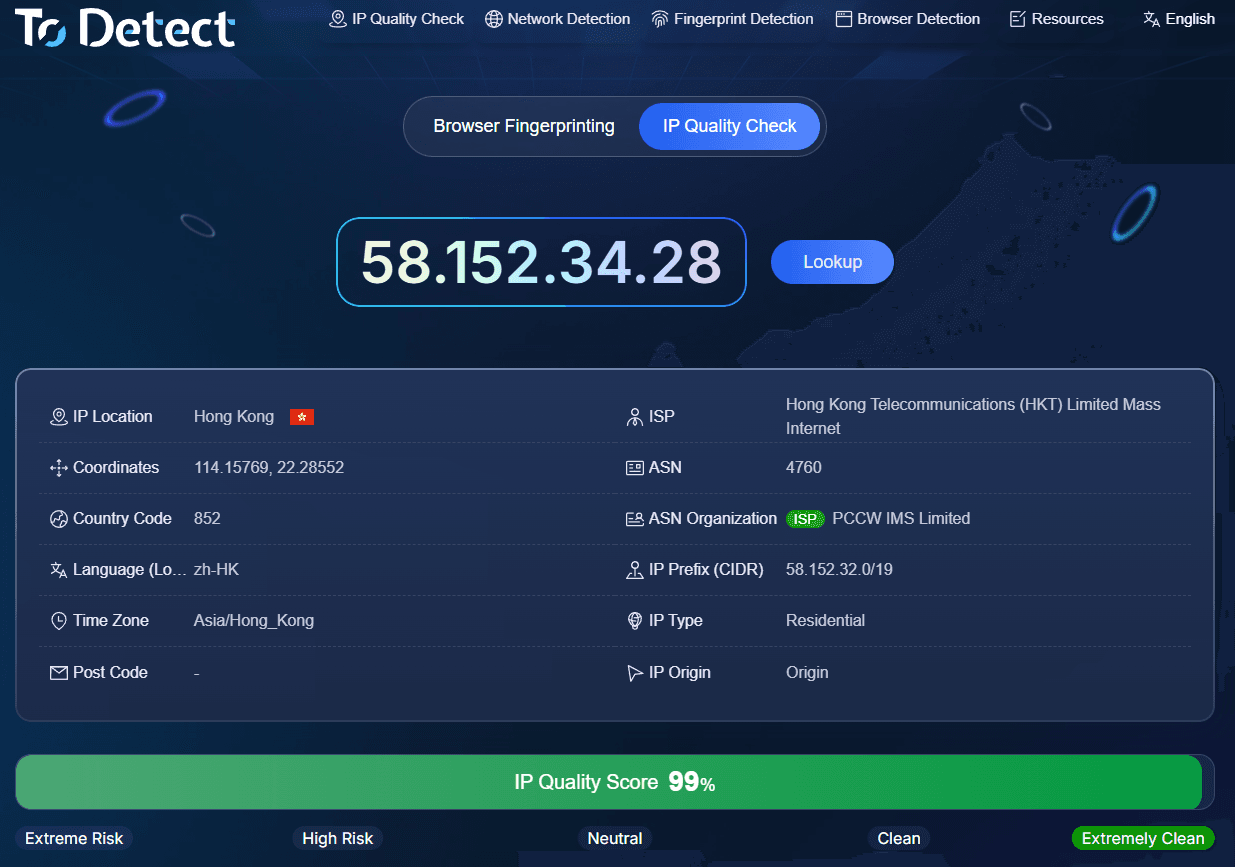
Compared to simple tools that only reveal "current IP address", specialized IP detection platforms excel at IP attribute profiling. During online IP lookup, users can evaluate IPs across multiple angles including geolocation, network type, ISP operator, and risk scores.
Of course, no matter which IP lookup tool you use, it is best not to treat a single metric as absolute truth. Proxies, data center IPs, and mobile networks inherently possess degree of variability. The safest approach is to combine IP detection data with actual website response metrics.
6. Don't Just Look at the Words "Clean IP"
When picking IPs, many people focus heavily on whether an IP is "clean". While this instinct is correct, "clean" itself is a rather broad concept.
Evaluating IP quality requires a holistic look at stability, network type, historical risk score, blacklist presence, and actual connection performance.
For instance, an IP with no explicit blacklist records might still perform poorly on risk-sensitive sites if it is a datacenter IP compared to a residential broadband IP. Conversely, an IP with flawless geolocation accuracy is not automatically ideal for account logins or business tasks.
Therefore, IP quality inspection shouldn't rely solely on a single score or label. Matching IP types with specific use cases remains equally critical.
Summary
Overall, online IP detection is an essential tool for evaluating IP attributes and quality, but it is not infallible. Discrepancies between different IP detection websites are normal due to variations in database sources, update speeds, and network conditions.
When selecting an IP detection tool, focus on: database update frequency, geolocation details, ISP & ASN reporting, network type classification, proxy detection, risk scoring, and blacklist checks. Multi-dimensional platforms like ToDetect are well-suited for users requiring deep IP analysis.
Finally, remember that any IP detection result should serve as a reference rather than an absolute conclusion. Truly determining whether an IP is effective requires combining technical lookup data with real-world target website accessibility testing.
