



 Resources
 Feature overview

 Ganesh
 2026-07-10 17:25
In today's landscape of expanding digital offices and cross-border businesses, proxy IPs have become essential tools for protecting personal privacy, optimizing network connections, and conducting market research.
However, the quality of proxy resources available on the market varies wildly. Knowing how to precisely check a proxy IP address and verify its validity is critical to ensuring network security and operational stability.
From a professional standpoint, this article will break down proxy IP lookup methods, core evaluation metrics, and key considerations in detail.

Why Do You Need a Proxy IP Address Lookup?
A proxy IP acts as an intermediary bridge between a user and the internet, forwarding requests to hide the client's actual IP. The primary reasons for performing a lookup include:
Verifying Anonymity: Confirming that your real IP is successfully hidden to prevent privacy leaks.
Evaluating Stability and Speed: Understanding the proxy server's latency (Ping) and response times to ensure smooth operations.
Identifying IP Types: High-value residential IPs need to be distinguished from datacenter IPs, which are easily flagged and blocked by risk control systems.
How to Check Your Current Device's Proxy Settings
Before using online lookup tools, you can check your local device's proxy configurations:
Windows Systems: View manual or automatic configuration details via "Settings" > "Network & Internet" > "Proxy".
macOS Systems: Confirm settings under "System Settings" > "Network" > "Advanced" > "Proxies" tab.
Browsers: Go to "Settings" -> "System and performance" in Chrome or Edge to view system proxy settings, or use proxy extensions (like SwitchyOmega) for a direct look at your active proxy environment.
Professional Steps for Online Proxy IP Lookups
Utilizing professional online detection tools is the most intuitive and effective method to verify a proxy IP.
1. Basic Geolocation Lookup
Online tools allow you to quickly retrieve the country, state/province, city, and Internet Service Provider (ISP) information of a proxy IP. This helps confirm whether the proxy matches the specific geographic location your business requires.
2. Advanced Risk Detection
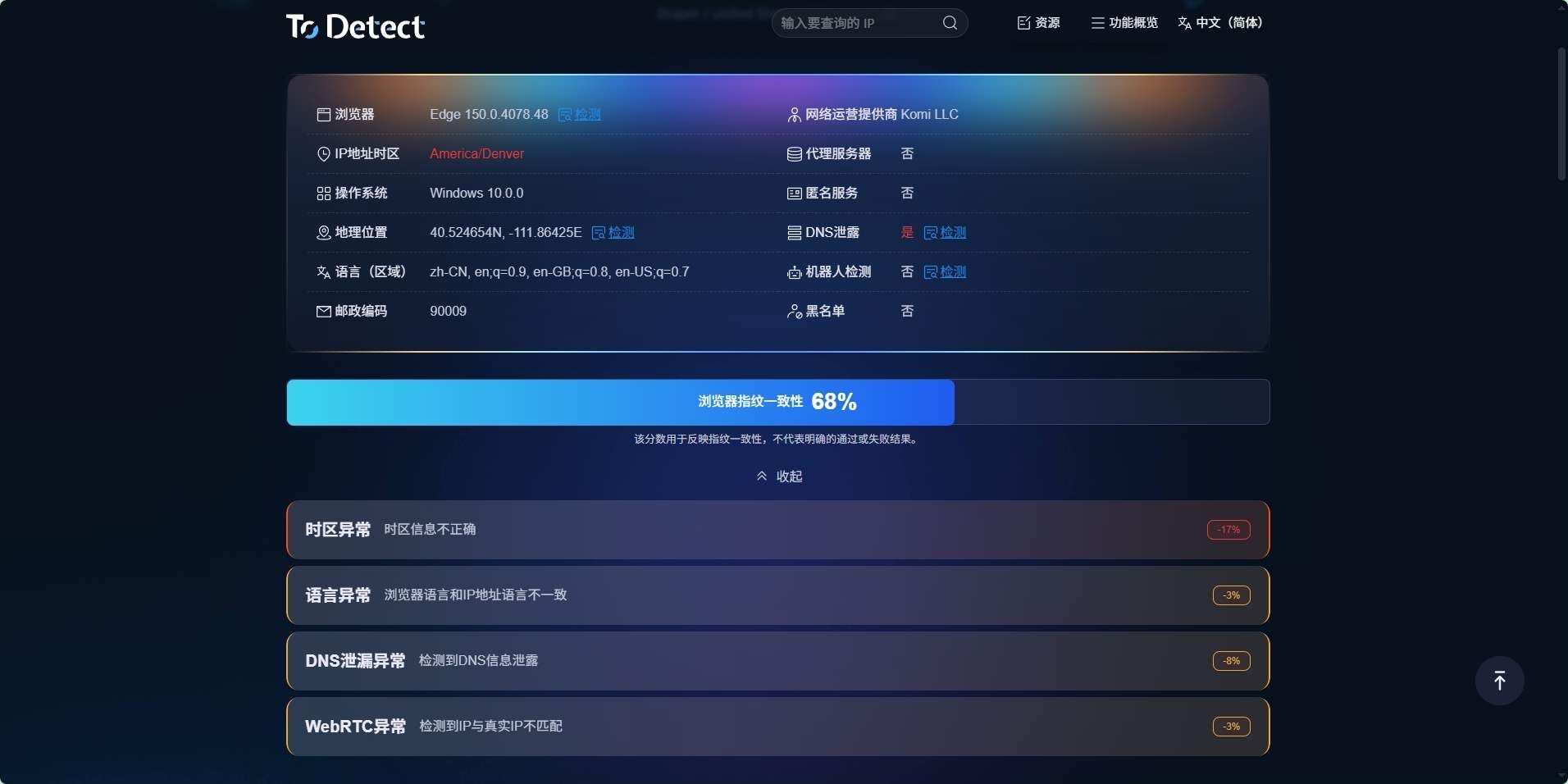
Professional lookup tools like ToDetect provide deeper data analysis:
IP Type Identification: Accurately detecting whether an IP is a "datacenter IP" or a "native residential IP"—a distinction crucial for cross-border e-commerce account nurturing and anti-association practices.
Blacklist Detection: Checking if the IP has been blacklisted by international fraud databases (such as Spamhaus or DNSBL) due to prior abuse.
Environment Consistency Check: Detecting DNS leaks or WebRTC leaks (which directly expose your real IP), and verifying if browser time zones and languages align with the IP's geographic location.
Advanced Techniques for Spotting High-Quality Proxies
To determine whether an IP is routed through a proxy server, technical professionals typically analyze multiple dimensions:
Analyzing HTTP Request Headers: Checking for specific proxy tags such as X-Forwarded-For, X-Real-IP, or Via.
Inspecting ASN and Organization Info: Determining the IP source via its ASN (Autonomous System Number). If the owner is a well-known hosting provider (like AWS or DigitalOcean), it is highly likely a datacenter IP.
Open Port Scanning: Abnormal request frequencies or open proxy-specific ports (such as 8080, 1080, 3128) strongly point to an active proxy service on that IP.
Professional Advice for Using Proxy IPs
Avoid Free Proxy Traps: Free proxies usually come with high latency and poor stability. Worse, malicious providers may log your browsing behavior or even tamper with web page data.
Rotate IPs Regularly: To maintain a clean and uncompromised network footprint, it is highly recommended to regularly rotate proxy addresses based on your business needs (e.g., web scraping or account management).
Comply with Laws and Regulations: Ensure that your proxy usage remains compliant with local internet regulations and the terms of service of your target platforms.
💡 For a deep, highly accurate proxy diagnostic, visit the ToDetect Official Website for a comprehensive IP check covering geolocation, network type, and more.
Frequently Asked Questions (FAQ)
Q1: How do I know if my proxy IP is working?
The simplest way is to visit an online IP lookup tool. If the displayed IP address, country, and city reflect your proxy server’s details rather than your local broadband IP, your proxy is successfully active.
Q2: What are WebRTC/DNS leaks, and do they affect proxy effectiveness?
Yes, they do. A DNS leak happens when internet requests are still routed through your local ISP's DNS servers. A WebRTC leak occurs when the browser exposes your true local IP address via APIs.
Both vulnerabilities leave your actual location completely exposed. Using a professional proxy lookup tool can help detect these leaks early so you can fix them by disabling the relevant browser features.
Q3: Why doesn't the detected IP location match what the proxy provider promised?
This usually happens for two reasons:
First, the IP might be a "broadcast IP" (meaning its geographic location has been re-declared, but underlying databases haven't synced yet). Second, different IP geolocation databases (such as MaxMind or IPIP.net) update at varying intervals.
Using a tool like ToDetect, which aggregates data from multiple authoritative databases, will yield much more accurate and reliable results.
